Operation
11
11.5 Connecting the camera to a computer
11.5.1 General
You can connect the camera to a computer, using the USB cable. Once connected, you
can move the images from the camera’s image archive to the computer. You can also im-
port the images into our Flir Tools software. A download card for Flir Tools is included in
the transport case.
For more information about Flir Tools, see the Flir Tools manual on the User Documenta-
tion CD-ROM, or on the Help menu in Flir Tools.
11.5.2 Procedure
Follow this procedure:
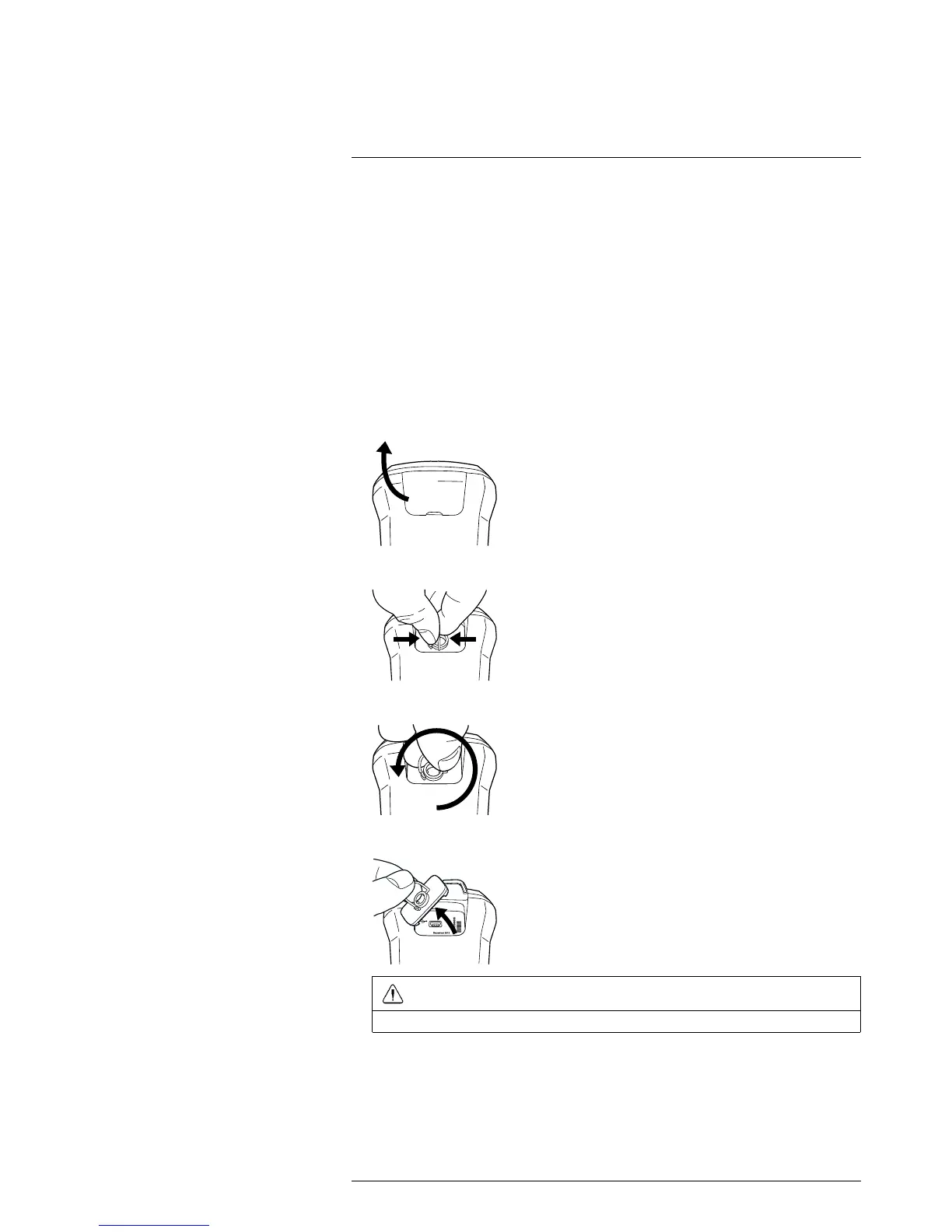
1. Fold up the rubber cover at the top of the camera.
2. Hold the metal ring firmly.
3. Rotate the ring approx. 110° counter-clockwise.
4. Pull out the plastic insert.
CAUTION
The plastic insert has an O-ring seal. Do not damage the O-ring seal.

 To Next Page
 Loading...