14
FLIR
THERMOSIGHT PRO
USER MANUAL - Rev 1
4.1 MAIN MENU
Most setup options can be accessed from the MAIN MENU.
To display the MAIN MENU, hold down the central ● button on the
control panel.
MAIN MENU
> EXIT
ENHANCEMENT
PALETTE
RETICLE
BORESIGHT
RECORDING
SHOT COUNTER
SETTINGS
Once the MAIN MENU is displayed, use ▲/▼ buttons to navigate
through the items on the menu.
Push ● button to view the settings available for the item selected.
Use ◄/► buttons to adjust the settings when specified on the menu
screen with < > symbols.
Select the EXIT item and then push ● button to return to the MAIN
MENU.
4.2 ENHANCEMENT MENU
The ENHANCEMENT menu settings allow the user to take advantage of
advanced signal processing algorithms, and improve the quality of the
image under a variety of different thermal environments.
ENHANCEMENT
> EXIT
PRESETS <> DEFAULT
CONTRAST <> 100
SHARPNESS <> 90
SMART SCENE <> 20
GAIN <> 138
AGC SPEED <> 85
PRESETS
PRESETS– a group of default settings for various environmental
conditions that are optimized toward best camera performance:
Default, Sky/Sea, Indoors and Outdoors.
For example, turning the “Sky/Sea” preset will improve contrast, but
at the possible loss of some scene content. This is especially helpful in
scenes with great expanses of visible sky or water.
The following table is provided all presets and their settings.
ITEM DEFAULT SKY/SEA INDOORS OUTDOORS
Contrast 100 100 100 100
Sharpness 90 100 75 110
Smart Scene 20 30 10 80
Gain 138 120 110 138
AGC Speed 85 85 85 99
CONTRAST
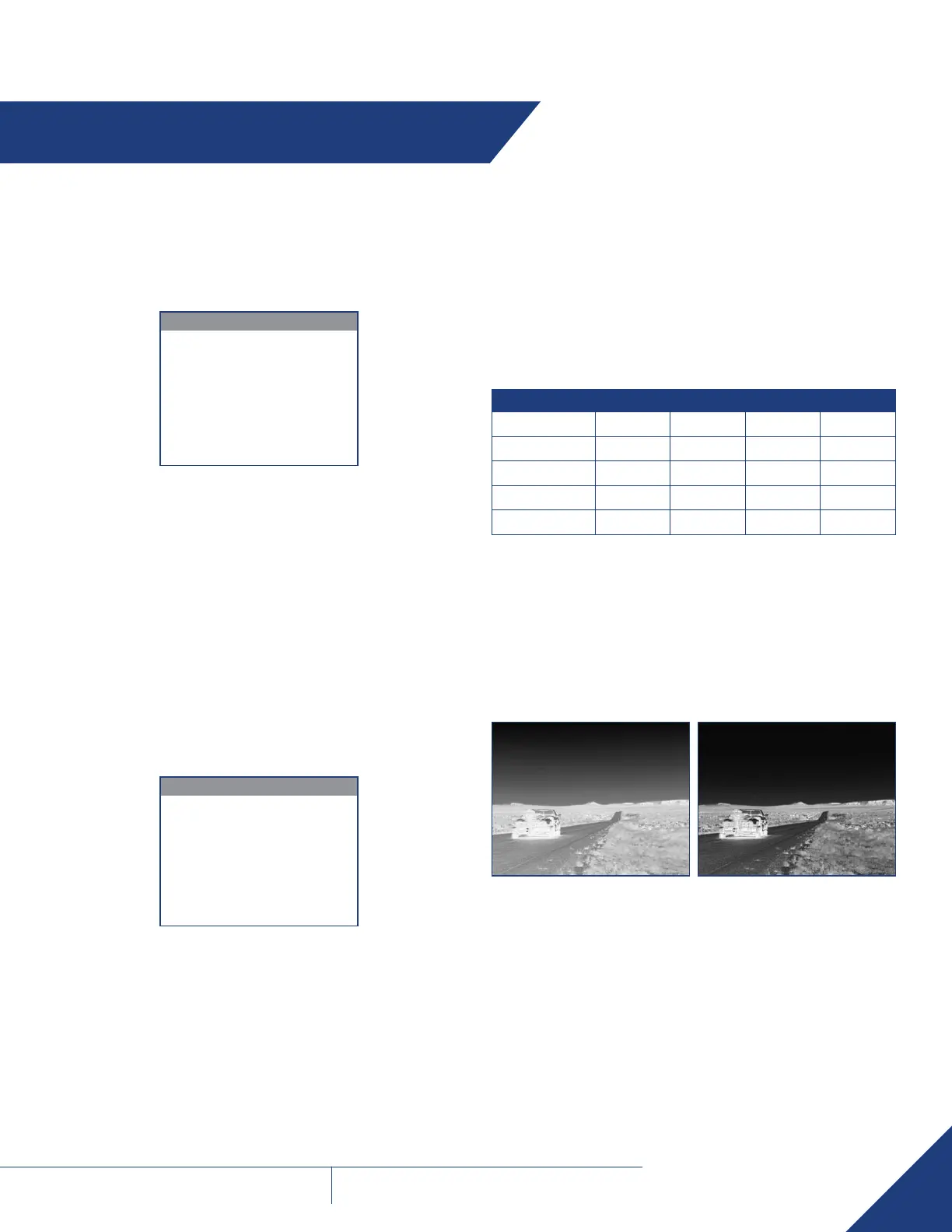
Active Contrast Enhancement (ACE) – a digital contrast correction that
allows for a smart scene optimization based on dynamic adjustments,
where a variety of contrast levels occur. The adjustment range is from
50 to 200 with a default value of 100. Lower values will cause hotter
objects to have greater contrast, and higher values will cause colder
objects to have greater contrast.
CONTRAST
Contrast 50 Contrast 200
SECTION 4. MAIN MENU


 To Next Page