11
Setting the current limit
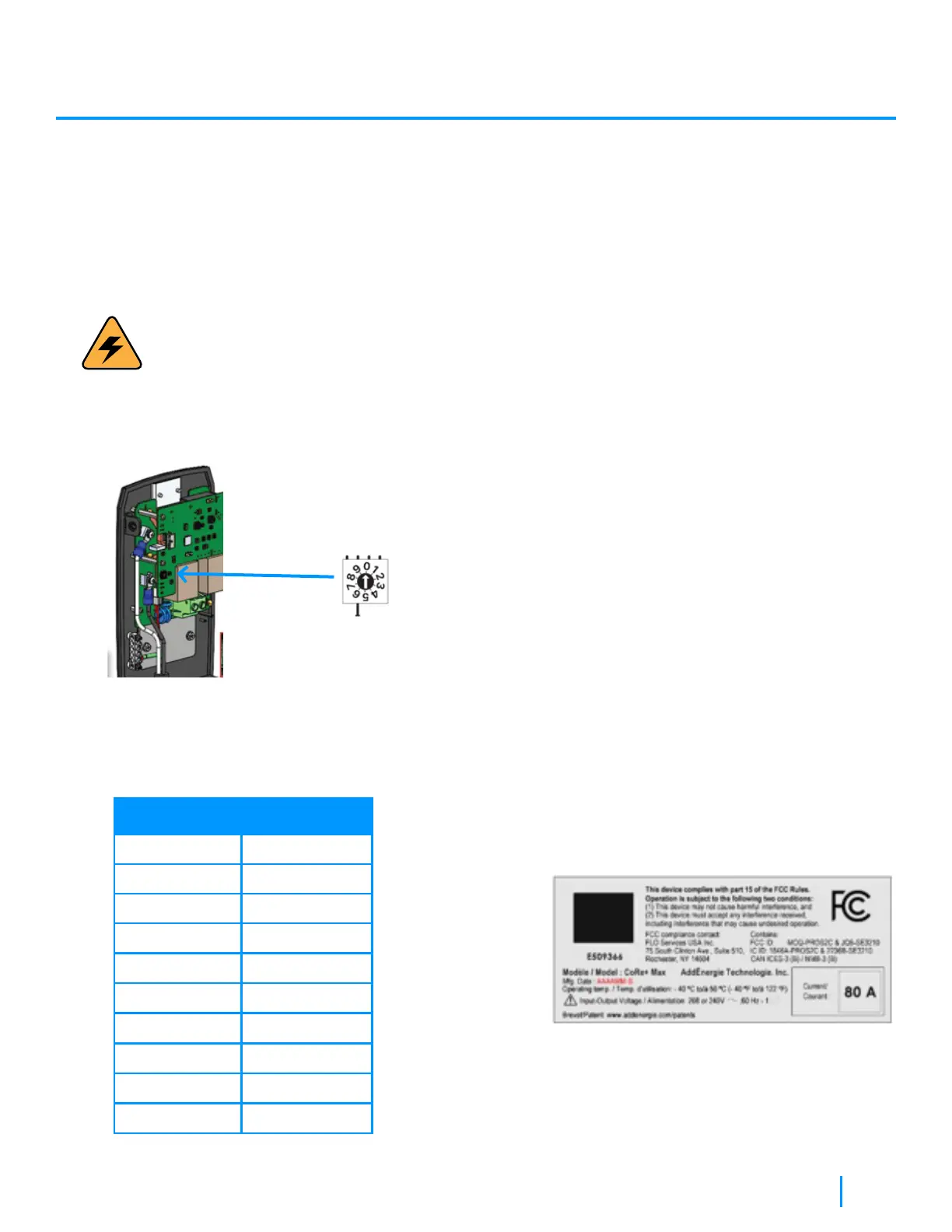
By default, the CoRe+ MAX is set to maximum power (factory). If your electrical infrastructure does not allow the charging
station to operate at maximum power (or preventing any potential current overload), it can be reduced using the Current
Limiter Switch.
WARNING:
Make sure power is off
Procedure:
1. Locate the current limiter switch on the main PC board.
2. Using a flat-bladed screwdriver, gently
rotate the switch to the desired position.
(See table below)
Rotary Position
Charging station
current (A)
0
1
2
3
4
5
6
7
8
9
80
72
64
59
56
48
40
32
24
16
3. Detach the corresponding maximum current
setting label, from the label set kit that came
with the unit, onto the label located on the
charging station enclosure, over the existing
current indication so maintenance personnel is
informed about the maximum current setting,
for safety and warranty validity considerations.
CoRe+ Max
TM
Installation Manual


 To Next Page