By a
11
Left button
12
8. FUEL AMOUNT
Fuel amount function determines the amount of fuel left in the tank, after subtracting the amount
of used fuel from the amount fuelled up. In order for it to be credible it is advised to fill up the tank
occasionally and knowing the capacity of the tank, insert in the data field the amount filled. Inserting
the fuel amount happens as follows: choose “fuel amount” (icon “l”) with the left button which then
we must hold for a few seconds. The message “+00L”
will appear on the top screen denoting the fuel
added which now we can insert by using the
right button (forwards) or the left button (backwards).
single click we add (or subtract) individual
litres and also by holding the buttons the changes
of figures are faster to shorten the time of inserting
large amounts of fuel. On the bottom left-hand
screen the total amount of fuel is visible, that is
the fuel which was left in the tank from the previous
fuelling added up to the currently added fuel.If
we want to clear the reading of fuel in the tank, then
while inserting the fuel amount we must hold both
buttons together for a few seconds.
Button L
9. FUEL CONSUMPTION
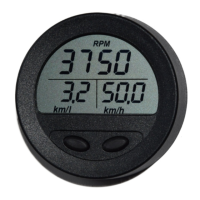
Fuel consumption is displayed on the left screen, when the icon “l/h” is visible on the bottom of the screen.
It's a momentary value, averaged within 5 seconds in order to minimize read-out fluctuations with variable
fuel usage by the engine (factory settings).
Fuel consumption in “l/h”
10. SPEED
Speed in relation to earth is displayed on the right screen, when the icon “km/h” is visible and
when correct signal from GPS satellite system is received. Lack of GPS signal is signalled
on the right screen (after choosing “km/l” indicator) by displaying the message GPS. A correct GPS
signal should appear within a few minutes from powering the device up.
This settings could be changed by user
if to big fluctuation of fuel consumption
are observed. See page 22.


 To Next Page