4
• High Performance Subwoofer
• Quick Start Guide
• 2 Year Warranty
• Lifetime Customer Support
What’s Included
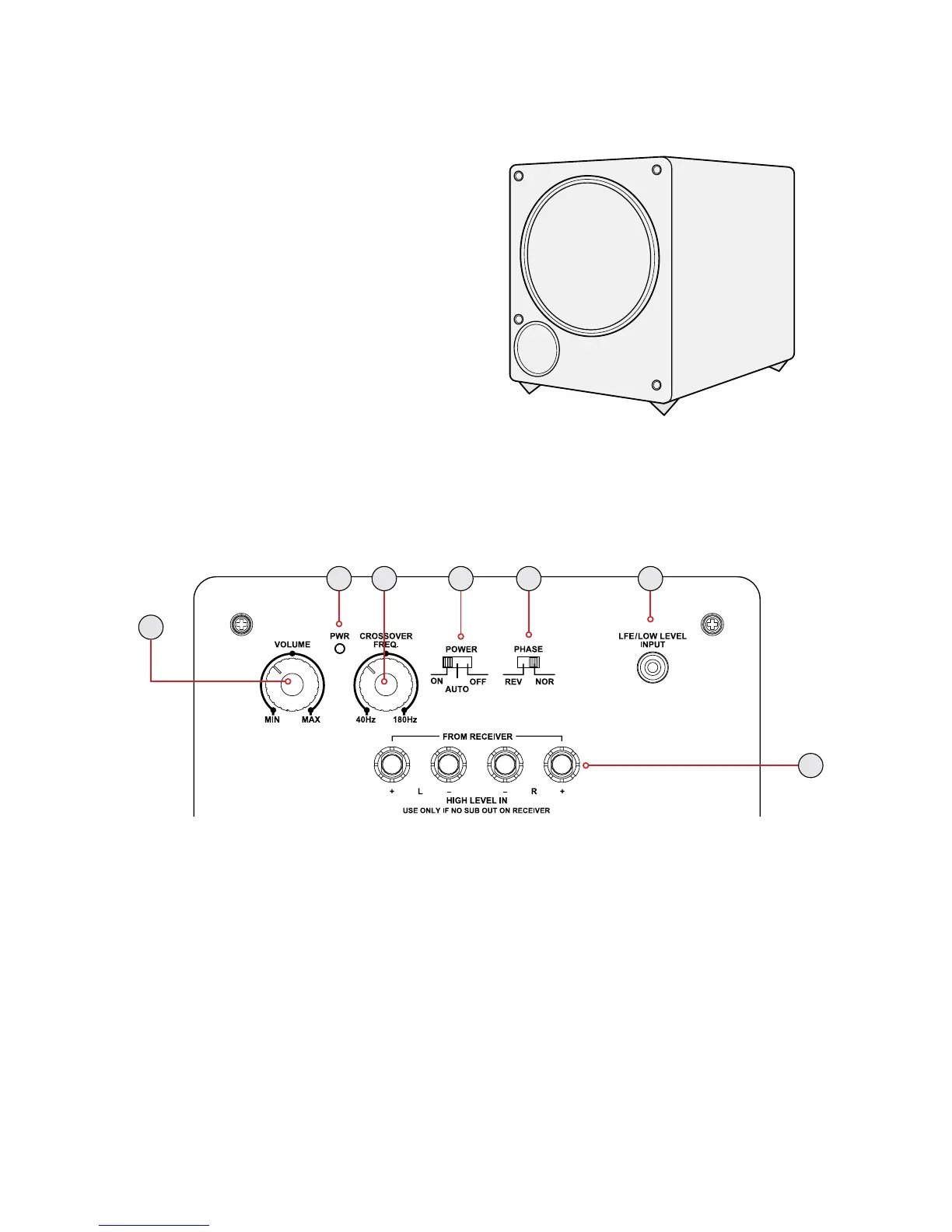
Back Panel Layout
1
2 3 4 5 6
7
1. Volume – Adjust to reduce/increase the intensity of the sound emitted from
the DB10.
2. PWR - Power LED indicator.
3. Crossover – Adjust to reduce/increase the frequency range of the DB10. The
frequency range is less than 40Hz to 180Hz.
4. Power – ON / AUTO / OFF (AUTO: The subwoofer will power on automatically
when it detects a signal from the home theater receiver.)
5. Phase – REVERSE / NORMAL (Adjust to ensure the DB10 is in phase with the rest
of your speaker system. The DB10 will be in phase if the bass response sounds full
and balanced.)
6. LFE / Low Level Input – Connect subwoofer cable to receive signal from home
theater receiver.
7. Speaker Inputs – Connect speaker wire to receive signal from home theater
receiver.


 To Next Page