Fluid Management Customer Service 1 . 800 . 462 . 2466
26
|
Accutinter1600
Basic Operations
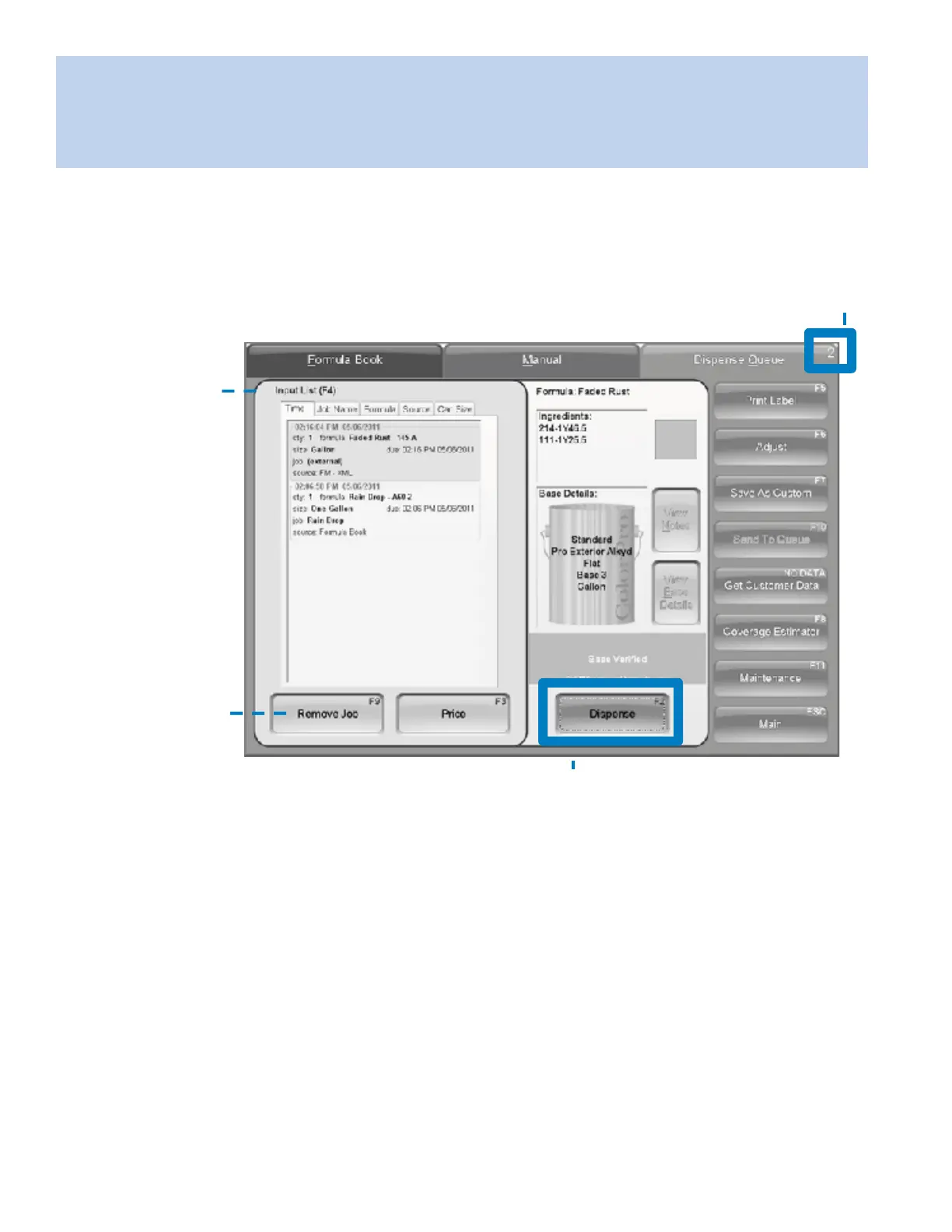
From the Main Menu, choose Dispense (F2). The Dispense Queue tab allows you to enter and dispense
a formula scanned by a spectrophotometer (optional) or from a previous order not yet dispensed.
OrderQueue
Thisnumber indicatesthe
numberofjobsqueuing.
Input List
The
Input List(F4)
displa y salltheformulas
waitingtobedispensed
fromanexternalsource
orpreviouslyrequested.
Thenumberofjobs
queuingislocated
intoprightcorner.
Searchforajobby
clickingonanyof
theinputtabs.
Remove Job
Clickheretoremove
thehighlighteddispense
fromtheinputlist.
Dispense
ChooseDispense(F2)afterselectingthe
formulafromtheInputList.
Usingexternaldatasourceanddispensequeuing


 To Next Page