6
INSTRUCTIONS:
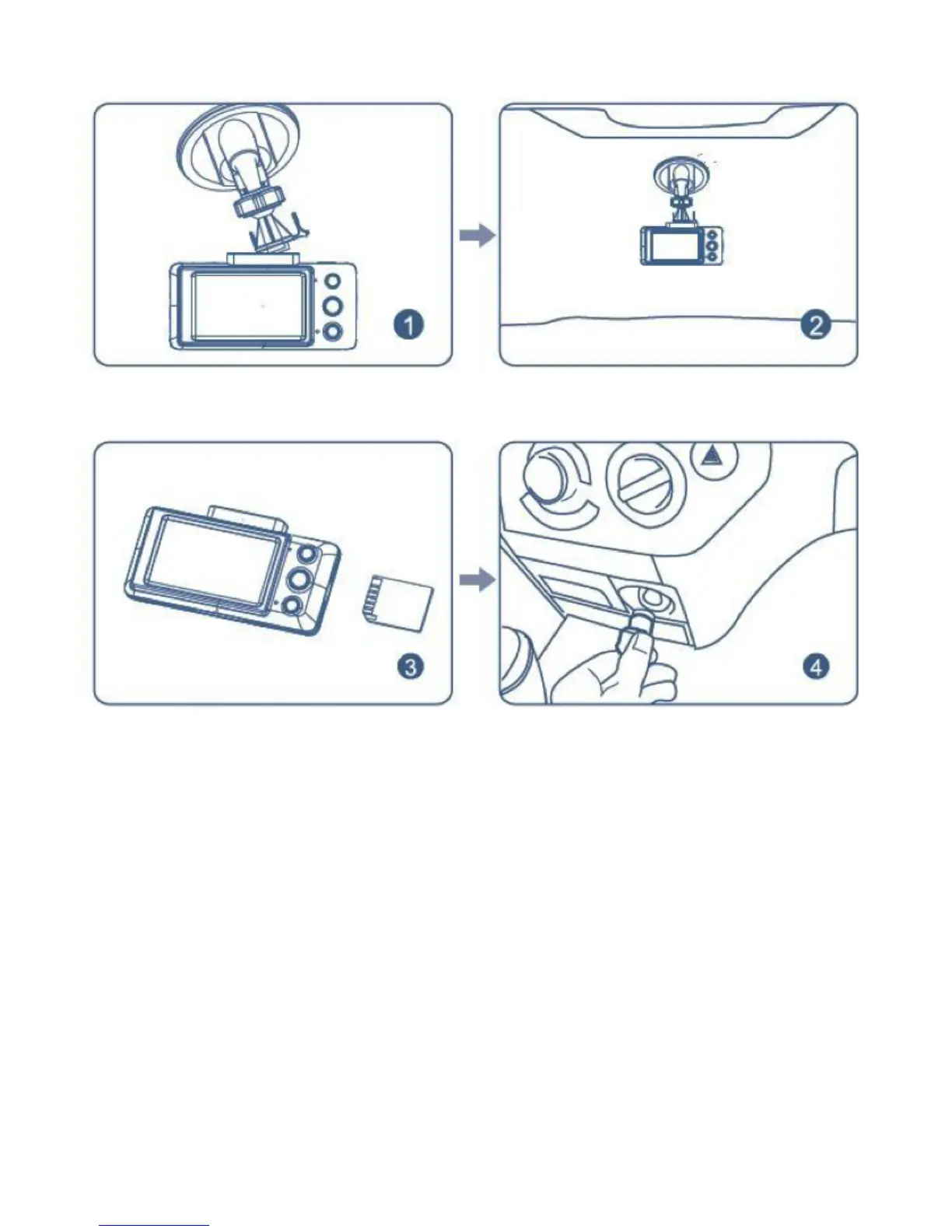
1. Insert the holder’s sheath into the square hole on the top of the
cameraandpushitalonguntiltheend.Thecamerawillbermly
fastened to the holder.
2. Tighten the holder’s suction cup.
3. Tweak and adjust the camera until it is aimed in the right
position. Fasten the nut so that the camera will be tightened
rmlytotheholder.
4. lnsert an SD card. (SD card not included).
5. Take out the power cord. Plug one end into the vehicle’s DC
socket, and plug the other end into the camera’s DC IN jack.
*If you want to use another power source from the vehicle or lay the
powercordimplicitly,pleaseconsultqualiedpersonnelforservice.
INSTALLATION
Place the holder’s sheath into the
square hole on the top of the camera.
Insert an SD card.
Adjust the camera until it is aimed in
the right direction.
Plug in the power cord.


 To Next Page