9
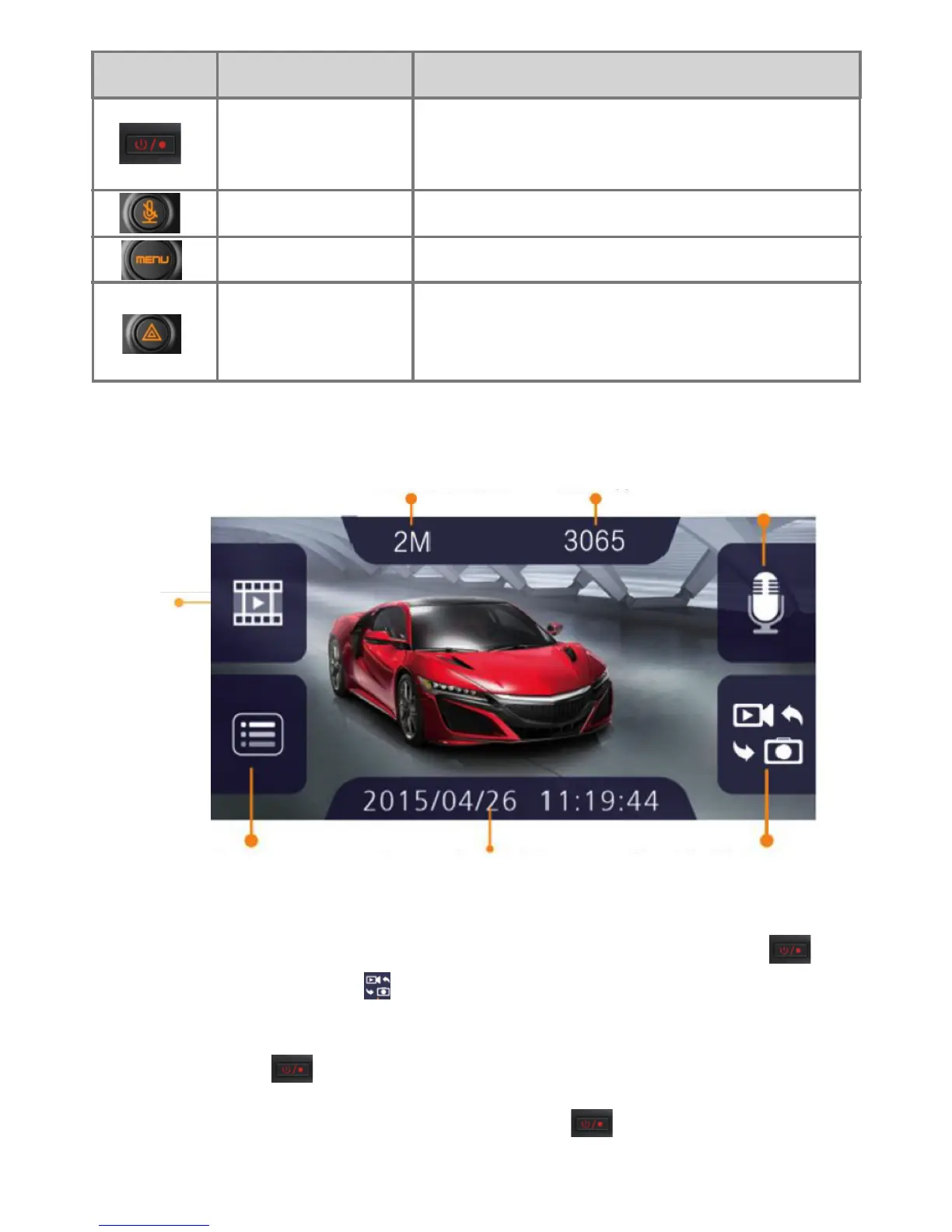
BUTTON NAME DESCRIPTION
POWER/REC
MENU
MUTE
EMERGENCY
Whenshortlypressed,start/stop
movie recording.
Pop up menu, enter setting mode.
Enable/disableaudiorecording.
Under recording mode, trigger
emergency movie recording. After 20
seconds,thecurrentlewillbesaved.
CAPTURE MODE
MICdisabled/
enabled
Photo Resolution
Settings
Current date and time
Mode-Video/
Capture
Photo Qty.
Playback
Folder
Undertherecordingmode,pressthe“POWER/REC”button to
stop recording, click the
icon to enter capture mode.
To take a picture click on a blank area of the screen or press the
“POWER/REC” button once.
*You must press “POWER/REC” button when you start to
record.


 To Next Page