Fluke 433, 434, 435
Service Manual
5-6
1
8
7
13
14
16
17
19
18
15
22
21
12
9
10
11
3
2
4
(4x)
(2x)
(2x)
(2x)
(2x)
20
6
5
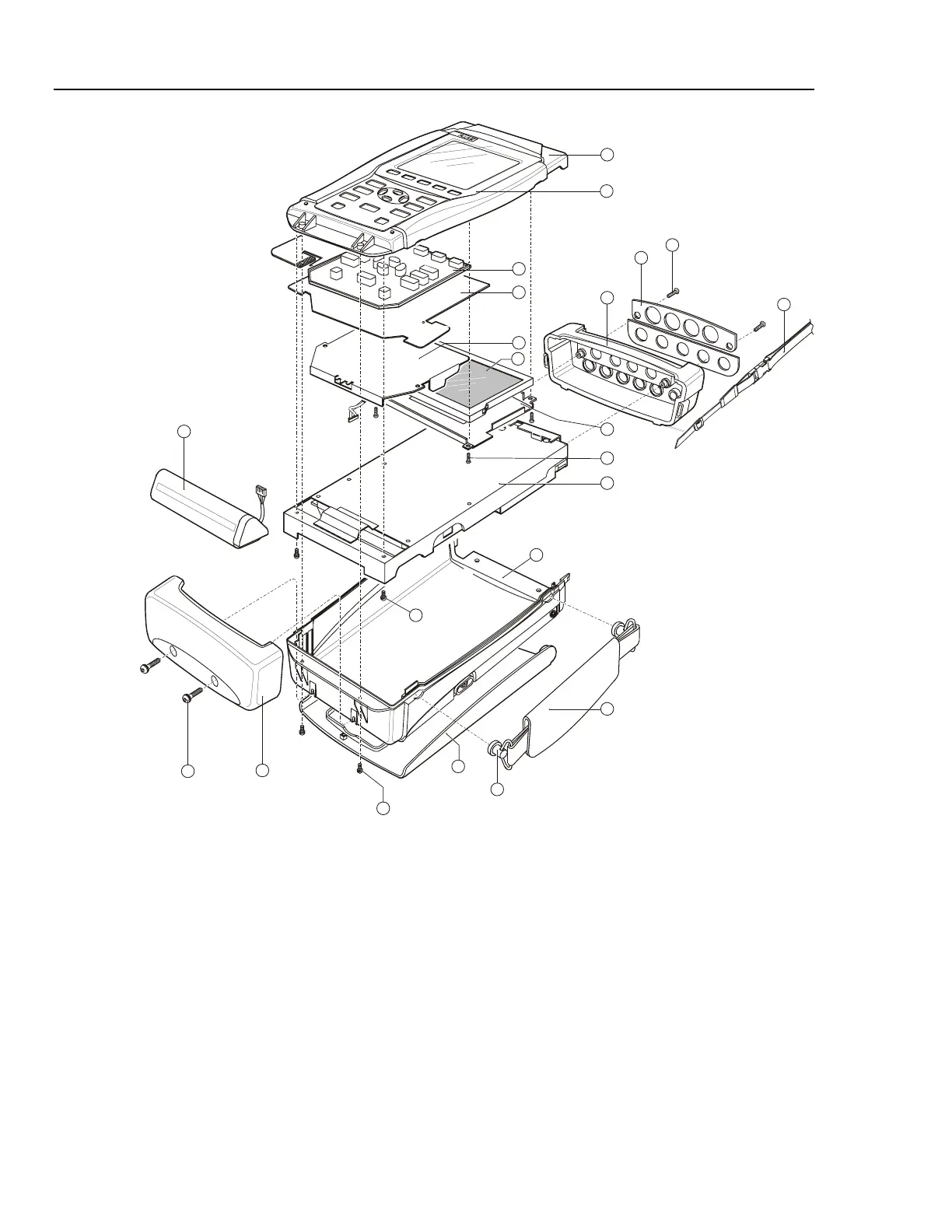
Figure 5-6. Final Assembly Details
5.2.5 Removing the Main PCA Unit
Caution
To avoid contaminating the flex cable contacts with oil from
your fingers, do not touch the contacts (or wear gloves).
Contaminated contacts may not cause immediate instrument
failure in controlled environments. Failures typically show up
when contaminated units are operated in humid areas.
Referring to Figure 5-6, use the following procedure to remove the main PCA unit.
1. Open the Analyzer (see Section 5.2.4).
2. Disconnect the blue keypad foil (item 4) flat cable, and the white LCD (item 6) flex
cable. Unlock each cable by lifting the connector latch at the left and right edge



 To Next Page