EasyManua.ls Logo

Fluke CertiFiber - CertiFiber Unit Interface; Function Key Operations (F1;F2); CertiFiber Keypad Operations

Fluke CertiFiber
57 pages
Print Icon
To Next Page IconTo Next Page
To Previous Page IconTo Previous Page
Loading...
CERTIFIBER ENGLISH - 4
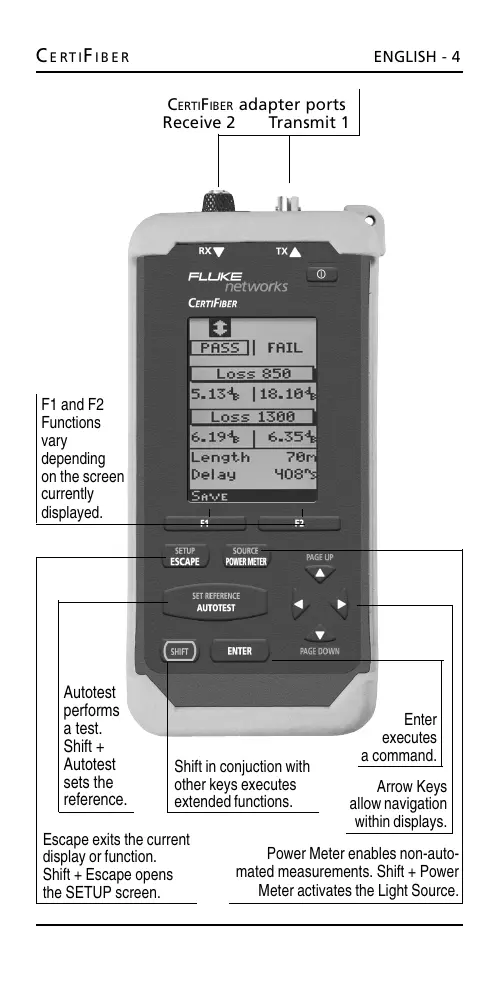
F1 and F2
Functions
vary
depending
on the screen
currently
displayed.
C
ERTIFIBER adapter ports
Receive 2 Transmit 1
Escape exits the current
display or function.
Shift + Escape opens
the SETUP screen.
Arrow Keys
allow navigation
within displays.
Power Meter enables non-auto-
mated measurements. Shift + Power
Meter activates the Light Source.
Enter
executes
a command.
Shift in conjuction with
other keys executes
extended functions.
Autotest
performs
a test.
Shift +
Autotest
sets the
reference.
All manuals and user guides at all-guides.com

Other manuals for Fluke CertiFiber

Related product manuals