EasyManua.ls Logo

Fluke i30 - User Manual

Fluke i30
11 pages
Print Icon
To Next Page IconTo Next Page
Loading...
Distributor of Fluke Electronics: Excellent Integrated System Limited
Datasheet of I30 - CLAMP CURRENT AC/DC 30A
Contact us: sales@integrated-circuit.com Website: www.integrated-circuit.com
Excellent Integrated System Limited
Stocking Distributor
Click to view price, real time Inventory, Delivery & Lifecycle Information:
Fluke Electronics
Fluke Electronics
I30
I30
For any questions, you can email us directly:
sales@integrated-circuit.com
1 / 11
1 / 11
Question and Answer IconNeed help?

Do you have a question about the Fluke i30 and is the answer not in the manual?

Summary

Product Information

Introduction

Provides a general overview of the i30s/i30 AC/DC Current Clamp and its capabilities.

Symbols

Explains the meaning of various symbols used on the product and within the instruction manual.

Safety Instructions

General Safety Precautions

Covers essential safety rules and warnings for using the i30s/i30 current clamp safely.

Specifications

Electrical Characteristics

Details the electrical performance parameters, including range, accuracy, and resolution.

General Characteristics

Outlines physical and environmental characteristics like size, weight, and operating temperature range.

Typical Performance Plots

Typical Frequency Response

Illustrates the gain and phase shift response of the clamp across various frequencies.

Typical Accuracy Curve

Shows the percentage error of reading for the i30s and i30 models at different current levels.

Safety Standards

Operating Instructions

Current Measurement

Step-by-step guide on how to perform current measurements using the probe.

Battery Replacement

Instructions for safely replacing the battery in the current probe.

Limited Warranty and Liability

Summary

Product Information

Introduction

Provides a general overview of the i30s/i30 AC/DC Current Clamp and its capabilities.

Symbols

Explains the meaning of various symbols used on the product and within the instruction manual.

Safety Instructions

General Safety Precautions

Covers essential safety rules and warnings for using the i30s/i30 current clamp safely.

Specifications

Electrical Characteristics

Details the electrical performance parameters, including range, accuracy, and resolution.

General Characteristics

Outlines physical and environmental characteristics like size, weight, and operating temperature range.

Typical Performance Plots

Typical Frequency Response

Illustrates the gain and phase shift response of the clamp across various frequencies.

Typical Accuracy Curve

Shows the percentage error of reading for the i30s and i30 models at different current levels.

Safety Standards

Operating Instructions

Current Measurement

Step-by-step guide on how to perform current measurements using the probe.

Battery Replacement

Instructions for safely replacing the battery in the current probe.

Limited Warranty and Liability

Overview

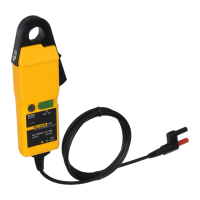
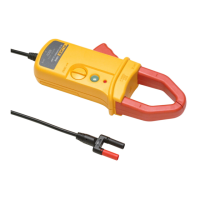
The Fluke i30s/i30 AC/DC Current Clamps are designed for accurate, non-intrusive measurement of AC, DC, and complex waveform currents. The i30s model is suitable for use with oscilloscopes and DMMs, while the i30 model is designed for use with DMMs only. These clamps utilize advanced Hall Effect technology, enabling them to measure currents with high resolution over a broad frequency range. This makes them a valuable tool for applications involving inverters, switch mode power supplies, industrial controllers, and other scenarios requiring precise current measurements and waveform analysis.

Safety Instructions and Precautions:

The i30s and i30 current clamps are intended for use by qualified personnel only. To prevent personal injury and ensure safe operation, several precautions must be observed:

  • Electrical Shock Hazard: Exercise extreme caution during installation and use, as high voltages and currents may be present in the circuit under test.
  • Product Damage: Do not use the product if it appears damaged. Always connect the probe to the display device before installing it around a conductor.
  • Battery Replacement: Before removing the battery cover, ensure the probe is disconnected from any live electrical circuit and all leads are removed. Never operate the probe without the battery cover securely fitted.
  • Intended Use: Use the Current Probe strictly as specified in the operating instructions. Deviating from these instructions may compromise the probe's safety features.
  • Safety Codes: Adhere to all local and national safety codes. When hazardous live conductors are exposed, individual protective equipment must be used to prevent shock and arc blast injuries.
  • Holding Position: Do not hold the Current Probe beyond the tactile indicator.
  • Improper Use: Using this equipment in a manner not specified in the manual may impair the protection provided by the equipment.
  • Protective Barrier: To avoid injury, always ensure your fingers are positioned behind the protective barrier on the probe, as illustrated in the manual.
  • Damaged Probe: Do not use the probe if any part of it, including the lead and connector(s), appears damaged, or if a malfunction of the instrument is suspected.

Operating Instructions:

  1. Power On: Switch on the probe using the On – Off switch and verify that the LED indicator is lit.
  2. Connect to Display Device: Connect the output lead of the clamp to an oscilloscope, multimeter, or other appropriate measuring equipment.
  3. Zero Adjustment: If necessary, adjust the probe's output voltage to zero using the Zero Adjust thumbwheel. This step is crucial for accurate DC current measurements.
  4. Clamp Around Conductor: Clamp the jaws of the probe around the conductor carrying the current to be measured. Ensure a good, firm contact between the closing faces of the jaws.
  5. Take Measurements: Observe the readings on your connected display device and take measurements as required. A positive output indicates that the current flow is in the direction shown by the arrow on the probe.

Battery Replacement:

The red LED on the probe will flash when the battery voltage approaches its minimum operating level, indicating that battery replacement is needed. Follow these steps:

  1. Disconnect and Power Off: Unclamp the probe from the conductor, turn it off using the On – Off switch, and disconnect the output leads from any external equipment.
  2. Access Battery: Loosen the captive screw that secures the battery cover. Lift the cover through approximately 30 degrees and pull it clear of the probe body. The battery will then be accessible.
  3. Replace Battery: Replace the old battery with a new one.
  4. Re-fit Cover: Carefully re-fit the battery cover, ensuring it is properly aligned and secured by tightening the captive screw.

Maintenance:

  • Cleaning: Periodically clean the case of the probe by wiping it with a damp cloth and a mild detergent.
  • Avoid Abrasives and Solvents: Do not use abrasive cleaners or solvents, as these can damage the probe's casing.
  • No Immersion: Never immerse the probe in liquids.

Symbols Used:

The manual uses specific symbols to convey important information:

  • Waste Disposal: A crossed-out wheeled bin symbol indicates that the product should not be disposed of as unsorted municipal waste. Contact Fluke or a qualified recycler for proper disposal.
  • Important Information: An exclamation mark within a triangle signifies important information that requires attention and refers the user to the manual.
  • Double Insulation: A double square symbol indicates that the product features double insulation, providing enhanced safety against electric shock.

Fluke i30 Specifications

General IconGeneral
Output Sensitivity100 mV/A
Battery Type9 V alkaline
Current Range30 A AC
Operating Temperature0°C to 50°C
Storage Temperature-20°C to 70°C
Safety RatingCAT III 300 V

Related product manuals