Need help?
Do you have a question about the Fluke TS 100 PRO and is the answer not in the manual?
Instructions for registering the product online for updates and support.
General warnings about fire, electric shock, and personal injury.
Cautions to prevent damage from static discharge and testing non-working circuits.
Advice on handling moisture and drying the tester.
Information on approved test leads and accessories for the tester.
Step-by-step instructions for installing the tester's batteries.
Instructions on how to power on the TS100 PRO tester and its self-test.
Explanation of the tester's automatic power-off feature to save battery.
Instructions on how to connect and test cables with the TS100 PRO.
Overview of the various operational modes available on the TS100 PRO.
Description of the default operating mode and its characteristics.
Explains how to use deadzone mode to skip the first 50 feet of cabling.
How to activate the filter to ignore the first bridge tap and find the second.
How to enter and use VOP mode to change Velocity of Propagation settings.
How to enter setup mode to change units or reset defaults.
Detailed explanation of how TDR technology works for cable fault finding.
Steps to manually set the VOP value for improved accuracy.
How to use the tester to automatically determine VOP for a known cable length.
Factors affecting VOP accuracy and potential variations in readings.
Guidance on testing cables with multiple conductors or shorts.
How to test wires within a conduit.
Steps for testing a pair of wires inside a conduit for opens.
How to test a single wire against a conduit for faults.
Using the tester to measure remaining cable length on spools for inventory.
Maximum measurable cable length and conditions affecting it.
Examples of maximum cable lengths for different cable types.
Minimum length for a non-zero reading on the tester.
Accuracy specifications for length measurements at different cable lengths.
The range for measuring the distance to a bridge tap.
Minimum length required to detect a bridge tap, dependent on cable.
How many measurements the tester can perform per second.
Range and saveability of the Velocity of Propagation setting.
The core testing technology used by the TS100 PRO.
Types of cables compatible with the TS100 PRO.
Specifies the type and quantity of batteries used.
Indicates if reverse battery installation causes damage.
Typical battery life duration for the tester.
How the tester indicates a low battery condition.
Maximum voltage the tester can safely withstand.
Range and accuracy of AC/DC voltage measurements.
How the tester warns about high AC or DC voltages.
Details about the tone injection frequency and cadence.
The range of cable impedances the tester can accurately measure.
Operating and storage temperature/humidity ranges for the tester.
Maximum operating altitude for the tester.
The weight and physical size of the TS100 PRO tester.
Safety standards and electromagnetic compatibility compliance.
Notes on specific applications, bridge tap detection, and DSLAM testing.
Troubleshooting steps for self-test failure, short readings, and unresponsive buttons.
Troubleshooting for readings shorter than expected.
Steps to take when the tester's buttons are not working.
Warnings about case opening, service, and battery leakage precautions.
Caution about battery leakage and removal for long storage.
Instructions for drying and handling the tester if it gets wet.
Warning against using specific solvents that can damage the tester.
Lists available accessories for the TS100 PRO tester.
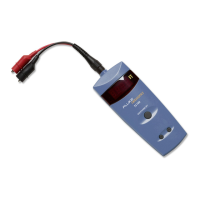
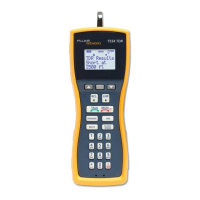
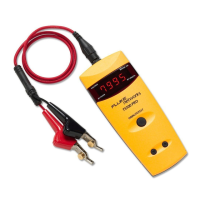
The Fluke Networks TS®100 PRO Cable Fault Finder is a portable, handheld Time Domain Reflectometry (TDR) device designed for installers, repair technicians, and other authorized personnel. Its primary functions include detecting bridge taps, locating problems on installed copper cable pairs, and managing cable inventory. This enhanced version of the TS100 PRO is specifically engineered to help technicians qualify, troubleshoot, and repair copper facilities that support high-speed VDSL services.
The TS100 PRO operates by sending a pulse down a pair of wires and measuring the reflections that occur due to impedance variations. This allows it to determine the length of the cable and the distance to any faults. The device is capable of detecting various cable issues such as opens, shorts, and bridge taps.
A key feature is its SmartTone™ Positive Identification System, which injects a tone onto the connected pair concurrently with fault locating signals. This tone is compatible with most tone probes and helps in positively identifying the target wire pair, especially in multi-wire environments where tones from nearby wires might be indistinguishable. The tone has five frequency and cadence options, and its characteristics change as the cable condition changes to "normal-open" from any other condition.
The device also includes PowerBT™ bridge tap detection, which is crucial for identifying these common cable faults. When a bridge tap is detected, the display shows the distance to the bridge tap or its length. The Bridge Tap Filter Test Mode allows the tester to ignore the first bridge tap to locate a second one, which is useful in complex cabling scenarios.
The TS100 PRO provides voltage detection, indicating the presence of DC voltage and flashing for AC voltage. It also offers an audible indication for shorted wires and external voltages greater than 90 volts AC or 100 volts DC, enhancing safety during use. The input is protected up to 250 volts against accidental connections to a power source.
For inventory management, the tester can measure the length of wire or cable remaining on spools without needing to unspool or move them. This is valuable for both job-site and warehouse personnel, helping to determine if enough cable is available for a job and preventing unnecessary trips for more supplies.
The TS100 PRO is designed for ease of use with automatic adjustments. It features a bright 0.4-inch LED display that shows test results, including length measurements, distance to faults, and VOP values. The display can provide up to four readings per second.
Modes of Operation:
Battery Management: The tester uses four AA batteries (included) and boasts a fifty-hour battery life with an intelligent power-down feature. It automatically turns off after five minutes if not connected to anything, or after one hour if connected to a cable. A low battery indicator (LO batt) alerts the user when the battery voltage falls below 4.5 VDC, although the tester will continue to operate for at least an hour, albeit with potentially less accurate readings.
Connecting to Cables: To test a cable, the test lead clips are attached to a pair of wires at one end of the cable. The tester shows the distance to the nearest fault it finds. It is crucial to use only test leads supplied with the tester or approved by Fluke Networks to ensure reliable results. When testing telephone cables, the tester should only be connected to non-working circuits to avoid causing service outages on active XDSL or T1 circuits.
Multi-Wire Environment Testing: In multi-wire cables (e.g., 4-wire telephone, 8-wire CAT-5, 12-2 AC wire), a short could exist between any number of conductors, including a shield or conduit. To fully test, each wire should be checked against every other wire, including shields and conduits. While connecting all conductors to one clip lead and the shield to the other is a quick method, it can reduce cable impedance and lead to measurements below the tester's range; individual wire testing is more reliable.
Conduit Testing: The TS100 PRO can test both wire pairs and single wires within a conduit. For a wire pair, if one wire separates from the other by at least 1 foot (30 cm), the tester indicates an open at that separation point. For a single wire, by clipping one test lead to the wire and the other to the conduit, the tester shows the length up to a fault or to the point where the wire separates from the conduit by at least 1 foot (30 cm).
The TS100 PRO is designed with durability in mind. Its components are protected against damage from moisture, and it features a high-strength plastic (ABS) housing.
Battery Installation and Replacement: The battery compartment is located on the back of the tester. To install or replace batteries, a number 2 Phillips screwdriver is used to loosen the screw on the battery door. The screw does not come out of the door. Users must ensure correct battery polarity as shown at the bottom of the compartment. To extend battery life, batteries should be removed if the tester will not be used for a long period.
Cleaning: For cleaning the display, lens cleaner and a soft, lint-free cloth are recommended. The case can be cleaned with a soft cloth moistened with water and a weak soap. Petroleum-based or chlorinated cleaning agents, such as CRC Cable Clean®, should not be used as they can damage the tester.
Troubleshooting:
Safety Precautions:
 General
| Type | Cable Tester |
|---|---|
| Power Supply | 9V alkaline battery |
| Continuity Testing | Yes |
| Warranty | 1 year |
| Supported Cables | Twisted pair, coaxial, and telephone cables |
| Display | LCD |
| Test Types | Wiremap |
| Battery Life | Approximately 50 hours |
| Operating Temperature | 0 °C to 50 °C |
| Storage Temperature | -20 °C to 60 °C |
| Tone Generator Frequency | 1 kHz |

 To Next Page