BLADE 2.0 | USER MANUAL | 13
DP C18 DISPLAY MANUAL
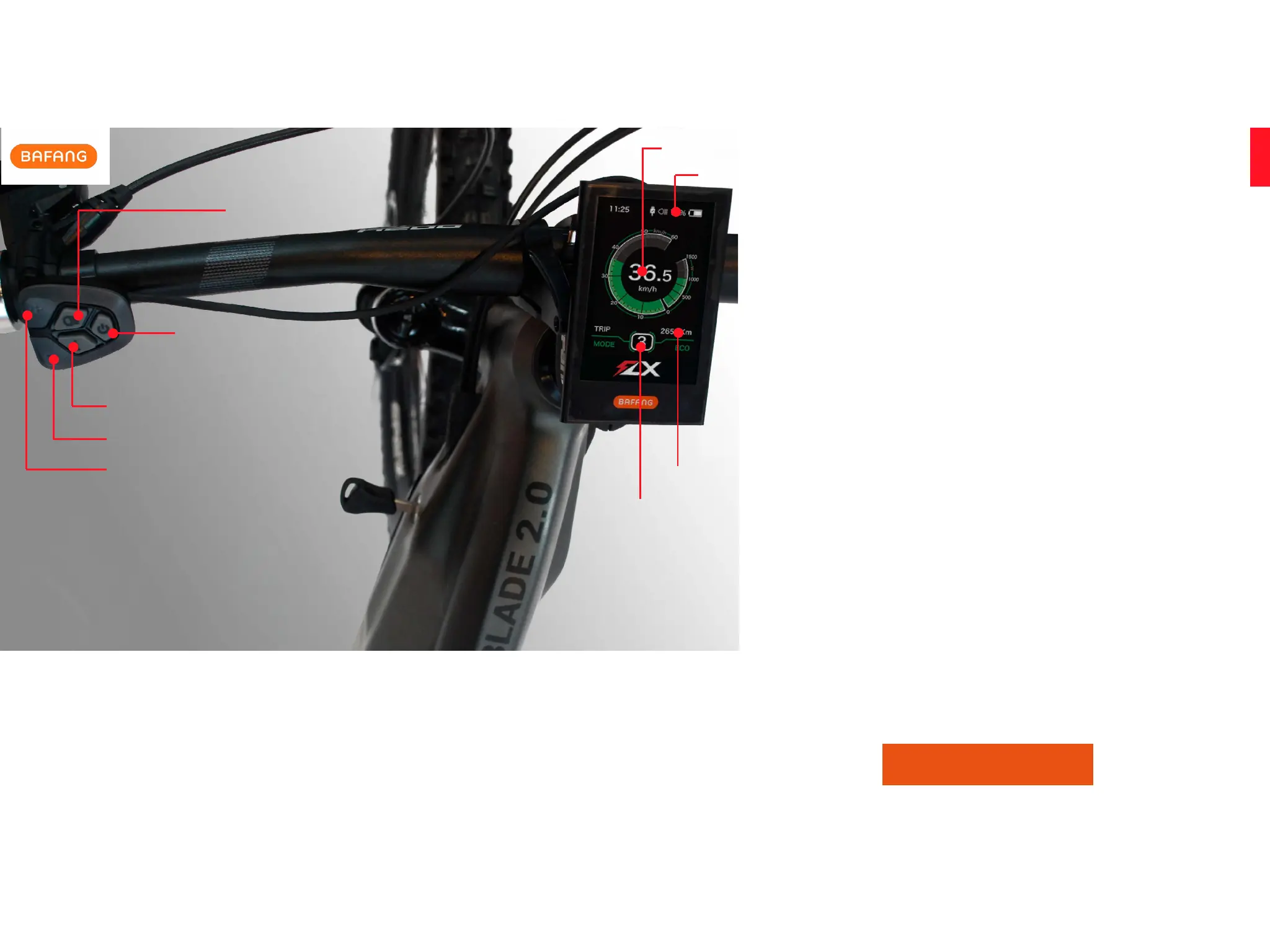
The DP C18 color LCD has many functions. The speed is shown
in the middle, the trip distance at the bottom, and the time of the
day in the top left. To learn about all functions in detail please
use the link below to view the Bafang LCD Screen manual.
To turn the LCD on, press and hold the ‘Power Button’ until it
responds. The level of pedal assist can be adjusted by pressing
the ‘+’ or ‘-’ buttons. The lights can be activated by pressing and
holding the ‘Light’ button until it responds. Walk-assist mode
can be activated by pressing and holding the ‘-’ button until it
responds.
The LCD has been pre-programmed to comply with your local
speed regulations.
BAFANG LCD SCREEN
DISPLAY
POWER BUTTON
LIGHTS BUTTON
MODE BUTTON
+ BUTTON
- BUTTON
POWER ASSIST LEVEL
BATTERY INDICATOR
SPEED INDICATOR
TRIP DISTANCE


 To Next Page