reaches or exceeds the set value, a warning will be shown.
TEMP UNIT :
X
℃、℉
interchangeable
MAX. TIRE PRESSURE : Set the maximum pressure warning value. When the
X
pressure reaches or exceeds the set value, a warning will be shown.
MIN. TIRE PRESSURE : Set the minimum pressure warning value. When the
X
pressure reaches or falls below the set value, a warning will be shown.
PRESSURE UNIT : psi or kpa interchangeable
X
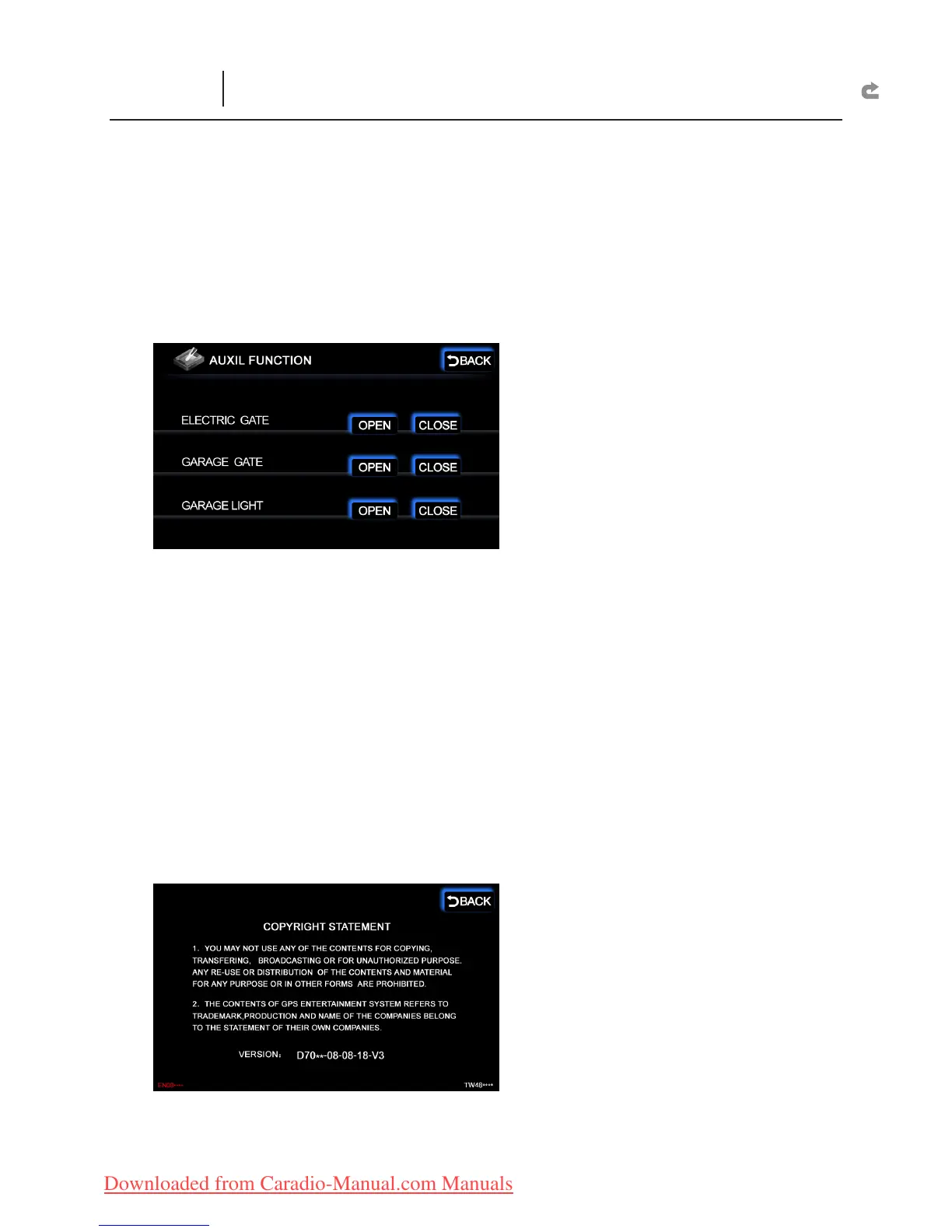
AUXIL :
ELECTRIC GATE :
X
OPEN :
`
If a Roll-up Gate Control is installed, you can use the touch screen
to open the Automatic Door.
CLOSE :
`
If a Roll-up Gate Control is installed, you can use the touch screen
to close the Automatic Door.
GARAGE GATE :
X
OPEN :
`
If a Roll-up Gate Control is installed, you can use the touch screen
to open the Garage Door.
CLOSE :
`
If a Roll-up Gate Control is installed, you can use the touch screen
to close the Garage Door.
GARAGE LIGHT :
X
OPEN :
`
If a Roll-up Gate Control is installed, you can use the touch screen
to turn on the Garage Light.
CLOSE :
`
If a Roll-up Gate Control is installed, you can use the touch screen
to turn off the Garage Light.
COPYRIGHT :
Mainframe software version and copyright policy
X
INFO
(Status Message and TPMS)


 To Next Page