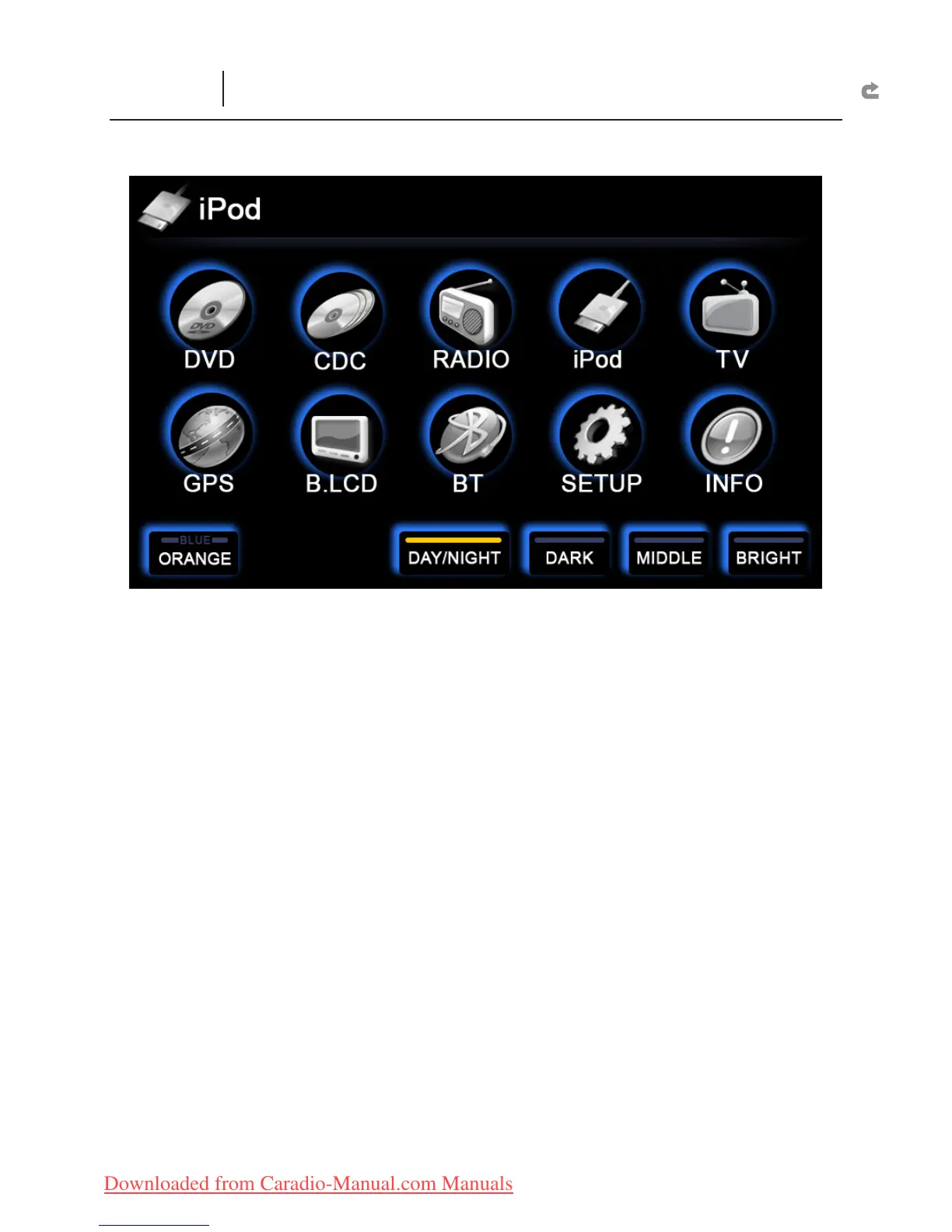
MAIN MENU
DVD :
Enter the DVD and USB function interface.
CDC :
Enter the DVD Disc Changer Function interface.
Radio :
Enter the Radio Function interface.
iPod :
Enter the iPod Function interface.
TV :
If FlyAudio digital TV set is connected, you can enter the Digital TV.
GPS :
Enter the GPS Function interface. Operate GPS through the touch screen.
B.LCD :
Enter the Back Headrest Display Image Changer interface.
BT :
If Bluetooth is connected, you can enter the Bluetooth Function interface.
SETUP :
Enter Other Function interface.
INFO :
If TPMS is connected, you can enter the TPMS Monitoring interface.
BLUE :
Select the color “blue” to have a blue operational interface on the next
startup.
ORANGE :
Select the color “orange” to have an orange operational interface on
the next startup.
DAY/NIGHT :
Can manually adjust the brightness of the monitor and the left right
buttons.
DARK :
Dim screen light.
MIDDLE :
Middle screen light.
BRIGHT :
Bright screen light.
MAIN MENU
S



 To Next Page