Q & A
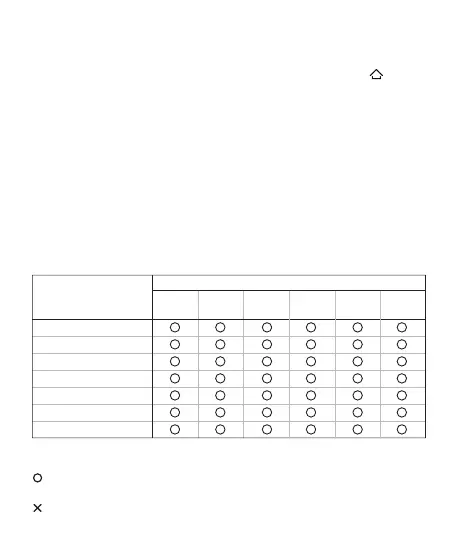
The name and content of
harmful substances in the product
Q: The controller cannot be connected?
A: Please make sure that the back gear of the controller is correct, and press and hold the
button for three seconds at the same time, the indicator flashes quickly, and the controller enters
the pairing state
- Pair the receiver: plug in the dongle and use the pin to press the pair button to finish the pairing
- Pair Bluetooth: Unpair the device on the Bluetooth settings page, turn Bluetooth on and off, and
reconnect
Q: How to upgrade the controller firmware?
A: Install the Feizhi space station on the computer, or install the Feizhi game hall on the mobile
phone, and upgrade the firmware according to the software boot
Q: Is there an abnormality in the joystick/trigger/body feeling?
A: Install the Feizhi space station on the computer, enter the test page, and press the guide
calibration controller
This form has been prepared in accordance with the provisions of SJ/T 11364
Indicates that the content of the hazardous substance in all homogeneous materials of this part is
within the limit specified in GB/T 26572-2011 Require the following
Indicates that the content of the hazardous substance in at least one homogeneous material of the
component exceeds the provisions of GB/T 26572-2011 The limited requirements
Part Name
Toxic or Hazardous Substances and Elements
Pb Hg Cd Cr PBB PBDE
PCB Borad
Shellt
Packaging
Wires
Polymer battery
Silicone
Small structural parts
such as metal and tape



 To Next Page