E-mail:info@flyrontech.com
Flyron Technology Co., Ltd. 20 Channel MP3 Sound Board
4.5.6 Specify playback of a track in a folder
Specify playback of track 001 in the folder 01
7E FF 06 0F 00 01 01 xx xx EF
Specify playback of track 100 in the folder 11
7E FF 06 0F 00 0B 64 xx xx EF
Specify playback of track 255 in the folder 99
7E FF 06 0F 00 63 FF xx xx EF
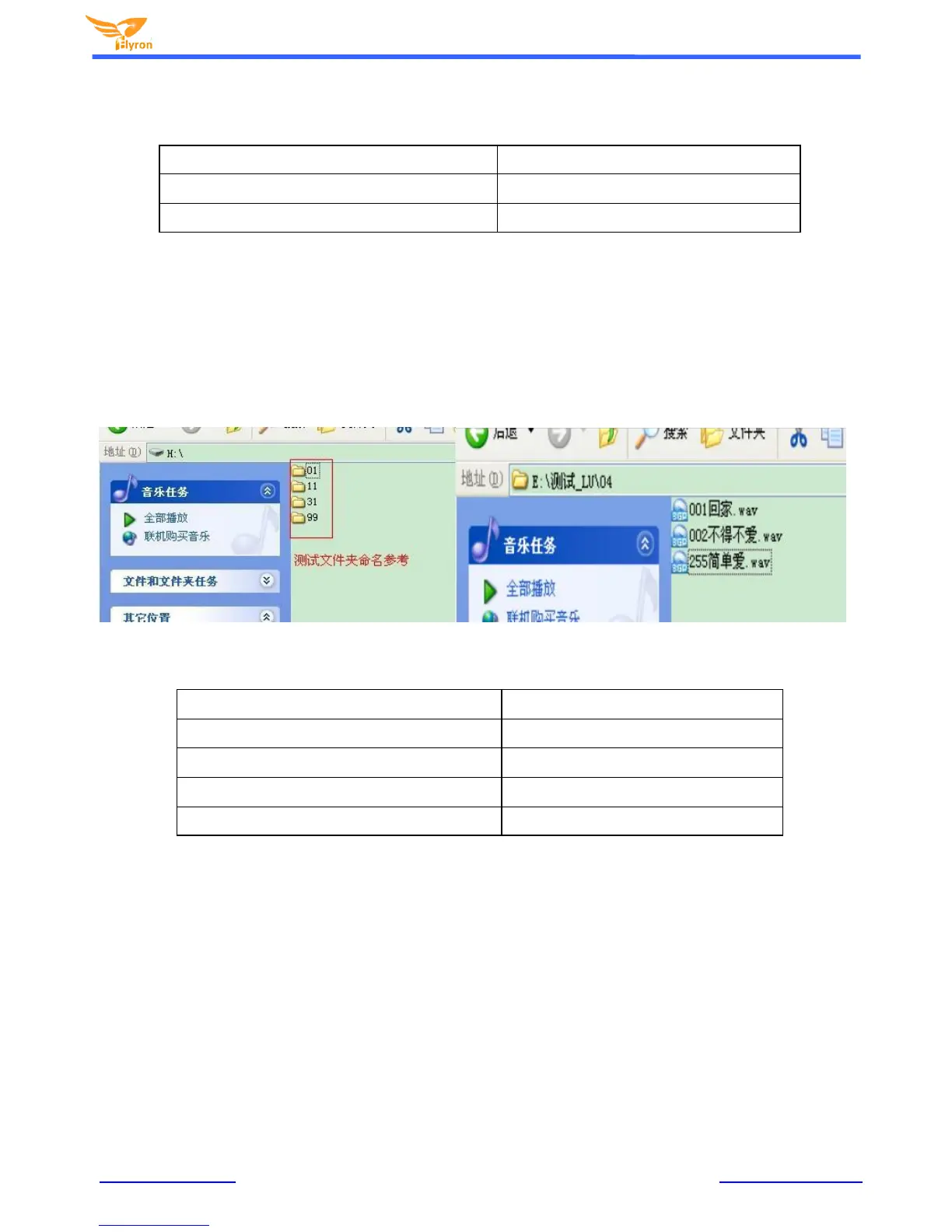
1) The default folders are named as "01", "11", and “99” in this way. In order to be with better system stability,
it is made to support maximum 99 folders and maximum 255 tracks in each folder. For example:
If specify to play “100.m p3” in the folder "01", send the command 7E FF 06 0F 00 01 64 xx EF MSB:
represents the name of the folder, maximum supports 99 folders from 01 - 99. LSB: represents the
track, maximum supports 255 tracks from 0x01 to 0xFF
You must specify both the folder and the file name to target a track. This feature supports MP3 and
WAV audio formats.
The following two images illustrate naming method of folders and files.
4.5.7 Inter-cut an advertisement
Inter-cut track "0001" in the folder “ADVERT”
7E FF 06 13 00 00 01 FE E7 EF
Inter-cut track "0002" in the folder “ADVERT”
7E FF 06 13 00 00 02 FE E6 EF
Inter-cut track "0255" in the folder “ADVERT”
7E FF 06 13 00 00 FF FD E9 EF
Inter-cut track "1999" in the folder “ADVERT”
7E FF 06 13 00 07 CF FE 12 EF
Inter-cut track "3000" in the folder "ADVERT”
7E FF 06 13 00 0B B8 FE 25 EF
1) This module supports inter-cut advertisements during playback of a track, so that it can meet some special
needs for some applications.
2) After sending the command 0x13, the system will save the ID V3 information of the track being played and
pause, and then it will play the specified inter-cut track (advertisement). When the inter-cut track is finished,
the system will go back and continue to play the track that was interrupted until to the end.
3) The setting method is build a folder named “ADVERT” in the storage device and put the tracks (ads) you
need in the folder and name the files as “0001 .mp3/wav”, 0002.mp3/wav.
4) If you send an inter-cut command when the module is at Pause status or Stop status, it will not work and
there will be returned error information. In the course of an inter-cut, you can continue to intercut the other
tracks (ads). When the last inter-cut track goes to the end, the systems till goes back to the ID V3 position
saved at the first time.


 To Next Page