FLYWOO LR4 QUAD O3 V1.0
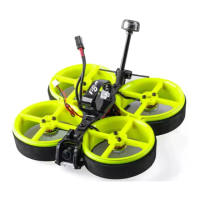
6/ Finder BUZZER function
The buzzer has two modes of operation:
1. It is compatible with the functions of the traditional active buzzer and synchronized
with the flight control.
2. When the flight control is normally connected, if the main battery in the flight is
powered off, it can still automatically emit 100 dB of drip sound after 30 seconds of
power failure, and the LED will emit white light.
To turn off the buzzer: Press and hold the release button for more than 2 seconds, the
Finder turns off the sound.
7/ Flight firmware upgrade and write default CLI
1/ Activate DFU mode(Two ways to enter DFU)


 To Next Page