Connection alpha LTE/UMTS 4/EDGE HS
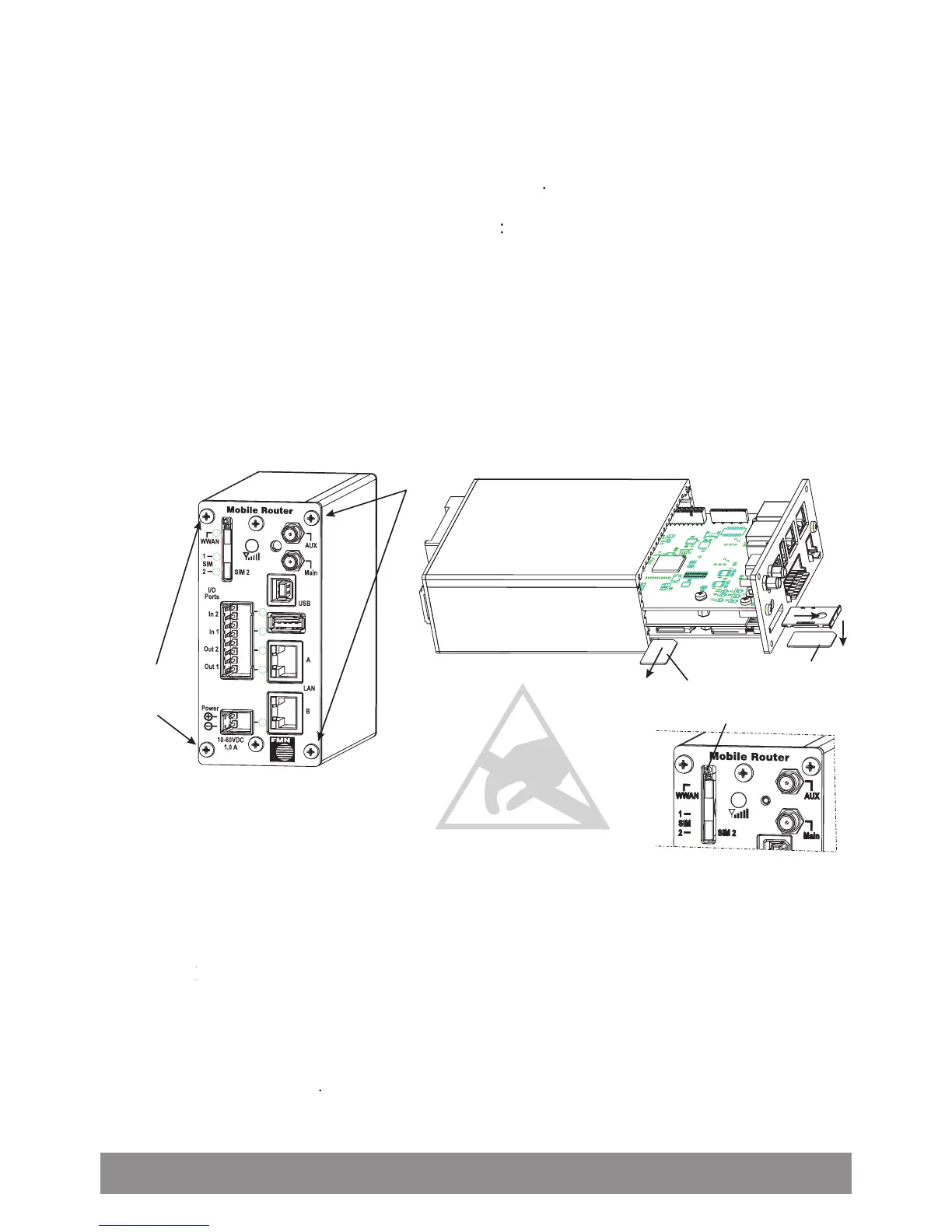
Entering the SIM card and connecting the router
For establishing a connection, you need at least one SIM card of your network provider
(not included in the delivery scope).
Using only one SIM card you can insert this either in the internal SIM card holder
in the from outside accessible SIM card holder
In the following pictures you can see how you have to insert the SIM cards and how you
(Only required for SIM card 1; otherwise forward at 4.) Open the housing; for this,
loosen the two screws that are marked in the picture below and remove the front
panel with thereon attached circuit board from the housing
Insert the SIM card 1 into the SIM card holder
SIM card 2 can insert in the SIM card holder
, accessible from outside (for
that press with a sharp object e.g. a pencil on the ejector pin of the SIM card holder
2, enter SIM card 2 in the card slot and insert card slot in SIM card holder 2)
Connect the LTE/UMTS antenna with the SMA antenna socket
; connect the GPS antenna with the SMA antenna socket
(if required use proper adapter;
AUX (if required use proper adapter;AUX
with deactivated GPS function an additional
LTE/UMTS antenna can be connected)
Connect LAN socket at the
LAN socket at the PC with LAN connection cable
Screw power supply cable to power connector and then plug in to



 To Next Page