Web: www.fmuser.net Email: rita@fmuser.net Skype: rita.cai87 MSN: rita_cai_jxpx@hotmail.com
5 / 11
11
ST▌==
Volume
dynamic
display
Dynamic displaying of the volume, the higher
volume, the more sign of .
Remark: “x”represents the numerals;“***” represents Mute
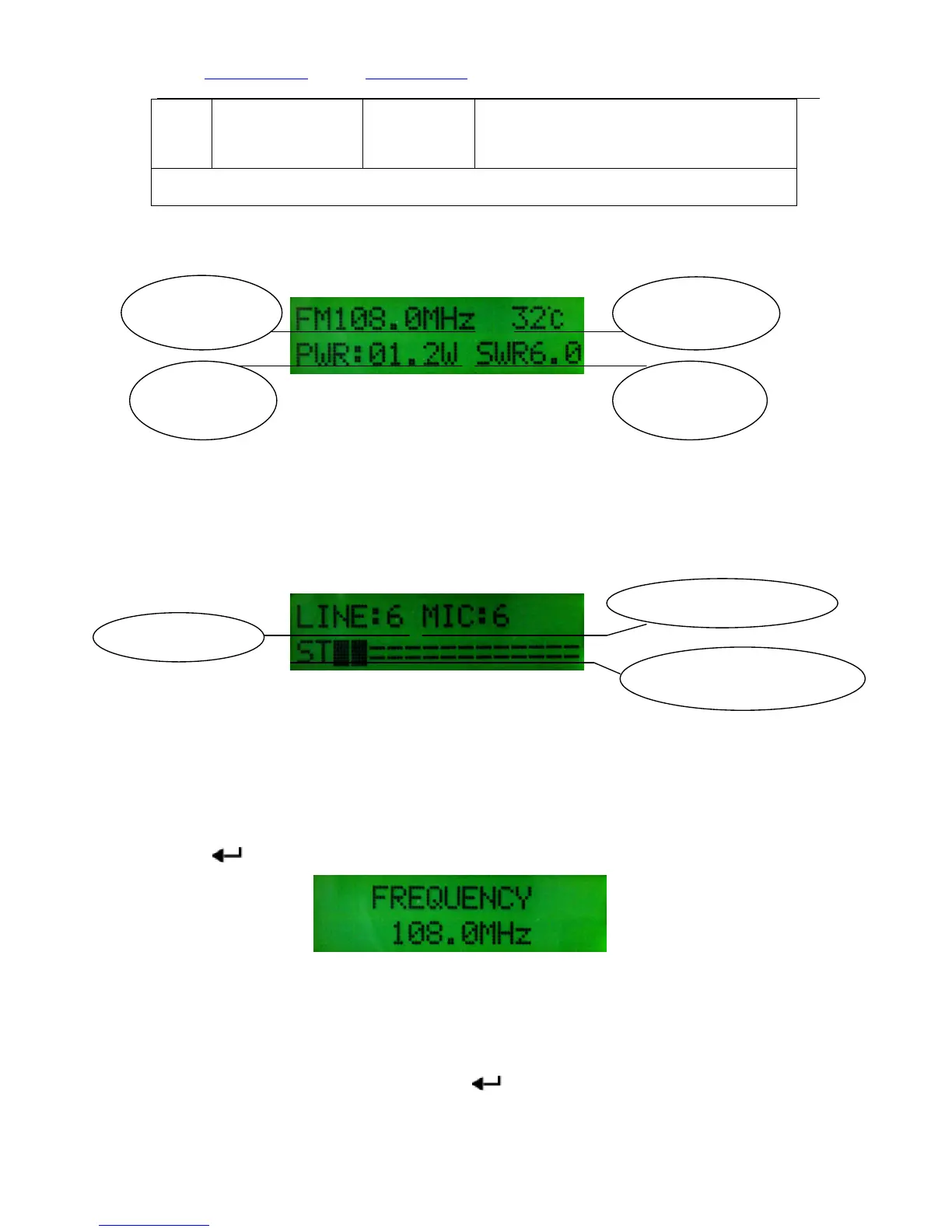
2 Home Page Display 1:
Home Page Display 1
3 Home Page Display 2:
In the Home page, press【▲】or【▼】 button to enter page 2 to check the audio volume and
microphone volume. Press【▲】or【▼】to home page.
Home Page Display 2
Attention: In the parameter setting pages, if there isn’t any operation in 30second, the
interface will automatically go back to Home page.
4. Frequency Adjusting
In the home page, press【FREQ】button to the frequency setting page, then press【▲】or
【▼】button to adjust the value by100khz frequency for each step. After setting, press
【 】to home page.
Frequency setting page
5. Power setting
In home page, press【WATT】button to the power setting page, press【▲】or【▼】 to adjust
the power between 0.2~15watt, then press【 】back to the home page.
SWR value
Machine
Temperature


 To Next Page