6
HARDWARE FEATURES
Front Panel
1
4
3
5
6
3
10 78
2 11
11
9
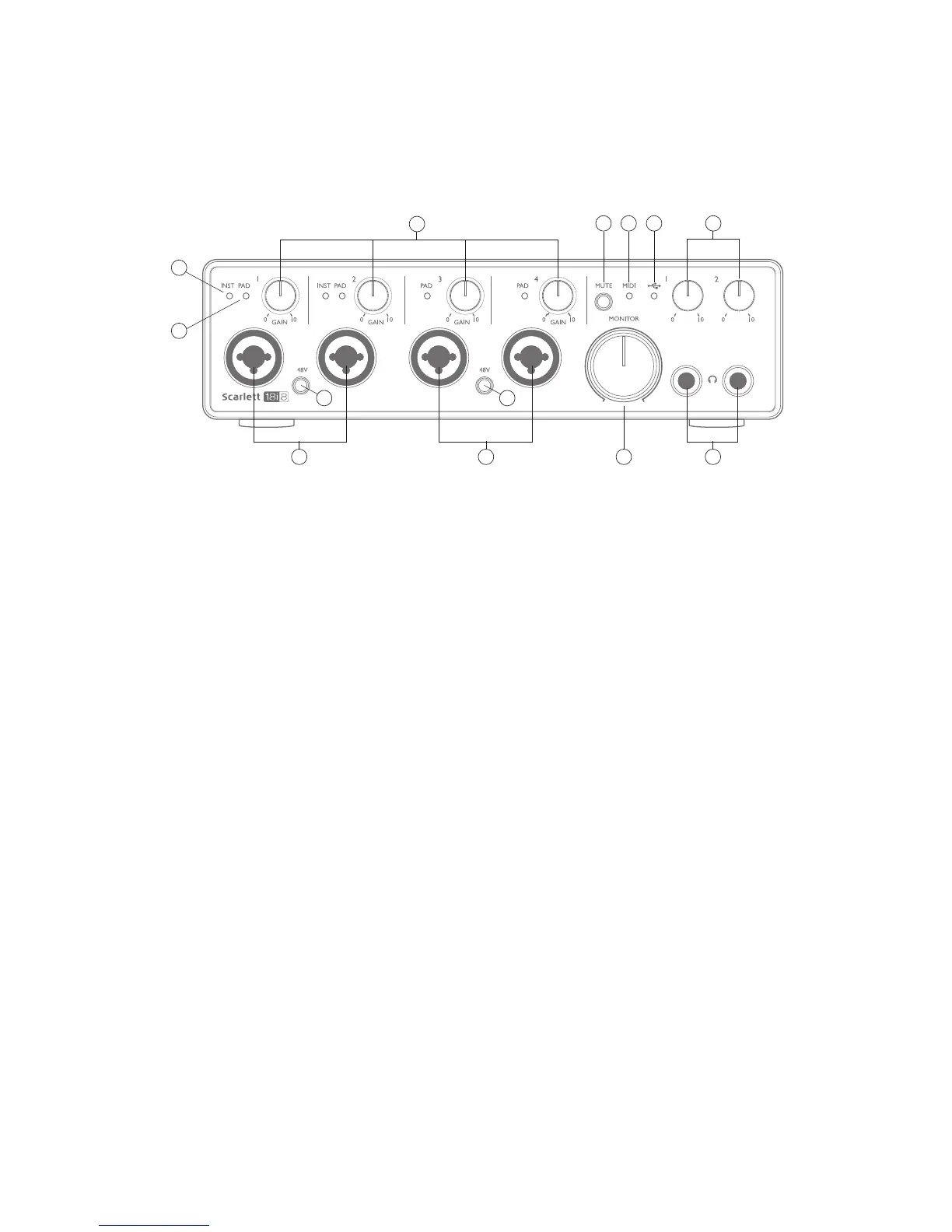
The Front Panel includes input connectors for Mic, Line and Instrument signals, the input gain and
monitoring controls, and sockets for headphones.
1. Inputs 1 and 2 – XLR Combo type input sockets - connect microphones, instruments (e.g.,
guitar), or line level signals via XLR or ¼” (6.35 mm) jacks as appropriate. Either ¼” TRS
(balanced) or TS (unbalanced) jack plugs can be used for instruments or line level signals.
2. Inputs 3 and 4 – XLR Combo type input sockets – as [1], but accept mic or line level signals
only. Direct connection of instruments should be via Inputs 1 and/or 2.
3. 48V – two switches enabling 48 V phantom power at the XLR contacts (mic inputs) of the
Combo connectors, in pairs (1 & 2; 3 & 4). The switch illuminates when phantom power is
selected.
4. GAIN 1 and GAIN 4 – adjust the input gain for the signals at Inputs 1 to 4 respectively. The
gain controls have concentric bi-colour LED ‘rings’ to confirm signal level: green indicates
an input level of at least -24 dBFS (i.e., ‘signal present’), the ring then turns red when signal
level reaches 0 dBFS.
5. INST – the input configuration for the jack contacts at Inputs 1 and 2 can be selected via
software from Focusrite Control. The green LEDs illuminate when INST is selected. With
INST selected, the gain range and input impedance are altered (relative to LINE), and the
input is made unbalanced. This optimises it for the direct connection of instruments (usually
via a 2-pole (TS) jack plug). When INST is off, the inputs are suitable for the connection of line
level signals. Line level signals may be connected either in balanced form via a 3-pole (TRS)
jack or unbalanced, via a 2-pole (TS) jack.
6. PAD – a 10 dB pad may be inserted in each of the four analogue input signal paths; these are
controlled via software from Focusrite Control. The pad increases the headroom of the input
stage, and should be used to reduce mic or line level signals which are ‘too hot’ (i.e., when the
gain halo is turning red while at minimum gain). It is not intended for use with the Instrument
inputs. The red LEDs illuminate when PAD is selected.















 To Next Page