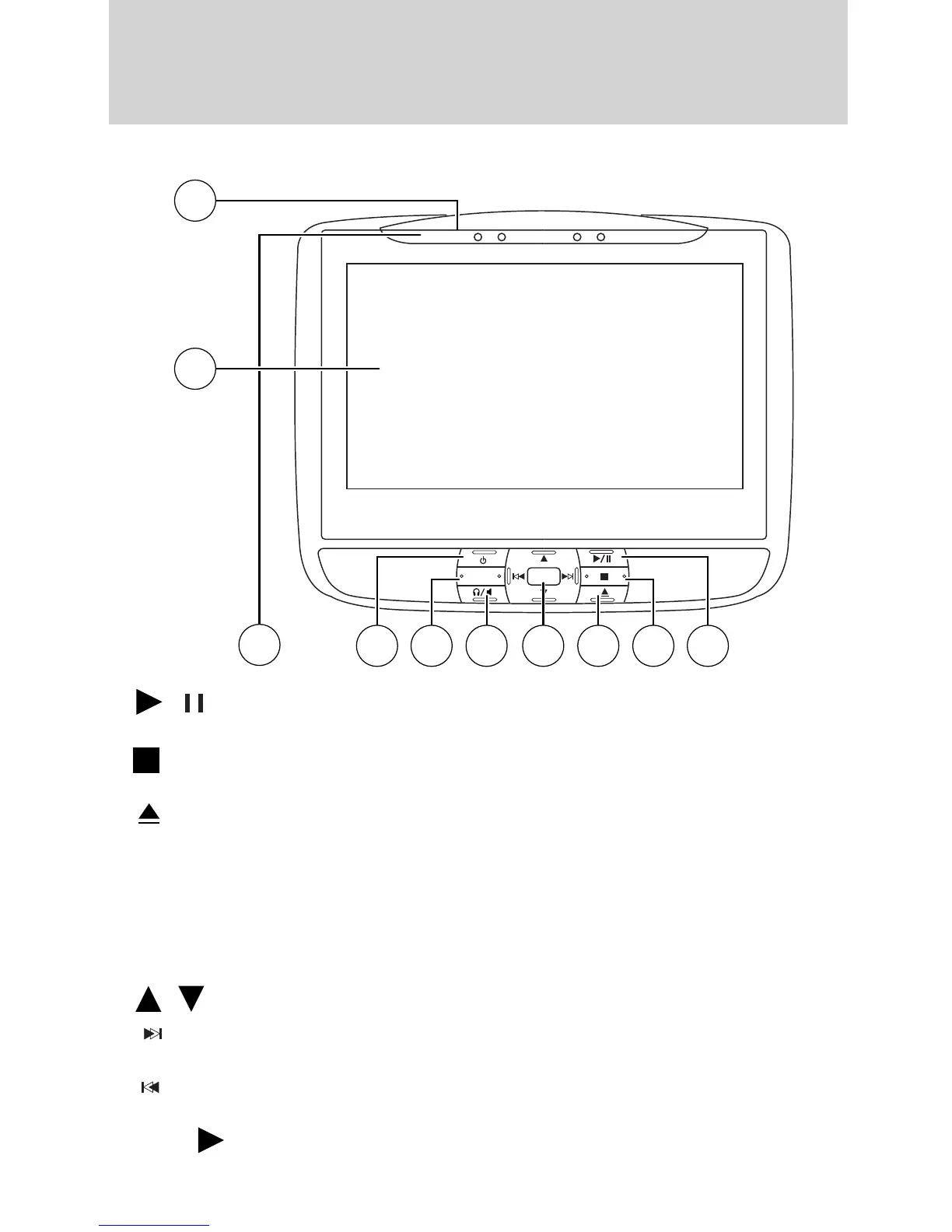
DVD player controls
1.
/ (Play/Pause): Press to play or pause a CD, DVD or
flash/thumb drive track.
2.
(Stop): Press to stop the current DVD, CD/MP3, or flash/thumb
drive track.
3.
(Eject): Press to eject a disc from the DVD system.
4. MENU: When playing a DVD, press MENU to enter the DVD disc
(root) menu (if available). Press again to exit and return to the movie.
SEL: Press to confirm the current selection that has been highlighted
through the use of the cursor controls.
Cursor controls: Use to navigate through selections when in any menu.
When not in a menu, you can also use them for the following features:
•
/ Use to scroll through menu sources.
•
(Fast forward/next): Press to access the next track or chapter.
Press and hold to activate fast forward mode (2x, 4x, 8x, 16x or 32x).
•
(Fast reverse/previous): Press to access the previous track or
chapter. Press and hold to activate fast reverse within a disc.
Press
(Play) to resume normal playback speed and volume.
MEDIA
MENU
SEL
4
7
5
6 1
3
2
8
9
10
Entertainment Systems
50
2010 Flex (471)
Owners Guide, 1st Printing
USA (fus)













 To Next Page