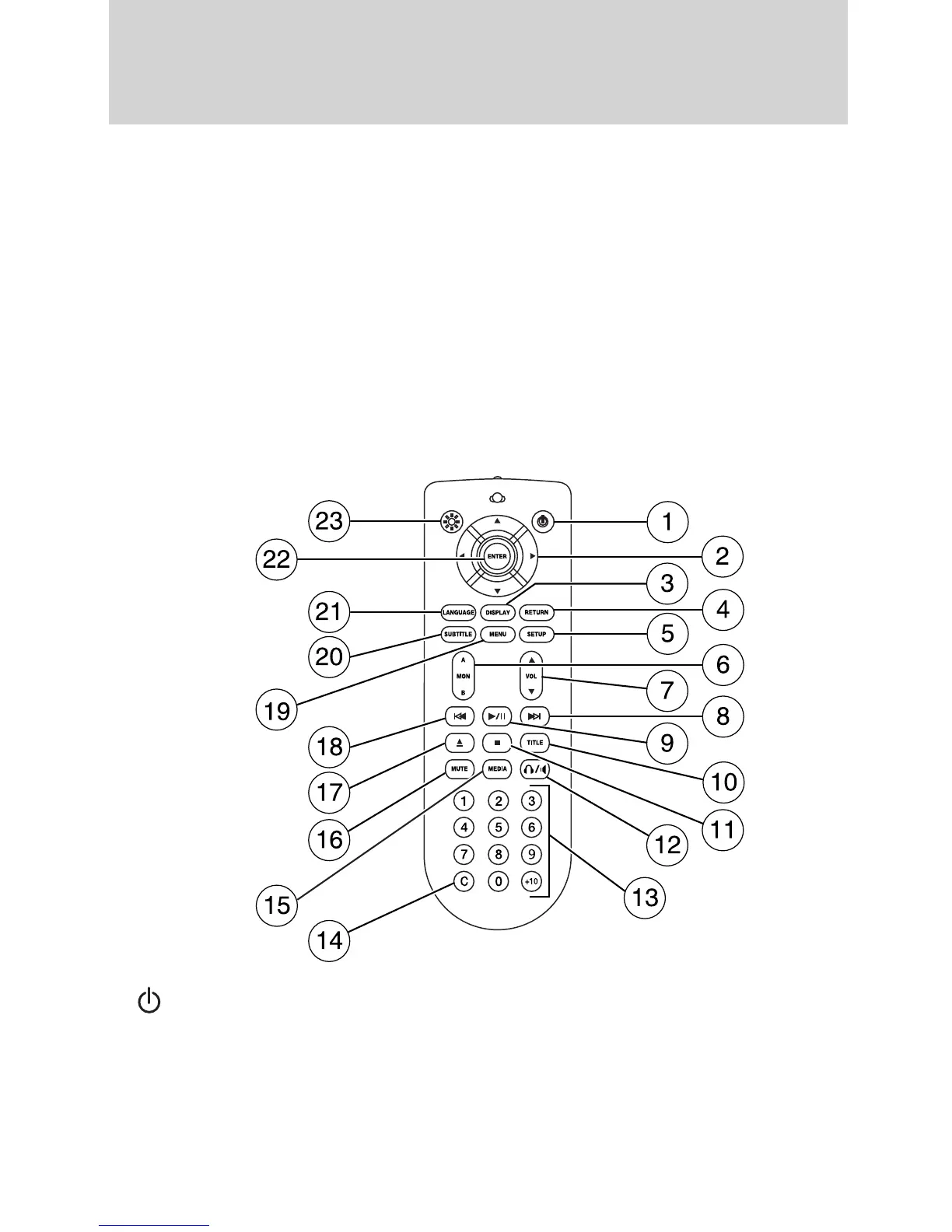
Remote control
Unless otherwise stated, all operations can be carried out with the
remote control. Always point the remote control directly at the player.
Ensure that there are no obstructions between the remote and player.
Press the MON A B control to select either Monitor A or Monitor B.
Note: Each headrest monitor is labeled with an identifier (either A or B)
found in the upper right corner of the system.
Note: Use the remote to adjust the volume levels for wired headphones
for headrest media sources only (DVD, USB port and auxiliary inputs).
To adjust the volume levels on the infrared wireless headphones
(provided with your system), use the rotary volume control on the side
of the headphones.
1.
(On/off): Press to turn each monitor/headrest system on or off.
2. Cursor controls: Use in various active menus to advance the cursor
up/down/left/right. When not in a menu, the left and right cursor controls
decrease and increase the display brightness.
3. DISPLAY: Press to access the on-screen display of title track, chapter
and time elapsed.
Entertainment Systems
52
2010 Flex (471)
Owners Guide, 1st Printing
USA (fus)















 To Next Page