02/2020 WDOC Diamond Sense www.forestgroup.com v1.4
FOREST DIAMOND SENSE REMOTE – SET TIMERS
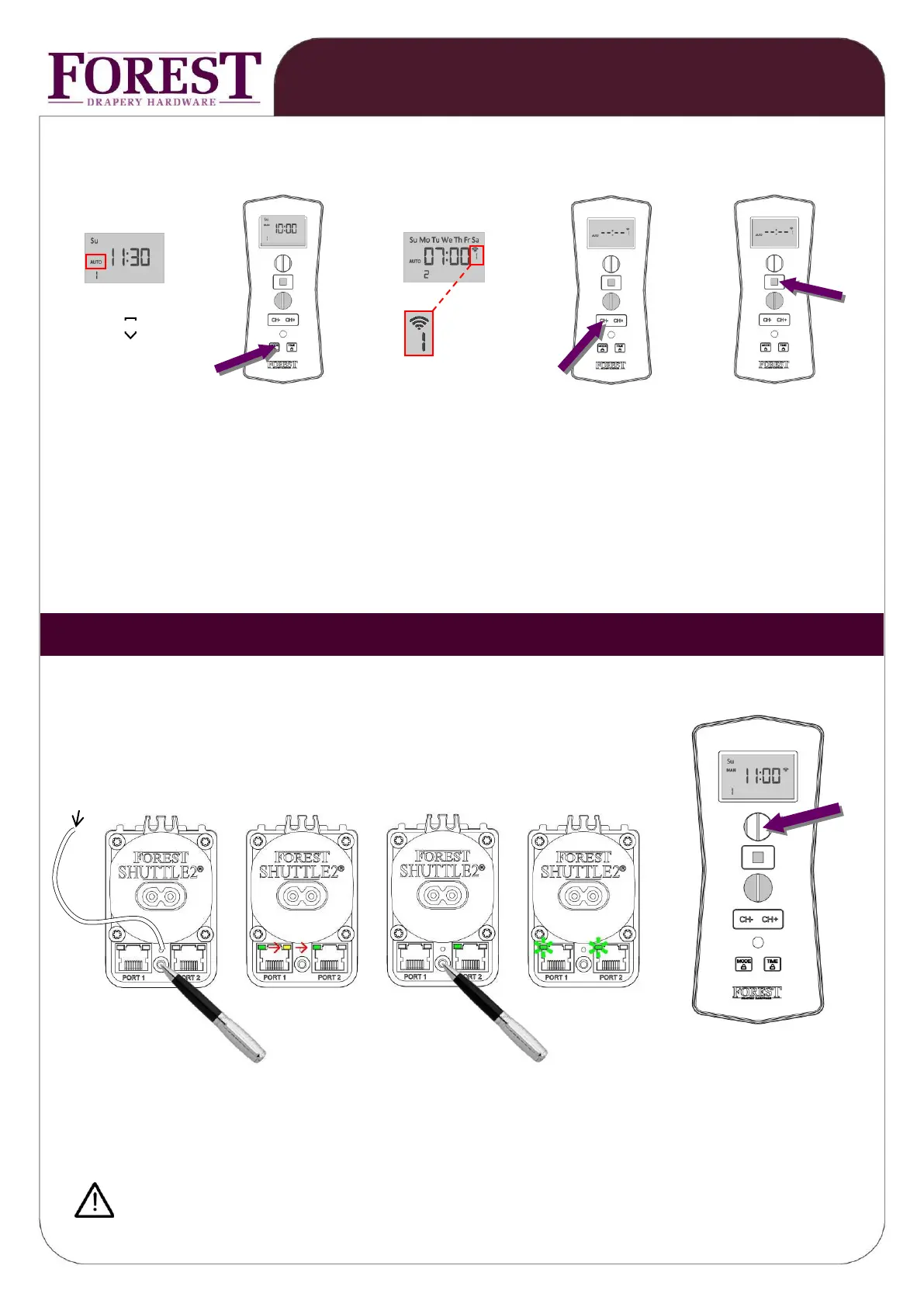
REMOVE / TURN OFF TIMING POSITION (example shows timing position 1 OPEN now on 07:00 CH2 → turn off)
MODE must be ‘AUTO’
or ‘AUTO’ OPEN
position 1
(houdt MODE knop
ingedrukt)
press MODE button once press a few times on press STOP button
CH- until --:-- appears to finish
When desired, repeat this action for any other timing position.
To turn off all timers temperately, set the remote control to mode ‘MAN’, see page 2.
You can recognize these Shuttle motors by the white antenna cable.
To program a Diamond Sense to a Shuttle S / L / M Receiver, first select the
desired channel and proceed:
antenna
LED MOVES FROM LED STARTS BLINKING
1
st
→2
nd
→3
rd
LED
3x 1x for 5 sec. press 1x OPEN button
Same procedure, but press CLOSE instead of OPEN, will erase the programmed channel.
Do not mount the motor within 1 meter from other equipment and receivers.
This will interfere with the receiver.



 To Next Page