07/2016 WDOC Diamond remote www.forestgroup.nl v1.4
TUBULAR MOTOR
BUILD-IN RECEIVER AND ELECTRONIC LIMIT SETTING
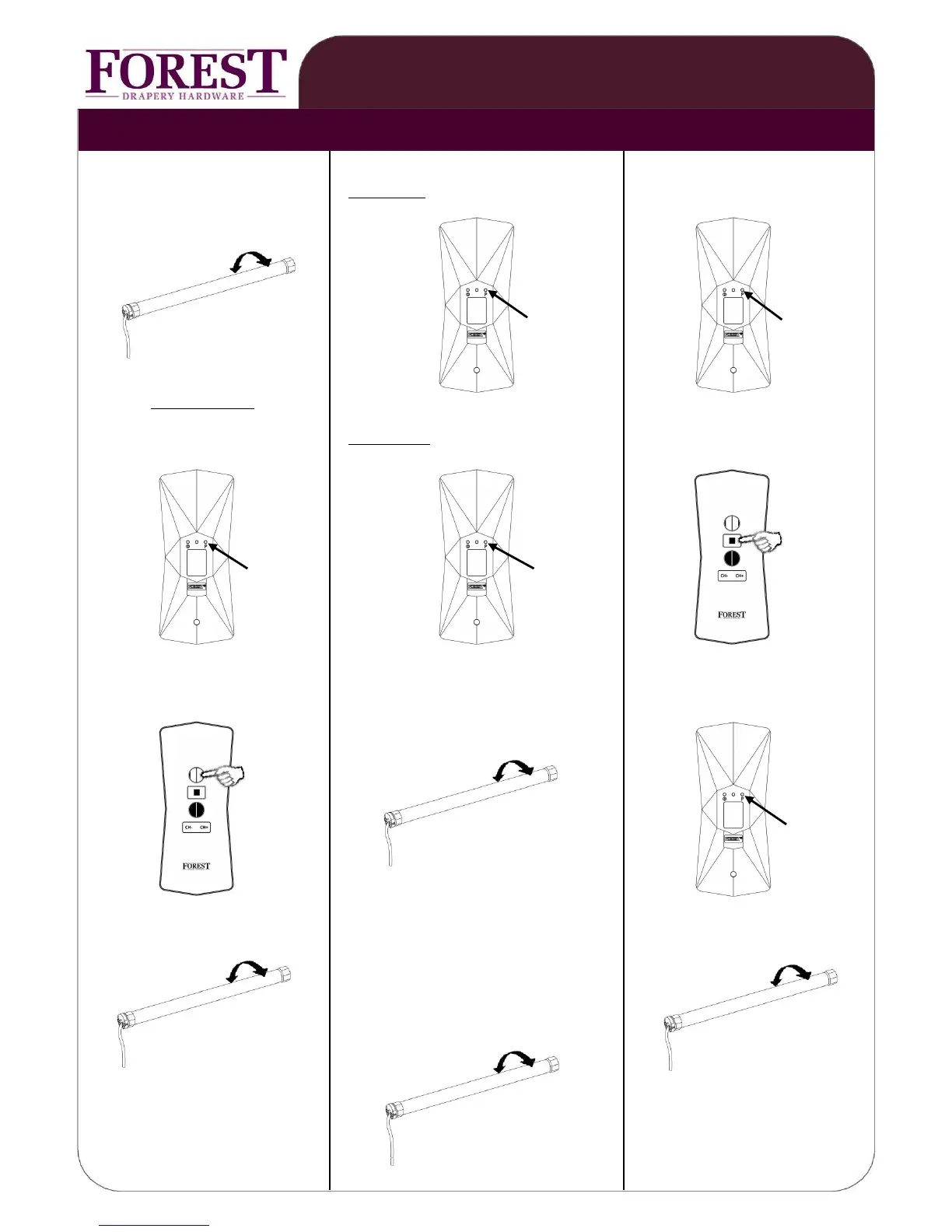
press button on motor, motor will ①st remote: press P button two times press P button one time
turn short to acknowledge
①
2x P 1x P
within 6 seconds:
press P button two times ②nd remote: press P button one time press STOP button one time
②
1x STOP
2x P 1x P
press OPEN button one time motor will turn to acknowledge press P button one time
1x OPEN
1x P
motor will turn to acknowledge to add another channel: motor will turn to acknowledge
1.press 2xP button of programmed channel,
2.select other channel and press P button
\
motor will turn to acknowledge
CHANGING DIRECTION OF ROTATION:
To change the direction of rotation,
keep green button on motor pressed
for 7 sec, until motor turns to
acknowledge.
PROGRAMMING REMOTE ADD MORE REMOTES OR
TO TUBULAR MOTOR: CHANNELS TO TUBULAR MOTOR CANCEL ALL REMOTES


 To Next Page