90
DE
FR
IT
EE
GR
ES
PL
CZ
SK
RU
LT
BG
RO
HU
LV
EN
NL
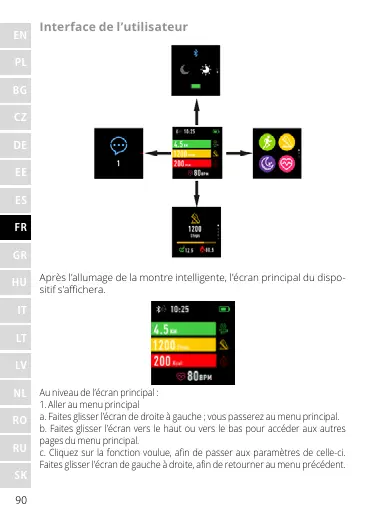
Interface de l’utilisateur
Après l’allumage de la montre intelligente, l’écran principal du dispo-
sitif s’achera.
Au niveau de l’écran principal :
1. Aller au menu principal
a. Faites glisser l’écran de droite à gauche ; vous passerez au menu principal.
b. Faites glisser l’écran vers le haut ou vers le bas pour accéder aux autres
pages du menu principal.
c. Cliquez sur la fonction voulue, an de passer aux paramètres de celle-ci.
Faites glisser l’écran de gauche à droite, an de retourner au menu précédent.










 To Next Page