5
DE
FR
IT
EE
GR
ES
PL
CZ
SK
RU
LT
BG
RO
HU
LV
EN
NL
smartwatch in settings of “Forever Smart”, and then go to
“Bluetooth” settings in the phone settings and select “Forget
this device”
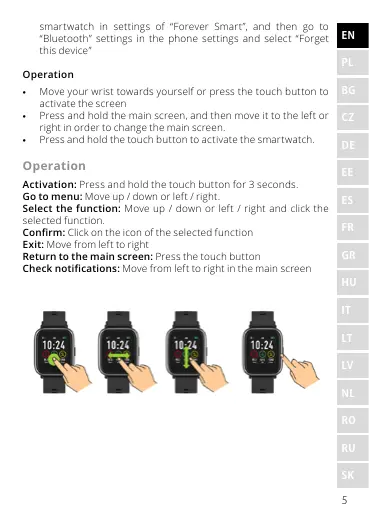
Operation
• Move your wrist towards yourself or press the touch button to
activate the screen
• Press and hold the main screen, and then move it to the left or
right in order to change the main screen.
• Press and hold the touch button to activate the smartwatch.
Operation
Activation: Press and hold the touch button for 3 seconds.
Go to menu: Move up / down or left / right.
Select the function: Move up / down or left / right and click the
selected function.
Conrm: Click on the icon of the selected function
Exit: Move from left to right
Return to the main screen: Press the touch button
Check notications: Move from left to right in the main screen










 To Next Page