29
WORKOUT SCREEN
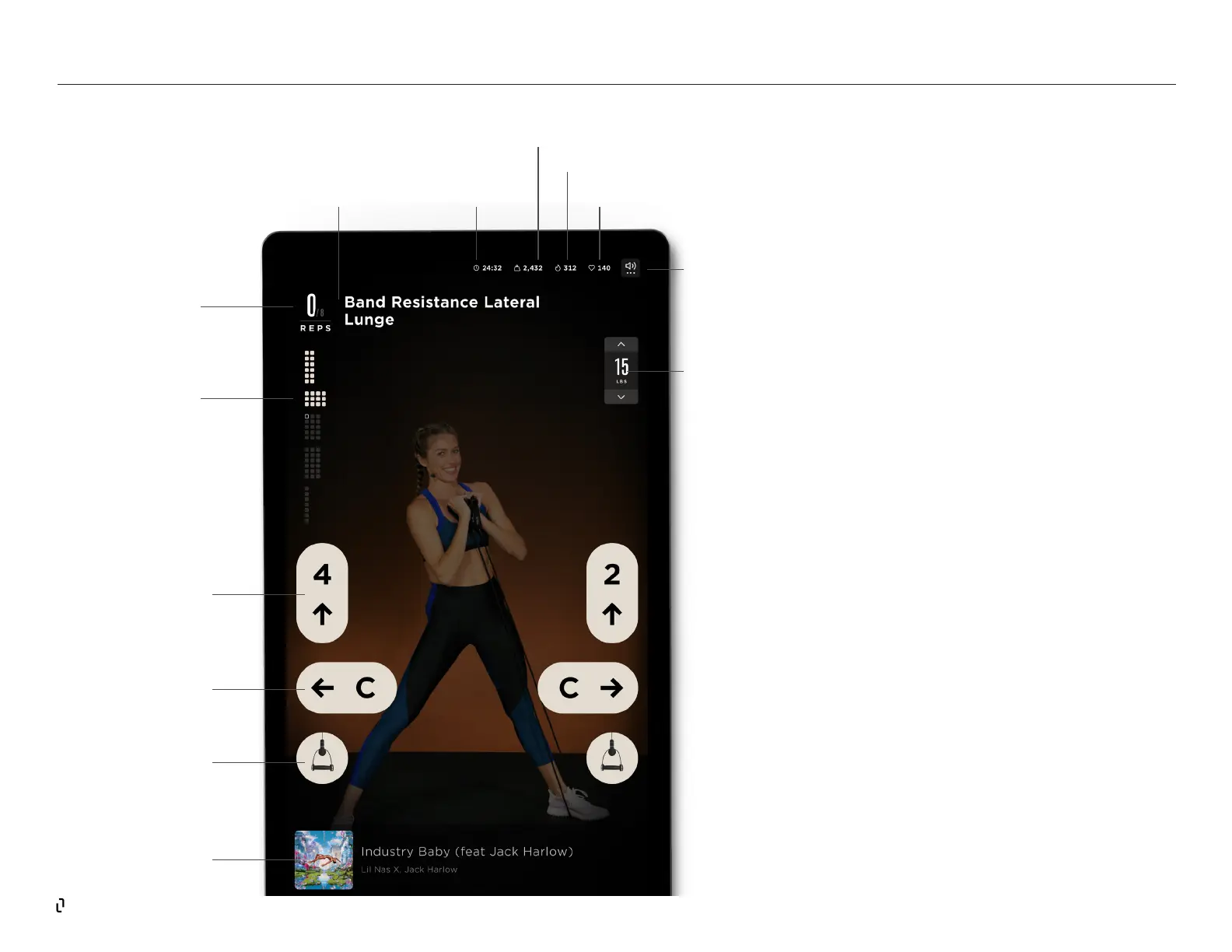
When you are in a workout, Studio Lift provides
essential information about the movements and
data from your workout. Along the top of the
screen, you’ll see the Session Status bar that lists
the elapsed time, weight moved, calories burned
and heart rate (if you’ve connected your heart rate
monitor).
Below is the movement name, which will always
show you the active movement, e.g. “Band
Resistance Lateral Lunge.” To the left of the
movement name, you’ll see your reps performed,
or in a time-based set, a timer that counts down
to the end of the set. Below the rep counter are
the workout blocks - each square icon signies a
movement to be performed, and each grouping of
squares indicates a workout block. As you move
through the workout, each square will turn from
hollow to lled and show your progress.
REP
COUNTER
WORKOUT
BLOCKS
HEIGHT
POSITION
HUG
POSITION
ATTACHMENT
MUSIC INFO
BAR
VOLUME
CONTROL FOR
MUSIC AND
TRAINER
ELAPSED TIME
WEIGHT MOVED
CALORIES BURNED
MOVEMENT
NAME
RESISTANCE
CONTROL
HEART RATE
STUDIO LIFT | The Screen



 To Next Page