-6-
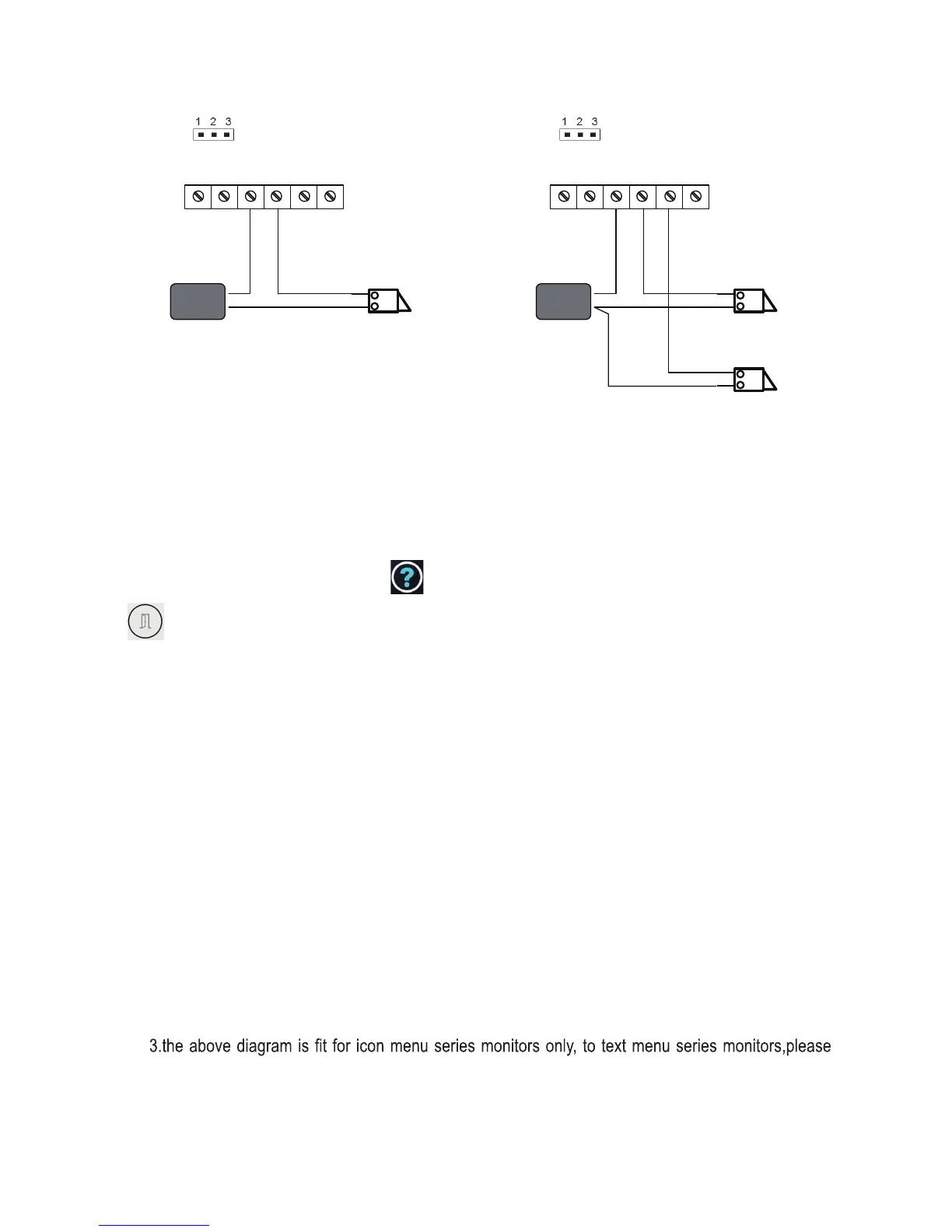
LOCK
BUS PL
S1
+
S2
+
S-
Take off the Jumper
POWER
SUPPLY
LOCK
BUS PL
S1
+
S2
+
S-
Take off the Jumper
POWER
SUPPLY
LOCK
connect one lock connect two locks
5.2.3 Unlock parameter setting(set on monitor)
Note:
1.must connect FTDEV1P correctly before setting.
2.the parameter will be saved in FTDEV1P automatically,so you need only set on one monitor.
refer to the corresponding user manual.
The door release time can be adjusted from 1s~9s by following the below step:
On the video monitor, touch on main menu, then press UNLOCK button
and hold for 2s which you then enter Installer Setup page.
Then input the code 8021~8029 (8021 = 1 second, 8029 = 9 seconds) to change
the unlock time.


 To Next Page