6
TURBO MODE (AUTOMATIC TRANSMISSION)
Turbo Mode (if installed) is similar to Idle Mode but is used to cool down the turbo-charger once the
driver leaves the vehicle. The Remote-Starter will continue run the vehicle for 2 minutes allowing the
turbo-charger to cool down. To activate Turbo Mode (automatic transmission) proceed with the
following steps:
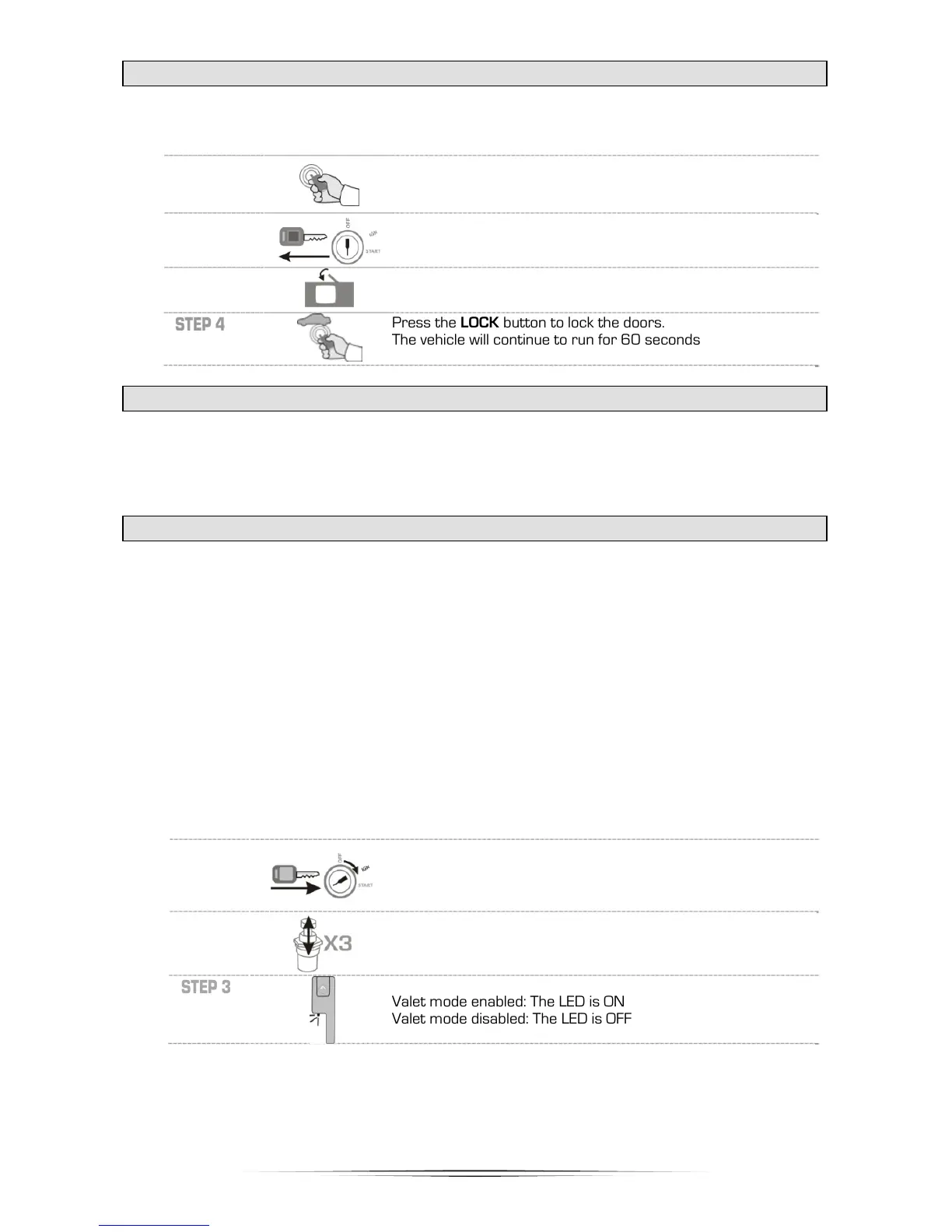
STEP 1
With the engine already running, push the START button until
he parking lights come on.
STEP 2
Remove the key from the ignition barrel.
The vehicle will continue to run with the the Remote-Starter.
STEP 3
Exit the vehicle and close all of the doors.
The vehicle will continue to run after all the doors are closed.
STEP 4
Press the LOCK button to lock the doors.
The vehicle will continue to run for 60 seconds
TURBO MODE (MANUAL TRANSMISSION)
Turbo Mode (if installed) is similar to Idle Mode but is used to cool down the turbo-charger once the
driver leaves the vehicle. The Remote-Starter will continue run the vehicle for 2 minutes allowing the
turbo-charger to cool down. To activate Turbo Mode (manual transmission) proceed with the following
steps:
Æ See IDLE MODE (MANUAL TRANSMISSION) page 5.
VALET MODE (VIA SWITCH) / VALET CODING
Valet Mode disables both the Remote-Starter and Alarm system. Whenever the vehicle is being
serviced or repaired, or the vehicle is parked indoors it is mandatory that Valet Mode be enabled to
prevent an accidental Remote-Start.
Note: The alarm system is not active (including Starter Kill) when the system is in Valet Mode.
However you are still able to lock and unlock the doors, and release the rear hatch/trunk.
Note: When the Remote-Starter/Alarm is in Valet Mode, the LED will stay ON solid instead of flashing
after the doors are locked. The LED will turn off only after the Remote-Starter/Alarm exit Valet Mode.
The valet mode can be programmed to use a coded entry in order to increase the security of your
alarm system and to prevent accidents. By default, the valet button is pressed 3 times after turning
the ignition. Function 30 can be programmed to use a coded value instead of the default one.
VALET CODING DISBALED (DEFAULT):
To activate and deactivate Valet Mode using the valet switch proceed with the following
steps:
STEP 1
Insert the key and turn it to the ignition (ON/RUN) position.
The vehicle does not need to be started.
STEP 2
Within 10 seconds press (1 second) and release the Valet
switch 3 times.
STEP 3



 To Next Page