EasyManua.ls Logo

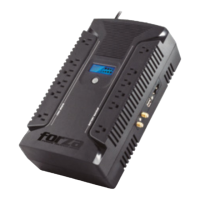
Forza FX-2200LCD-U - User Manual

Forza FX-2200LCD-U
10 pages
Print Icon
To Next Page IconTo Next Page
Loading...
3-year
warranty*
FX-1500LCD/2200LCD
FX-1500LCD-U/2200LCD-U
Home theater / Server & network
Power Protection
Question and Answer IconNeed help?

Do you have a question about the Forza FX-2200LCD-U and is the answer not in the manual?

Summary

Important Safety Instructions

Safe Battery Handling

Precautions for safely handling and maintaining the internal sealed lead-acid battery.

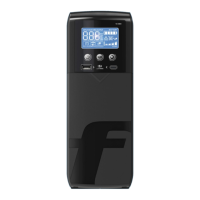
Product Features Overview

Installation and Operation Guide

Charging the UPS Battery

Procedure for charging the internal UPS battery before initial use.

Battery Removal and Replacement

Battery Replacement Procedure

Step-by-step guide for safely removing and replacing the UPS batteries.

Software Installation and Usage

ForzaTracker Software Installation

Instructions for downloading and installing the ForzaTracker UPS monitoring software.

Troubleshooting Common Issues

UPS Not Turning On

Solutions for UPS not turning on with no LED display.

Audible Alarm During Normal AC Input

Troubleshooting for continuous alarm beeps when AC input is normal.

Shortened Backup Time

Resolving issues with backup time being shorter than expected.

Communication Loss with Computer

Steps to resolve communication errors between the UPS and computer.

LED Displays Battery Mode Continuously

Diagnosing why the LED indicator stays on battery mode during normal mains supply.

Technical Specifications

Forza FX-2200LCD-U Specifications

General IconGeneral
BrandForza
ModelFX-2200LCD-U
CategoryUPS
LanguageEnglish

Related product manuals