If you have added time and camera name in the video, you can see it in the live window.
Go to Settings ---Basic settings---Camera name panel, and you can change another device name. The
default device name is anonymous.
Go to Settings ---Basic settings---Camera time panel and adjust the device time.
Go to Settings ---Video---On Screen Display panel, you can add or no add OSD.
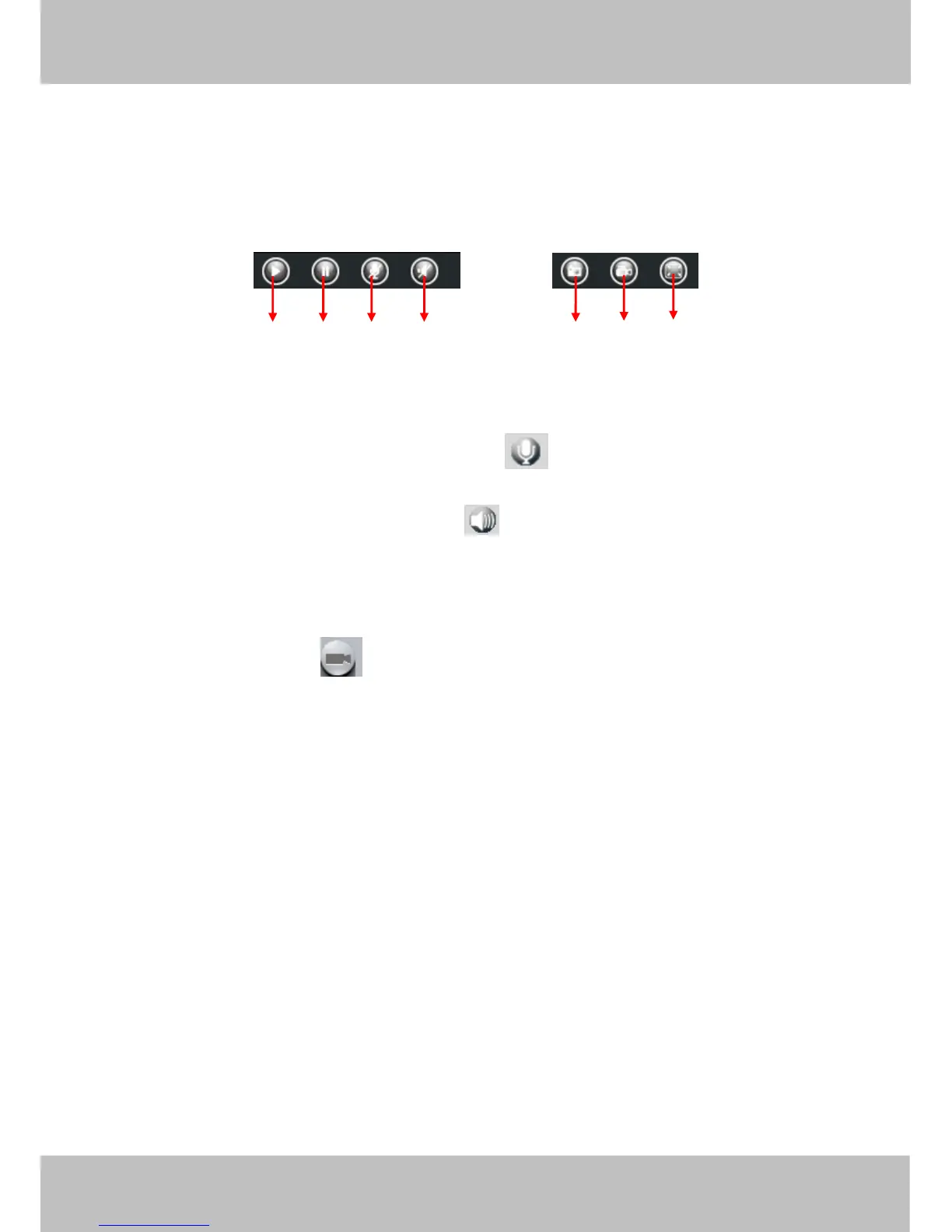
Section9 Play/Stop/ Talk/Audio/ Snap/ Record/ Full screen button
1------Play Click it to play the video of the camera
2------Stop Click it to stop the video of the camera
3------ Talk Click the button and the icon will become to , then talk to the microphone that connected
with PC, people around the camera can here your voice. Click the icon again and stop talking.
4------ Audio Click this icon, the icon will become to you can hear the sound around the camera by the
earphone or speakers that connected with PC.
5----- Snapshot Click it to make snapshot and it pop-up a window which picture you snapshot, right click in
the window and save the picture to anywhere you want.
6----- Record Click the icon and the camera start recording, you can see a green dot in the live
window. Click again and stop recording. The default storage path is C:\IPCamRecord. You can change the
storage path: Go to Settings- >Record->Storage Location panel.
7------Full Screen Click it to make full-screen, or you can double click the surveillance screen to make
full-screen. Double click again and exit full-screen.
Onscreen Mouse Control
Right click the mouse and you can adjust the screen ration, full screen and Zoom up.



 To Next Page