EasyManua.ls Logo

Foscam FI9828P - Page 72

Foscam FI9828P
91 pages
Print Icon
To Next Page IconTo Next Page
To Previous Page IconTo Previous Page
Loading...
50
Foscam Digital Technologies
Telephone: 1-800-930-0949 50
w
w
www
www
.foscam.
.foscam.
us
us
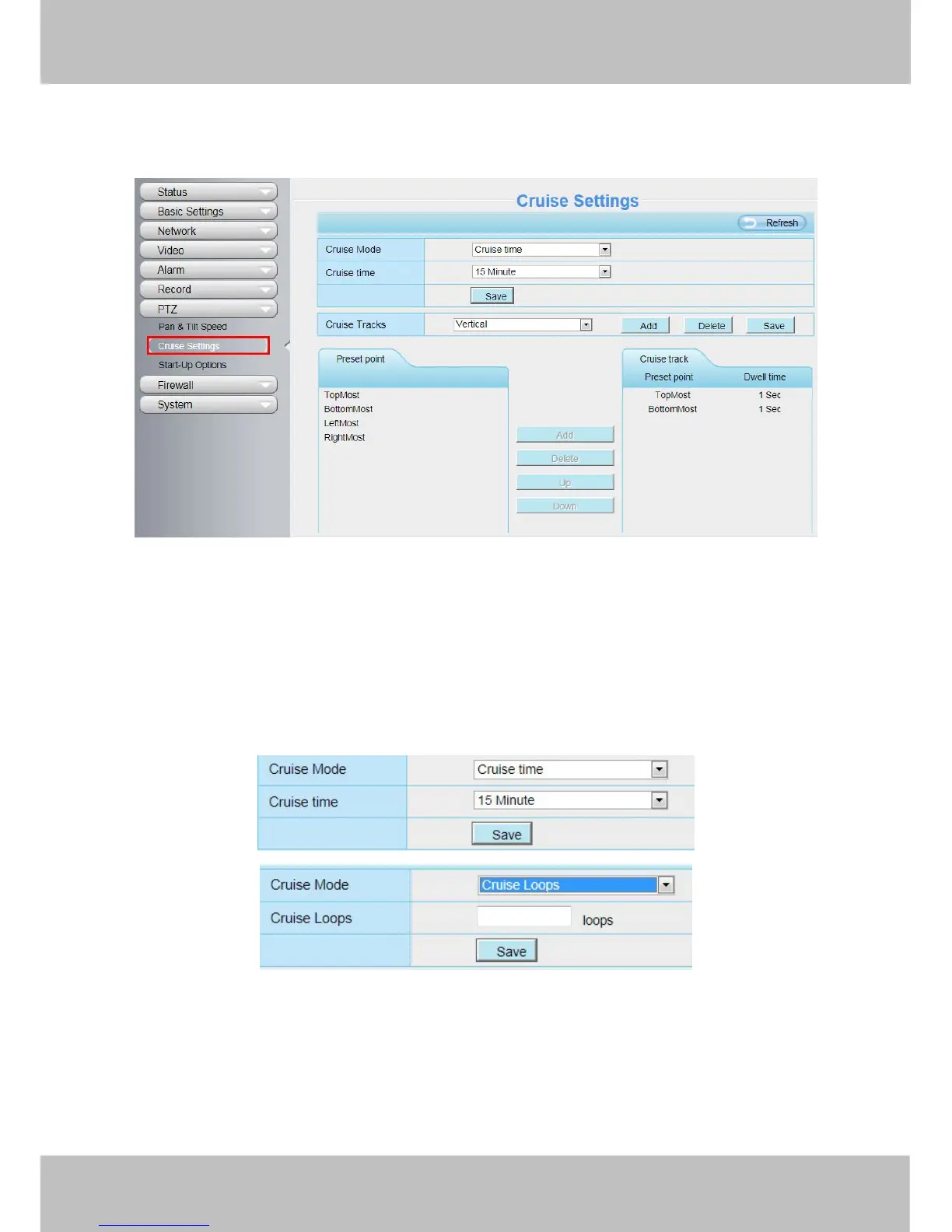
4.7.2 Cruise Settings
This section explains how to add/ delete one cruise track.
Figure 4.69
Setting the Cruise Mode
There are two cruise mode: Cruise time and Cruise Loops.
Cruise time: Select Cruise time from Cruise Mode dropdown, then you can set the Cruise time of the
camera.
Cruise Loops:Select Cruise Loops from Cruise Mode dropdown, you can set the Cruise Loops of the
camera.
Click Save to take effect.
Figure 4.70
Manage the Cruise Track
There are two default cruise tracks: Vertical and Horizontal.
Vertical: The camera will rotate from up to down
Horizontal: The camera will rotate form left to right.

Other manuals for Foscam FI9828P

Related product manuals