EasyManua.ls Logo

Fostex 1240 - Interconnections with Various Processors

Fostex 1240
22 pages
Print Icon
To Next Page IconTo Next Page
To Previous Page IconTo Previous Page
Loading...
SECTION
5.
INTERCONNECTIONS
WITH
VARIOUS
PROCESSORS
Numerous
varieties
of
processes
such
as
digital
reverb
and
delay,
cnmpressor/iimiter
and
noise
gates
are
indis¬
pensable
tools
of
music
production
in
recent
years.
The
Series
40
units
are
provided
with
inputs
and
outputs
convenient
For
connecting
these
processor
such
as
AUX
OUT
jack
1
~
4
(39).
SEND/RCV
jack
(37),
D.GUTjack
(33),
GROUP
IN
jack
1
-
4
(41),
etc.
Among
these,
the
i
and
2
AUX
OUT
jack
(39)
can
be
selected
For
pre-fader
mix
or
post-fader
mix
and
either
can
he
chosen
according
to
the
application,
The
GROUP
IN
jacks
1
-
4
(41)
and
STEREO
IN
Jacks
(44)
are
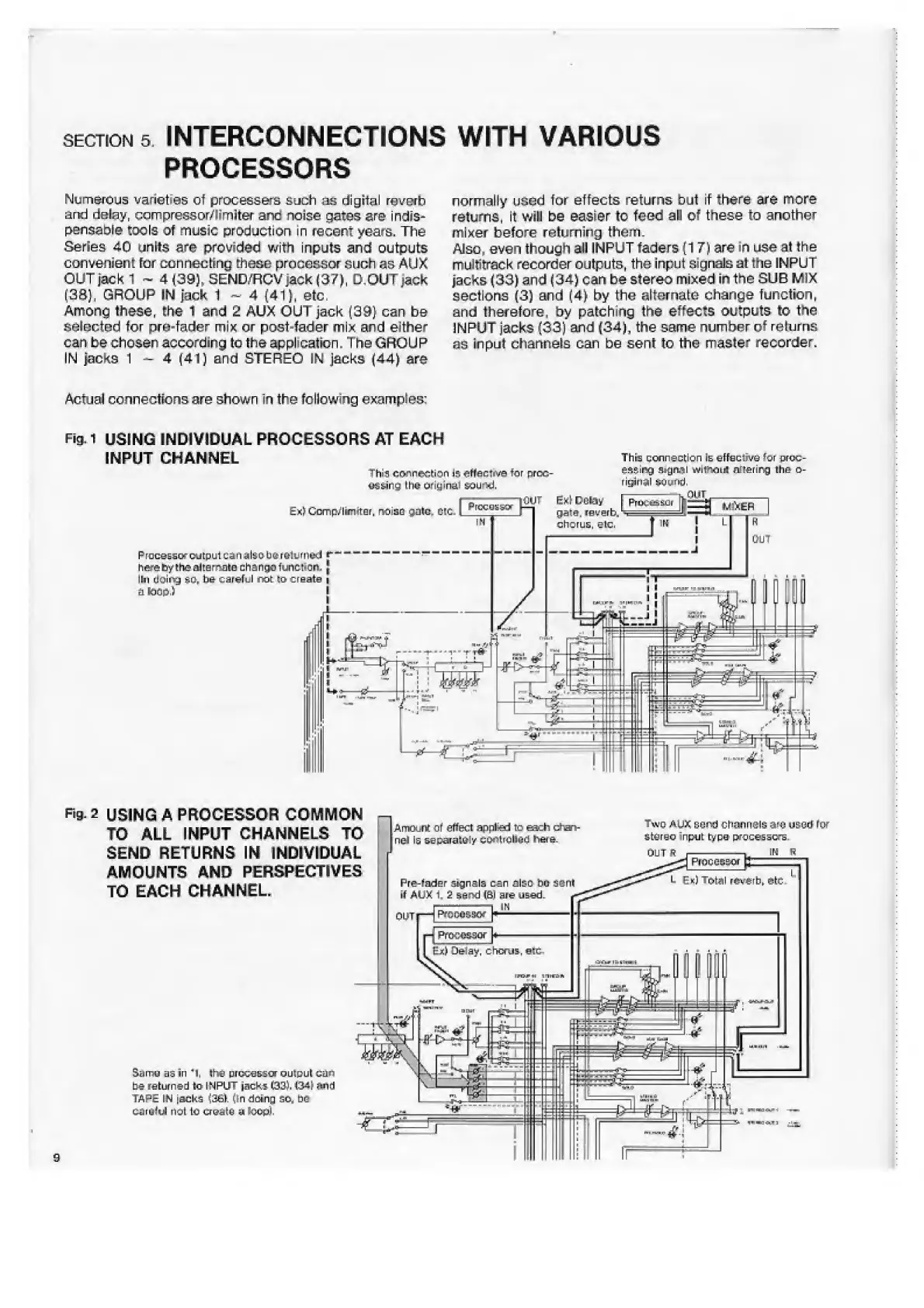
Actual
connections
are
shown
in
the
following
examples:
Fin-1
USING
INDIVIDUAL
PROCESSORS
AT
EACH
INPUT
CHANNEL
Thre
connection
Is
eFFaclive
^jr
or-tx;-
normally
used
for
effects
returns
but
if
there
are
more
returns,
It
will
be
easier
to
feed
ail
of
these
to
another
mixer
before
returning
them.
Also,
even
though
all
INPUT
faders
(17)
are
in
use
at
the
multitrack
recorder
outputs,
the
input
signals
at
the
INPUT
jacks
(33)
and
(34)
can
be
stereo
mixed
in
the
SUB
MIX
sections
(3)
and
(4)
by
the
alternate
change
function,
and
therefore,
by
patching
the
effects
outputs
to
the
INPUT
jacks
(33)
and
(34),
the
same
number
of
returns
as
in
pul
channels
Gan
be
sent
to
the
master
recorder.
Sg.2
USING
A
PROCESSOR
COMMON
TO
ALL
INPUT
CHANNELS
TO
SEND
RETURNS
IN
INDIVIDUAL
AMOUNTS
AND
PERSPECTIVES
TO
EACH
CHANNEL
fl
Amount
Of
effect
appfer!
to
each
dhan-
neJ
is
separator
extolled
h&e
Pre-fader
signals
can
also
bo
S^nt
if
AUK
H
-
1
Tiwg
rt.ua;
sc
rtf
channels
are
used-
fix
LiLuTL-u
input
tvcci
processors.
OUT
R
Processor
[
3z
b
Ek)
Total
reverb*
ytc
San
as
=in
4
1
,
I
he
processor
output
cas-
be
returned
to
INPUT
jacks
C33J.
W\
and
TAPE
IN
jacks
(36k
(In
doing
so.
be
CaruM
not
to
crustu
a
lOOpI
9

Related product manuals