EasyManua.ls Logo

Fostex 1240 - Multitrack Recording

Fostex 1240
22 pages
Print Icon
To Next Page IconTo Next Page
To Previous Page IconTo Previous Page
Loading...
SECTION
6.
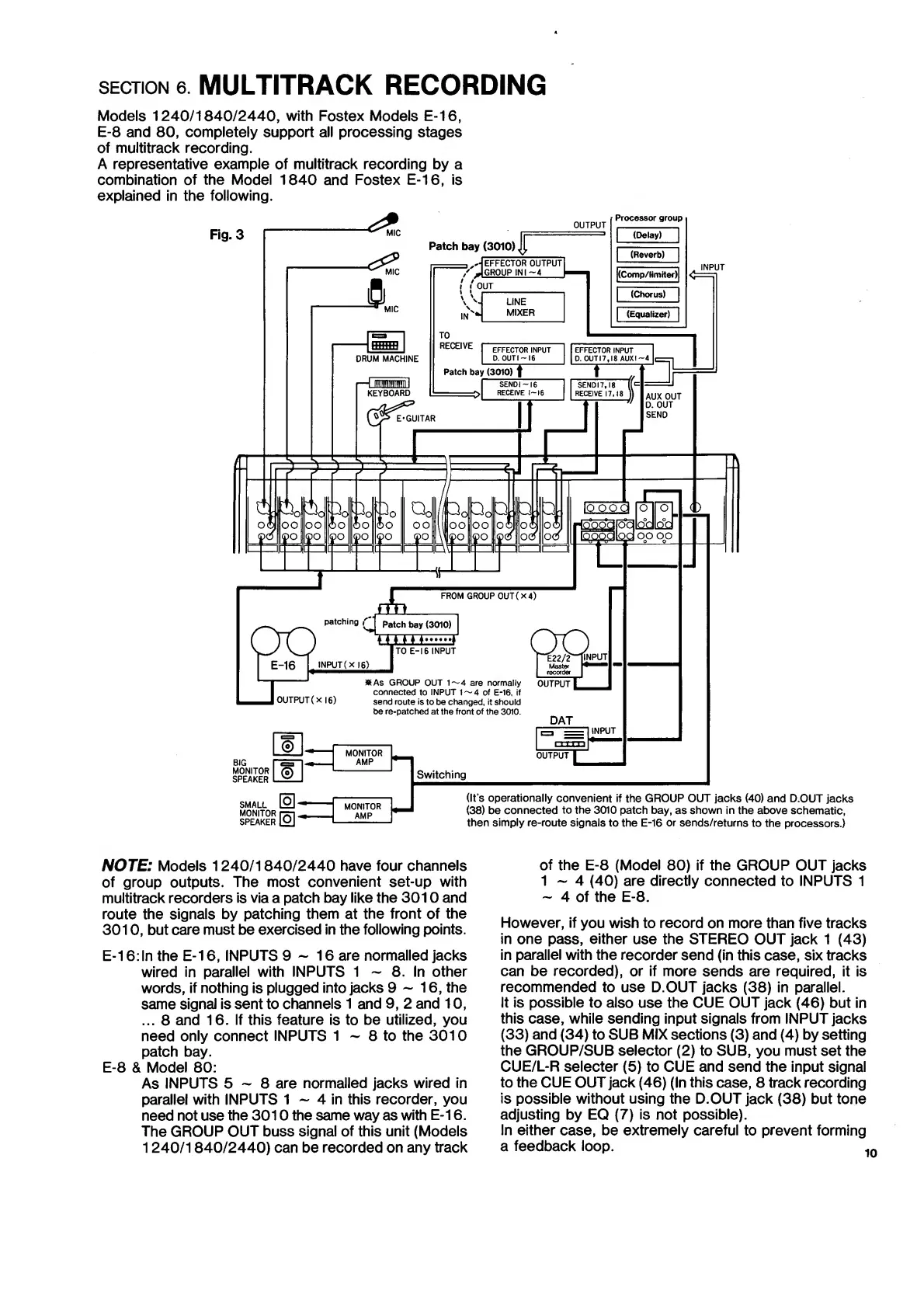
MULTITRACK
RECORDING
Models
1240/1840/2440,
with
Fostex
Models
E-16,
E-8
and
80,
completely
support
all
processing
stages
of
multitrack
recording.
A
representative
example
of
multitrack
recording
by
a
combination
of
the
Model
1840
and
Fostex
E-16,
is
explained
in
the
following.
NOTE:
Models
1240/1840/2440
have
four
channels
of
group
outputs.
The
most
convenient
set-up
with
multitrack
recorders
is
via
a
patch
bay
like
the
3010
and
route
the
signals
by
patching
them
at
the
front
of
the
3010,
but
care
must
be
exercised
in
the
following
points.
E-16:
In
the
E-16,
INPUTS
9
~
16
are
normalled
jacks
wired
in
parallel
with
INPUTS
1
~
8.
In
other
words,
if
nothing
is
plugged
into
jacks
9-16,
the
same
signal
is
sent
to
channels
1
and
9,
2
and
10,
...
8
and
16.
If
this
feature
is
to
be
utilized,
you
need
only
connect
INPUTS
1
~
8
to
the
3010
patch
bay.
E-8
&
Model
80:
As
INPUTS
5
~
8
are
normalled
jacks
wired
in
parallel
with
INPUTS
1
~
4
in
this
recorder,
you
need
not
use
the
3010
the
same
way
as
with
E-16.
The
GROUP
OUT
buss
signal
of
this
unit
(Models
1240/1840/2440)
can
be
recorded
on
any
track
of
the
E-8
(Model
80)
if
the
GROUP
OUT
jacks
1
~
4
(40)
are
directly
connected
to
INPUTS
1
-
4
of
the
E-8.
However,
if
you
wish
to
record
on
more
than
five
tracks
in
one
pass,
either
use
the
STEREO
OUT
jack
1
(43)
in
parallel
with
the
recorder
send
(in
this
case,
six
tracks
can
be
recorded),
or
if
more
sends
are
required,
it
is
recommended
to
use
D.OUT
jacks
(38)
in
parallel.
It
is
possible
to
also
use
the
CUE
OUT
jack
(46)
but
in
this
case,
while
sending
input
signals
from
INPUT
jacks
(33)
and
(34)
to
SUB
MIX
sections
(3)
and
(4)
by
setting
the
GROUP/SUB
selector
(2)
to
SUB,
you
must
set
the
CUE/L-R
selecter
(5)
to
CUE
and
send
the
input
signal
to
the
CUE
OUT
jack
(46)
(In
this
case,
8
track
recording
is
possible
without
using
the
D.OUT
jack
(38)
but
tone
adjusting
by
EQ
(7)
is
not
possible).
In
either
case,
be
extremely
careful
to
prevent
forming
a
feedback
loop.
1

Related product manuals