EasyManua.ls Logo

Fostex 1240 - Page 12

Fostex 1240
22 pages
Print Icon
To Next Page IconTo Next Page
To Previous Page IconTo Previous Page
Loading...
I
RECORDING
OF
THE
BASIC
TRACK
What
is
the
basic
track?
In
multitrack
recording,
the
first
step
is
usually
the
Rhythm
track
and
consists
of
an
combined
unit
of
important
parts
which
determine
the
outline
of
the
music.
This
"Rhythm
track”
is
also
called
the
“Basic
track”.
NOTES
BEFORE
OPERATING
In
the
operating
example
of-Fig.
1,
the
STEREO
buss
is
also
used
for
sending
signals
to
the
recorder.
If
recording
work
is
to
be
started
by
this
method,
you
should
always
first
set
all
CUE/L-R
selector
(5)
to
CUE
to
prevent
a
feed¬
back
loop.
For
the
same
reason,
set
all
GROUP/SUB
selectors
(2)
to
GROUP.
Please
refer
to
Fig.
4.
This
is
an
example
of
separately
recording
seven
tracks
in
one
pass.
It
is
the
method
of
picking
up
sounds
such
as
dram,
electric
base,
electric
guitars
by
a
multiple
number
of
microphones
and
recording
these
in
one
pass
on
tracks
1
~
7
of
E-16.
After
completing
level
matching
and
timbre
of
each
sound
source
(Refer
to
page
7,
“2.
Level
Matching
With
External
Equipment”
and
“THE
PARAMETRIC
EQUALIZER,”
page
8.)
note
the
settings
for
sending
these
signals
to
the
E-16.
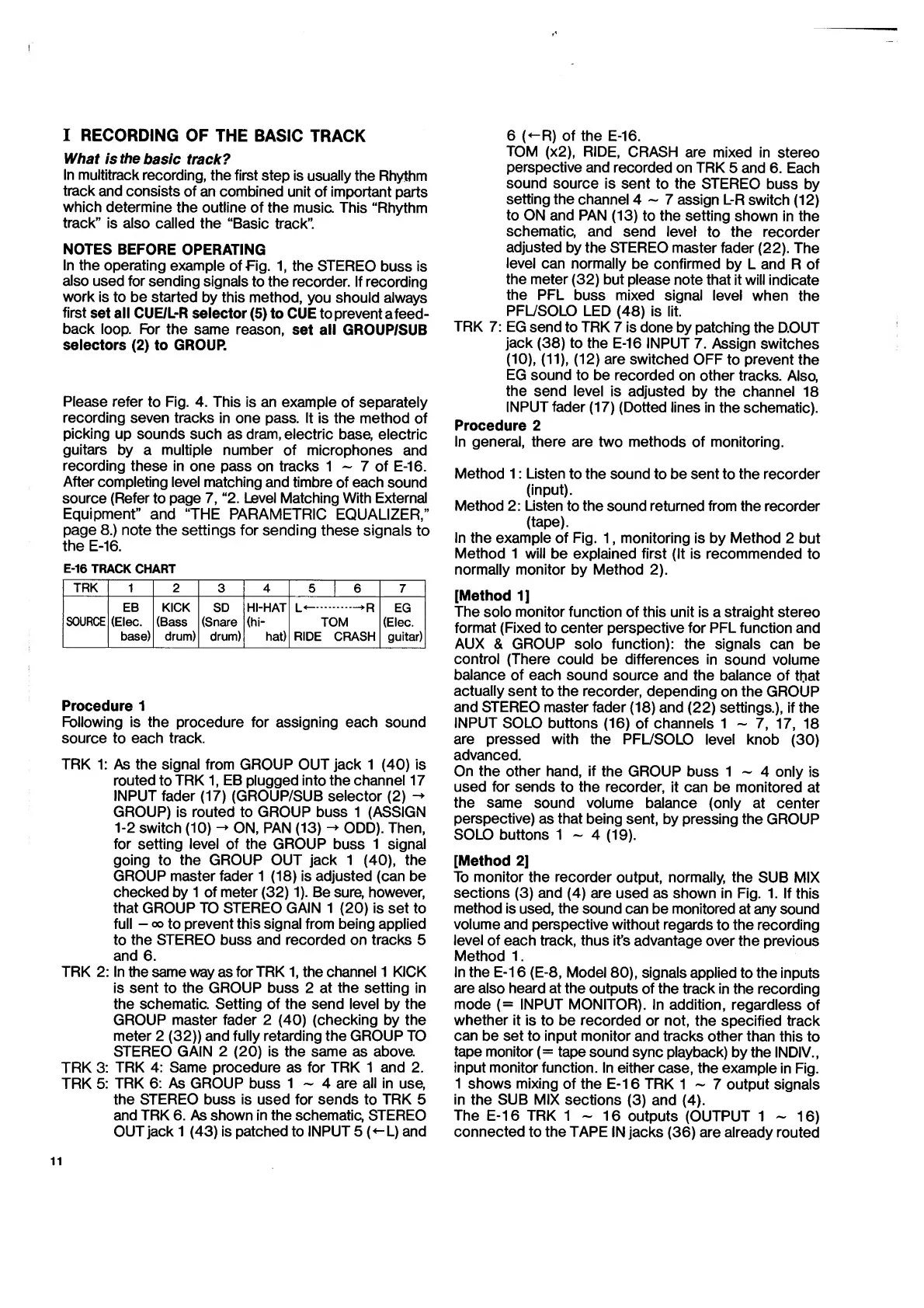
E-16
TRACK
CHART
TRK
1
2
3
4
5
|
6
7
SOURCE
EB
(Elec.
base)
KICK
(Bass
drum)
SD
(Snare
drum)
HI-HAT
(hi-
hat)
L<—.—
R
TOM
RIDE
CRASH
EG
(Elec.
guitar)
Procedure
1
Following
is
the
procedure
for
assigning
each
sound
source
to
each
track.
TRK
1:
As
the
signal
from
GROUP
OUT
jack
1
(40)
is
routed
to
TRK
1,
EB
plugged
into
the
channel
17
INPUT
fader
(17)
(GROUP/SUB
selector
(2)
-
GROUP)
is
routed
to
GROUP
buss
1
(ASSIGN
1-2
switch
(10)
-
ON,
PAN
(13)
-
ODD).
Then,
for
setting
level
of
the
GROUP
buss
1
signal
going
to
the
GROUP
OUT
jack
1
(40),
the
GROUP
master
fader
1
(18)
is
adjusted
(can
be
checked
by
1
of
meter
(32)
1).
Be
sure,
however,
that
GROUP
TO
STEREO
GAIN
1
(20)
is
set
to
full
-
oo
to
prevent
this
signal
from
being
applied
to
the
STEREO
buss
and
recorded
on
tracks
5
and
6.
TRK
2:
In
the
same
way
as
for
TRK
1,
the
channel
1
KICK
is
sent
to
the
GROUP
buss
2
at
the
setting
in
the
schematic.
Setting
of
the
send
level
by
the
GROUP
master
fader
2
(40)
(checking
by
the
meter
2
(32))
and
fully
retarding
the
GROUP
TO
STEREO
GAIN
2
(20)
is
the
same
as
above.
TRK
3:
TRK
4:
Same
procedure
as
for
TRK
1
and
2.
TRK
5:
TRK
6:
As
GROUP
buss
1
~
4
are
all
in
use,
the
STEREO
buss
is
used
for
sends
to
TRK
5
and
TRK
6.
As
shown
in
the
schematic,
STEREO
OUT
jack
1
(43)
is
patched
to
INPUT
5
(
<-L)
and
6
(-R)
of
the
E-16.
TOM
(x2),
RIDE,
CRASH
are
mixed
in
stereo
perspective
and
recorded
on
TRK
5
and
6.
Each
sound
source
is
sent
to
the
STEREO
buss
by
setting
the
channel
4-7
assign
L-R
switch
(12)
to
ON
and
PAN
(13)
to
the
setting
shown
in
the
schematic,
and
send
level
to
the
recorder
adjusted
by
the
STEREO
master
fader
(22).
The
level
can
normally
be
confirmed
by
L
and
R
of
the
meter
(32)
but
please
note
that
it
will
indicate
the
PFL
buss
mixed
signal
level
when
the
PFL/SOLO
LED
(48)
is
lit.
TRK
7:
EG
send
to
TRK
7
is
done
by
patching
the
D.OUT
jack
(38)
to
the
E-16
INPUT
7.
Assign
switches
(10),
(11),
(12)
are
switched
OFF
to
prevent
the
EG
sound
to
be
recorded
on
other
tracks.
Also,
the
send
level
is
adjusted
by
the
channel
18
INPUT
fader
(17)
(Dotted
lines
in
the
schematic).
Procedure
2
In
general,
there
are
two
methods
of
monitoring.
Method
1:
Listen
to
the
sound
to
be
sent
to
the
recorder
(input).
Method
2:
Listen
to
the
sound
returned
from
the
recorder
(tape).
In
the
example
of
Fig.
1,
monitoring
is
by
Method
2
but
Method
1
will
be
explained
first
(It
is
recommended
to
normally
monitor
by
Method
2).
[Method
1]
The
solo
monitor
function
of
this
unit
is
a
straight
stereo
format
(Fixed
to
center
perspective
for
PFL
function
and
AUX
&
GROUP
solo
function):
the
signals
can
be
control
(There
could
be
differences
in
sound
volume
balance
of
each
sound
source
and
the
balance
of
that
actually
sent
to
the
recorder,
depending
on
the
GROUP
and
STEREO
master
fader
(18)
and
(22)
settings.),
if
the
INPUT
SOLO
buttons
(16)
of
channels
1
-
7,
17,
18
are
pressed
with
the
PFL/SOLO
level
knob
(30)
advanced.
On
the
other
hand,
if
the
GROUP
buss
1
-
4
only
is
used
for
sends
to
the
recorder,
it
can
be
monitored
at
the
same
sound
volume
balance
(only
at
center
perspective)
as
that
being
sent,
by
pressing
the
GROUP
SOLO
buttons
1
-
4
(19).
[Method
2]
To
monitor
the
recorder
output,
normally,
the
SUB
MIX
sections
(3)
and
(4)
are
used
as
shown
in
Fig.
1.
If
this
method
is
used,
the
sound
can
be
monitored
at
any
sound
volume
and
perspective
without
regards
to
the
recording
level
of
each
track,
thus
it’s
advantage
over
the
previous
Method
1.
In
the
E-16
(E-8,
Model
80),
signals
applied
to
the
inputs
are
also
heard
at
the
outputs
of
the
track
in
the
recording
mode
(=
INPUT
MONITOR).
In
addition,
regardless
of
whether
it
is
to
be
recorded
or
not,
the
specified
track
can
be
set
to
input
monitor
and
tracks
other
than
this
to
tape
monitor
(=
tape
sound
sync
playback)
by
the
INDIV.,
input
monitor
function.
In
either
case,
the
example
in
Fig.
1
shows
mixing
of
the
E-16
TRK
1
7
output
signals
in
the
SUB
MIX
sections
(3)
and
(4).
The
E-16
TRK
1-16
outputs
(OUTPUT
1-16)
connected
to
the
TAPE
IN
jacks
(36)
are
already
routed

Related product manuals