EasyManua.ls Logo

Fostex 1240 - Page 13

Fostex 1240
22 pages
Print Icon
To Next Page IconTo Next Page
To Previous Page IconTo Previous Page
Loading...
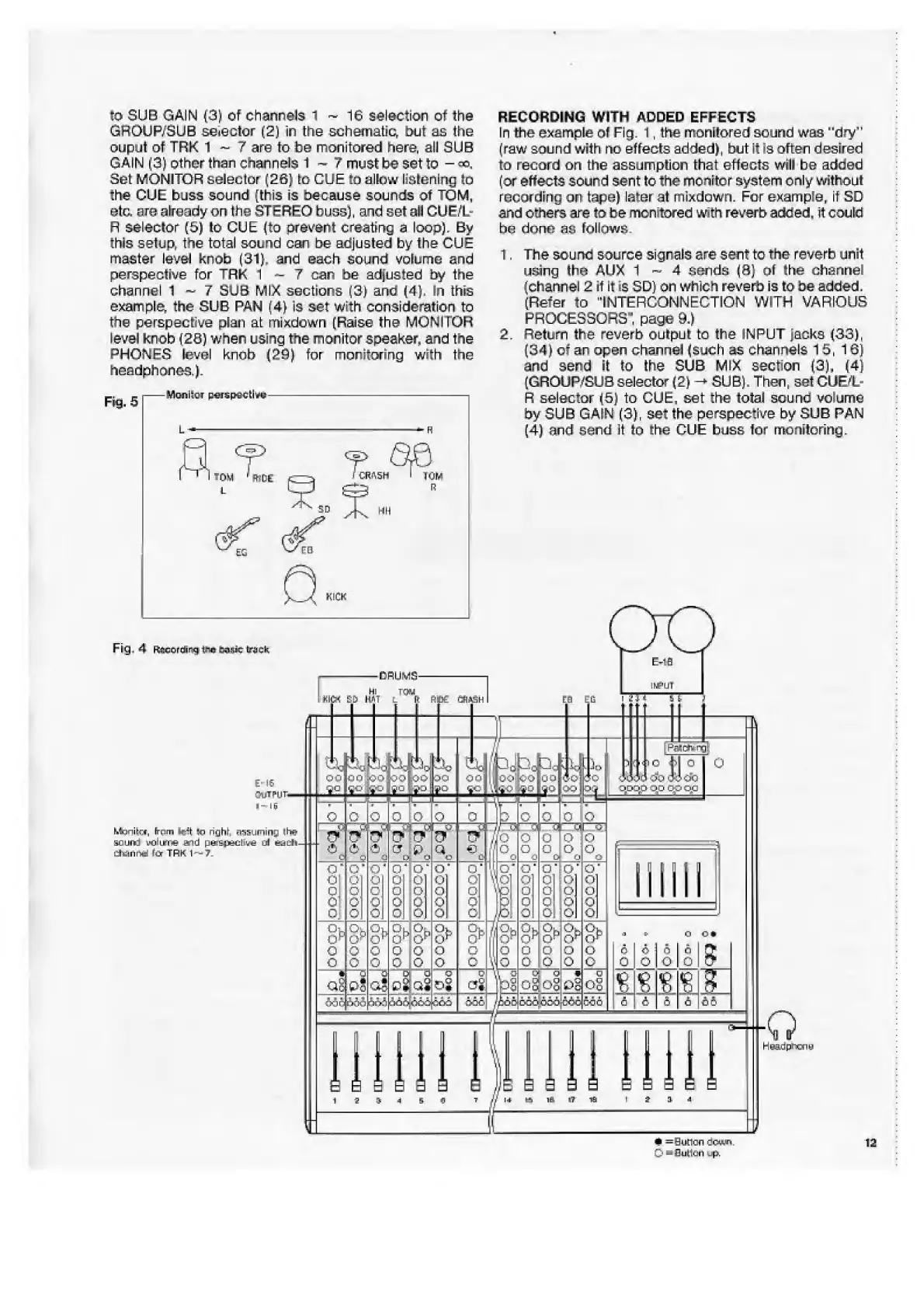
to
SUB
GAIN
(3)
of
channels
1
~
16
selection
of
the
GROUP/SUB
selector
(2)
in
the
schematic,
but
as
the
ouput
of
TRK
1
~
7
are
to
be
monitored
here,
all
SUB
GAIN
(3)
other
than
channels
1
?
must
be
set
to
Set
MONITOR
selector
(26}
tc
CUE
to
allow
listening
to
the
CUE
buss
sound
(this
is
because
sounds
of
TOM,
etc,
are
already
on
the
STEREO
buss},
and
set
all
CUE/L-
R
selector
(5)
to
CUE
(to
prevent
cresting
s
loop}.
By
this
setup,
the
total
sound
can
be
adjusted
by
the
CUE
master
level
knob
(31},
and
each
sound
volume
and
perspective
for
TRK
1
-
7
can
be
adjusted
by
the
channel
1
~
7
SUB
MIX
sections
(3}
ana
(4),
In
this
exam
pi
e,
the
SUB
PAN
(4}
is
set
With
consideration
to
the
perspective
plan
at
mixdown
(Raise
the
MONi
IOR
level
knob
(2B)
when
using
the
monitor
speaker,
and
the
PHONES
level
knob
(29)
for
monitoring
with
the
headphones.}.
RECORDING
WITH
ADDED
EFFECTS
In
the
example
of
Fig.
1,
the
monitored
sound
was
"dry"
(raw
sound
with
no
effects
added},
but
it
is
often
desired
to
record
on
the
assumption
that
effects
will
be
added
(or
effects
sound
sent
to
the
monitor
system
only
wlthoui
recording
on
tape)
later
at
mixdown.
For
example,
if
SD
and
others
are
to
be
monitored
with
reverb
added,
it
could
he
doms
as
follows.
1.
The
sound
source
signals
are
sent
to
the
reverb
unit
using
the
AllX
1
~
4
sends
(3}
of
the
channel
(channel
2
if
it
:s
SD}
on
which
reverb
is
to
be
added,
(Refer
to
"INTERCONNECTION
WITH
VARIOUS
PROCESSORS",
page
9,}
2.
Return
the
reverb
output
to
the
INPUT
jacks
(33),
(34}
of
an
open
channel
(such
as
channels
15,
16)
and
send
it
to
the
SUB
MIX
section
{3],
(4)
(GROUP/SUB
selector
(2)
-*
SUB).
Then,
set
CUE/L-
R
selector
(5)
to
CUE,
set
the
total
sound
volume
by
SUB
GAIN
(3),
set
the
perspective
by
SUB
PAN
(4}
rind
send
it
to
the
CUE
buss
tor
monitoring.
VlanhcT
perspective
CR*5H>
Fig.
4
Recording
t?*
ta4*
friiek
DRUMS-
GhiVSIl
PdtP*~-
r
n
Monitor,
frnm
Ieft
IP
ri^hl
nssupiinr.
iin?
sound
volume
and
peraceclitee
o\
eadh-
dlttinifad
fir
TRK
1
-
?
*
=
0
u
t
1
c
n
down
0
Cumuli
Mp.
T
QO
00
go
go
Pc|
po
0
il-i
1
oc-
0
o|£D
£
O
O
o
c
be
0
0
<5
C
L!
0
C
is
a
0‘!0
f
Ol
o
01
o,
0
G
|
0:
o\
O;
c
O
C
o
c
O'
c
0
c
rjo‘
c
i
ol
t:
)
o
c
>
o
c
>
ol
C
°D
°b
o
p
o
p
o
o
o
o
°b
c
a
p
c
o
c
o
c
ml
>
o
c
5
EO
C
*
d
ag:P?
--Q-
ST
a'
5
>#Q*e

Related product manuals