EasyManua.ls Logo

Fostex 1240 - Name and Function;Operation of

Fostex 1240
22 pages
Print Icon
To Next Page IconTo Next Page
To Previous Page IconTo Previous Page
Loading...
SECTION
2.
NAME
AND
FUNCTION/OPERATION
OF
CONTROLS
AND
SWITCHES
Letters
in
(
)
are
identical
to
panel
letterings.
In
the
explanations,
the
panel
lettering
will
always
precede
the
control
number.
(Ex:
PAN
(13);
EQ
(7);
etc.)
1.
INPUT
TRIM
(TRIM)
The
knob
for
trimming
the
preamplifier
gain
to
the
optimum
level
with
regards
to
the
input
signal
at
the
INPUT
jacks
(33)
and
(34).
It
can
comply
to
a
wide
range
from
mic
level
(-60dBV)
through
line
level
(-
lOdBV).
Please
note,
however,
that
this
control
has
no
affect
on
the
input
level
to
the
TAPE
IN
jack
(36).
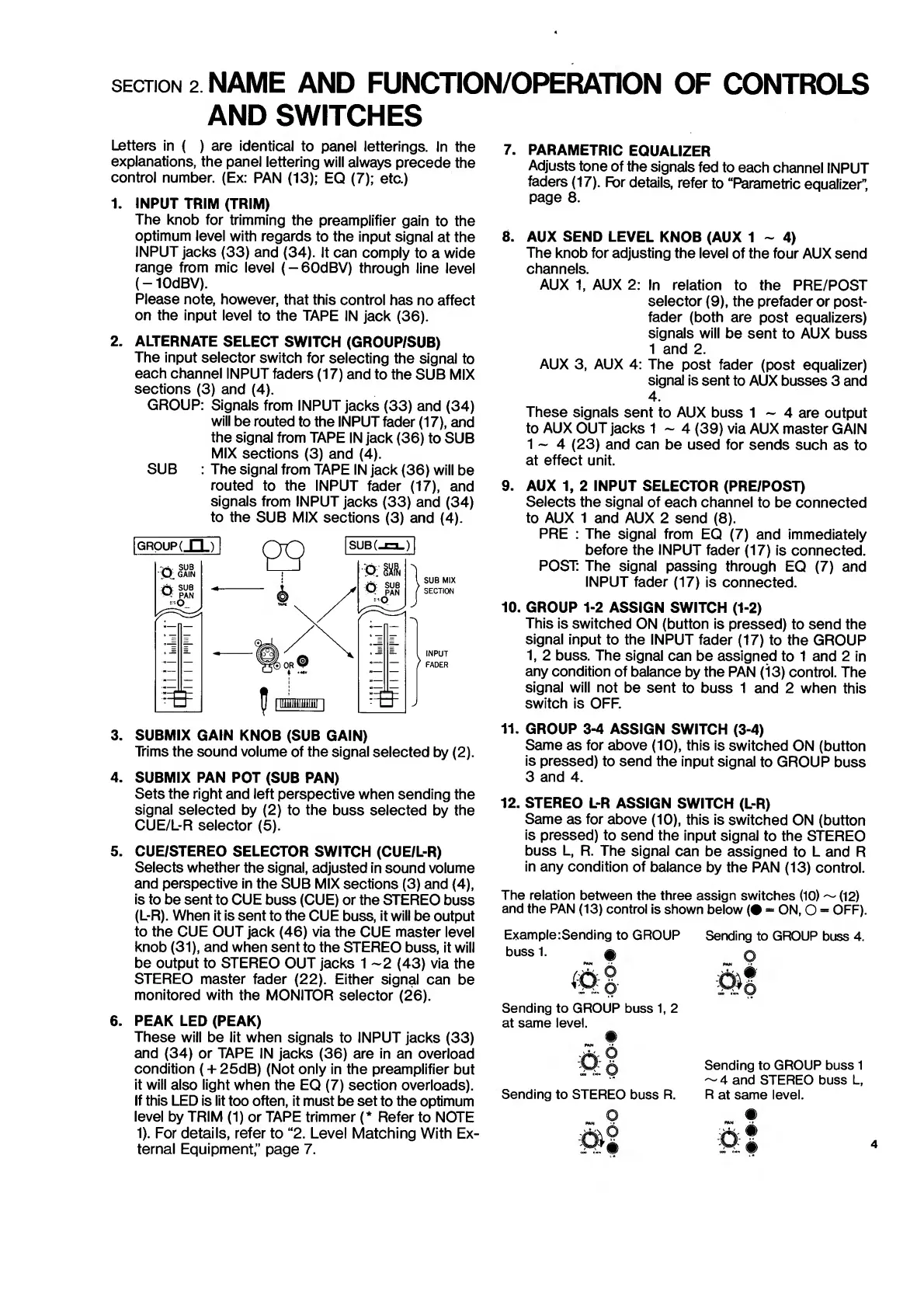
2.
ALTERNATE
SELECT
SWITCH
(GROUP/SUB)
The
input
selector
switch
for
selecting
the
signal
to
each
channel
INPUT
faders
(17)
and
to
the
SUB
MIX
sections
(3)
and
(4).
GROUP:
Signals
from
INPUT
jacks
(33)
and
(34)
will
be
routed
to
the
INPUT
fader
(17),
and
the
signal
from
TAPE
IN
jack
(36)
to
SUB
MIX
sections
(3)
and
(4).
SUB
:
The
signal
from
TAPE
IN
jack
(36)
will
be
routed
to
the
INPUT
fader
(17),
and
signals
from
INPUT
jacks
(33)
and
(34)
to
the
SUB
MIX
sections
(3)
and
(4).
3.
SUBMIX
GAIN
KNOB
(SUB
GAIN)
Trims
the
sound
volume
of
the
signal
selected
by
(2).
4.
SUBMIX
PAN
POT
(SUB
PAN)
Sets
the
right
and
left
perspective
when
sending
the
signal
selected
by
(2)
to
the
buss
selected
by
the
CUE/L-R
selector
(5).
5.
CUE/STEREO
SELECTOR
SWITCH
(CUE/L-R)
Selects
whether
the
signal,
adjusted
in
sound
volume
and
perspective
in
the
SUB
MIX
sections
(3)
and
(4),
is
to
be
sent
to
CUE
buss
(CUE)
or
the
STEREO
buss
(L-R).
When
it
is
sent
to
the
CUE
buss,
it
will
be
output
to
the
CUE
OUT
jack
(46)
via
the
CUE
master
level
knob
(31),
and
when
sent
to
the
STEREO
buss,
it
will
be
output
to
STEREO
OUT
jacks
1
~2
(43)
via
the
STEREO
master
fader
(22).
Either
signal
can
be
monitored
with
the
MONITOR
selector
(26).
6.
PEAK
LED
(PEAK)
These
will
be
lit
when
signals
to
INPUT
jacks
(33)
and
(34)
or
TAPE
IN
jacks
(36)
are
in
an
overload
condition
(+
25dB)
(Not
only
in
the
preamplifier
but
it
will
also
light
when
the
EQ
(7)
section
overloads).
If
this
LED
is
lit
too
often,
it
must
be
set
to
the
optimum
level
by
TRIM
(1)
or
TAPE
trimmer
(*
Refer
to
NOTE
1).
For
details,
refer
to
“2.
Level
Matching
With
Ex¬
ternal
Equipment,”
page
7.
7.
PARAMETRIC
EQUALIZER
Adjusts
tone
of
the
signals
fed
to
each
channel
INPUT
faders
(17).
R»r
details,
refer
to
“Parametric
equalizer'’,
page
8.
8.
AUX
SEND
LEVEL
KNOB
(AUX
1
~
4)
The
knob
for
adjusting
the
level
of
the
four
AUX
send
channels.
AUX
1,
AUX
2:
In
relation
to
the
PRE/POST
selector
(9),
the
prefader
or
post¬
fader
(both
are
post
equalizers)
signals
will
be
sent
to
AUX
buss
1
and
2.
AUX
3,
AUX
4:
The
post
fader
(post
equalizer)
signal
is
sent
to
AUX
busses
3
and
4.
These
signals
sent
to
AUX
buss
1
~
4
are
output
to
AUX
OUT
jacks
1
~
4
(39)
via
AUX
master
GAIN
1
~
4
(23)
and
can
be
used
for
sends
such
as
to
at
effect
unit.
9.
AUX
1,
2
INPUT
SELECTOR
(PRE/POST)
Selects
the
signal
of
each
channel
to
be
connected
to
AUX
1
and
AUX
2
send
(8).
PRE
:
The
signal
from
EQ
(7)
and
immediately
before
the
INPUT
fader
(17)
is
connected.
POST:
The
signal
passing
through
EQ
(7)
and
INPUT
fader
(17)
is
connected.
10.
GROUP
1-2
ASSIGN
SWITCH
(1-2)
This
is
switched
ON
(button
is
pressed)
to
send
the
signal
input
to
the
INPUT
fader
(17)
to
the
GROUP
1,
2
buss.
The
signal
can
be
assigned
to
1
and
2
in
any
condition
of
balance
by
the
PAN
(13)
control.
The
signal
will
not
be
sent
to
buss
1
and
2
when
this
switch
is
OFF.
11.
GROUP
3-4
ASSIGN
SWITCH
(3-4)
Same
as
for
above
(10),
this
is
switched
ON
(button
is
pressed)
to
send
the
input
signal
to
GROUP
buss
3
and
4.
12.
STEREO
L-R
ASSIGN
SWITCH
(L-R)
Same
as
for
above
(10),
this
is
switched
ON
(button
is
pressed)
to
send
the
input
signal
to
the
STEREO
buss
L,
R.
The
signal
can
be
assigned
to
L
and
R
in
any
condition
of
balance
by
the
PAN
(13)
control.
The
relation
between
the
three
assign
switches
(10)
~
(12)
and
the
PAN
(13)
control
is
shown
below
(•
-
ON,
O
-
OFF).
Example:Sending
to
GROUP
Sending
to
GROUP
buss
4.
bussl.
p
<*!
M
Sending
to
GROUP
buss
1,
2
at
same
level.
©
Vf
O
Sending
to
GROUP
buss
1
~
4
and
STEREO
buss
L,
Sending
to
STEREO
buss
R.
R
at
same
level.

Related product manuals