EasyManua.ls Logo

Fostex 1240 - Page 14

Fostex 1240
22 pages
Print Icon
To Next Page IconTo Next Page
To Previous Page IconTo Previous Page
Loading...
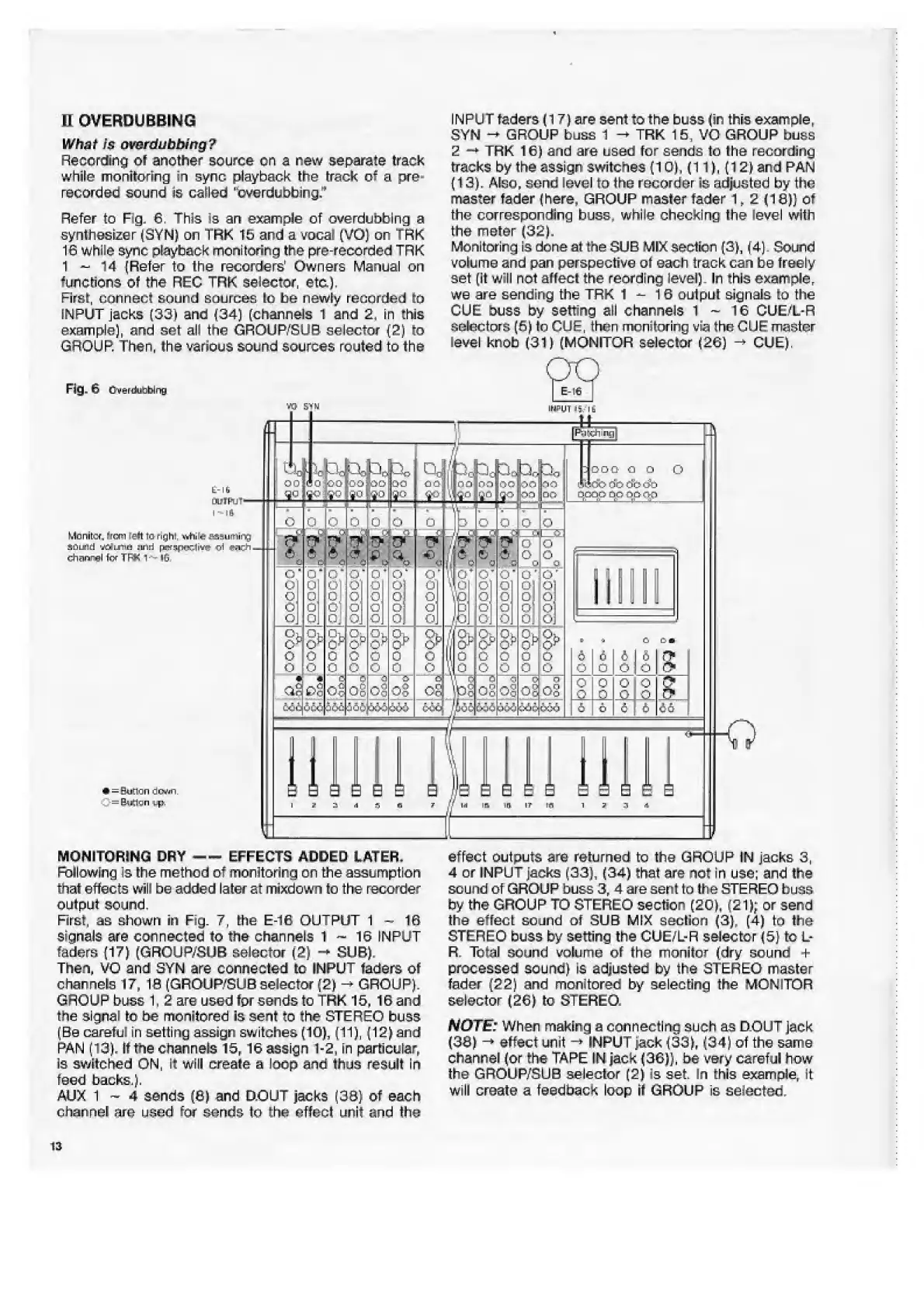
INPUT
faders
(17)
are
sent
to
the
buss
(in
this
example,
SYN
-*
GROUP
buss
1
TRK
15,
VO
GROUP
buss
2
-*
TRK
16)
and
are
used
for
sends
to
the
recording
tracks
by
the
assign
switches
(10),
(11},
(12)
and
PAN
(13).
Also,
send
level
to
the
recorder
is
adjusted
by
the
master
fader
(here,
GROUP
master
fader
1,2
(18})
of
the
corresponding
buss,
while
checking
the
level
with
the
meter
(32).
Monitoring
is
don
eat
the
SUB
MIX
section
(3),
(4).
Sound
volume
and
pan
perspective
ot
each
track
can
be
freely
set
(it
will
not
affecl
the
reording
level).
In
this
example,
we
are
sending
the
TRK
1
-
?6
oulpul
signals
to
the
CUE
buss
by
setting
all
channels
1
~
16
CUE/L-R
selectors
(6)
to
CUE,
then
monitoring
via
the
CUE
master
level
knob
(31)
(MONITOR
selector
(26)
-
CUE).
H
OVERDUE
BING
What
Is
ovsrdubbing?
Recording
of
another
source
cn
a
new
separate
track
while
monitoring
in
sync
playback
the
track
of
a
pre¬
recorded
sound
is
called
"cverdubbing,'
1
Refer
to
Fig.
6.
This
is
an
example
of
overdubbing
a
synthesizer
(SYN)
on
TRK
15
and
a
vocat
(VO)
on
Trk
16
while
sync
playback
monitoring
the
pre-recorded
TRK
1
-
14
(Refer
to
the
recorders'
Owners
Manual
on
functions
of
the
REC
TRK
selector,
etc.).
First,
connect
sound
sources
lo
be
newly
recorded
to
INPUT
jacks
(33)
and
(34)
(channels
1
and
2,
in
this
example),
and
set
all
the
GROUP'SUB
selector
(2)
to
GROUP.
Then,
the
various
sound
sources
routed
to
the
Fig.
6
Cven.li/r:birig
too
10-0
L-lli
OUlPlJT'
I
-
I
ft
Monitor
town
left
ta
righs
wftiitf
assuming
SCn-rid
rfjiiB
sinsd
prtf!ipcic-1i^
Ch^ngl
fcf
TFK
1-
lG,
a.-:
c
:m
*
=
Sudan
down.
=
(ktlgn
:.p.
MONITORING
DRY
--EFFECTS
ADDED
LATER,
Following
is
the
method
of
monitoring
on
the
assumption
that
effects
will
be
added
later
at
mixdown
to
the
recorder
output
sound.
First,
as
shown
in
Fig.
7,
the
E-16
OUTPUT
1-16
signals
are
connected
to
the
channels
1
~
16
INPUT
faders
(17)
(GROUP/SUB
selector
(2)
-
SUB),
Then,
VO
and
3YN
are
connected
to
INPUT
faders
of
channels
17,
16
(GROUP/SU8
selector
(2)
-
GROUP).
GROUP
buss
1.
2
are
used
for
sends
to
TRK
15,
16
and
the
signal
to
be
monitored
is
sent
to
the
STEREO
buss
(Be
careful
in
setting
assign
switches
(10),
(11),
(12)
and
PAN
(13),
It
the
channels
15,
16
assign
1-2,
in
particular.
Is
switched
ON,
it
will
create
a
loop
and
thus
result
in
feed
backs.).
AUX
1
~
4
sends
(6)
and
D.OUT
jacks
(39}
of
each
effect
outputs
are
returned
to
the
GROUP
IN
jacks
3,
4
or
JNPUT
jacks
(33),
(34)
that
are
not
in
use;
and
the
sound
of
GROUP
buss
3,
4
are
sent
to
the
STEREO
buss
by
the
GROUP
TO
STEREO
section
(20),
(21);
or
send
the
effect
sound
of
SUB
MIX
section
(3),
(4)
to
the
STEREO
buss
by
setting
the
CUE/L-R
selector
(5)
to
L-
R.
Total
sound
volume
of
the
monitor
(dry
sound
+
processed
sound)
is
adjusted
by
the
STERE-O
master
fader
(22)
and
monitored
by
selecting
the
MONITOR
selector
(26)
to
STEREO.
NOTE:
When
making
a
connecting
such
as
D.OUT
jack
(38)
-*
effect
unit
-*INPUT
jack
(33),
(34)
of
the
same
channel
(or
the
TAPE
IN
jack
(36)),
be
very
careful
how
the
GROUP/SUB
selector
(2)
is
set.
In
this
example,
it
will
create
a
feedback
loop
it
GROUP
is
selected.
channel
are
used
few
sends
to
the
effect
unit
and
the
13

Related product manuals