EasyManua.ls Logo

Fostex G16S - Page 16

Fostex G16S
107 pages
Print Icon
To Next Page IconTo Next Page
To Previous Page IconTo Previous Page
Loading...
4.2.6
A
Preparation
1)
Load
lO-K
inch
reels
wound
with
about
the
same
amount
of
tape
on
both
left
and
right
reel
turntables.
2)
Disconnect
the
connector
J4
on
the
DD
CAPSTAN
PCB
to
prevent
the
capstan
motor
from
rotating.
3)
Put
the
G24S/G16S
in
the
2nd
mode
by
depressing
the
|STO|
(store)
button
while
holding
down
the
RCL
(recall)
button.
Then,
put
the
G24S/G16S
in
MECHANISM-ADJUST
mode
by
depressing
the
|
STOP|
button
on
the
Controller
while
holding
down
the
|
HOLD
|
(hold)
button.
4)
With
putting
G24S/G16S
on
the
horizontal
position,
pull
the
Panel
Lock
Release
Knob
on
the
Controller
down
to
open
up
the
Controller
panel,
(open
the
Controller
panel
fully
to
see
and
calibrate
the
pots
of
TENSION
POD
PCB)
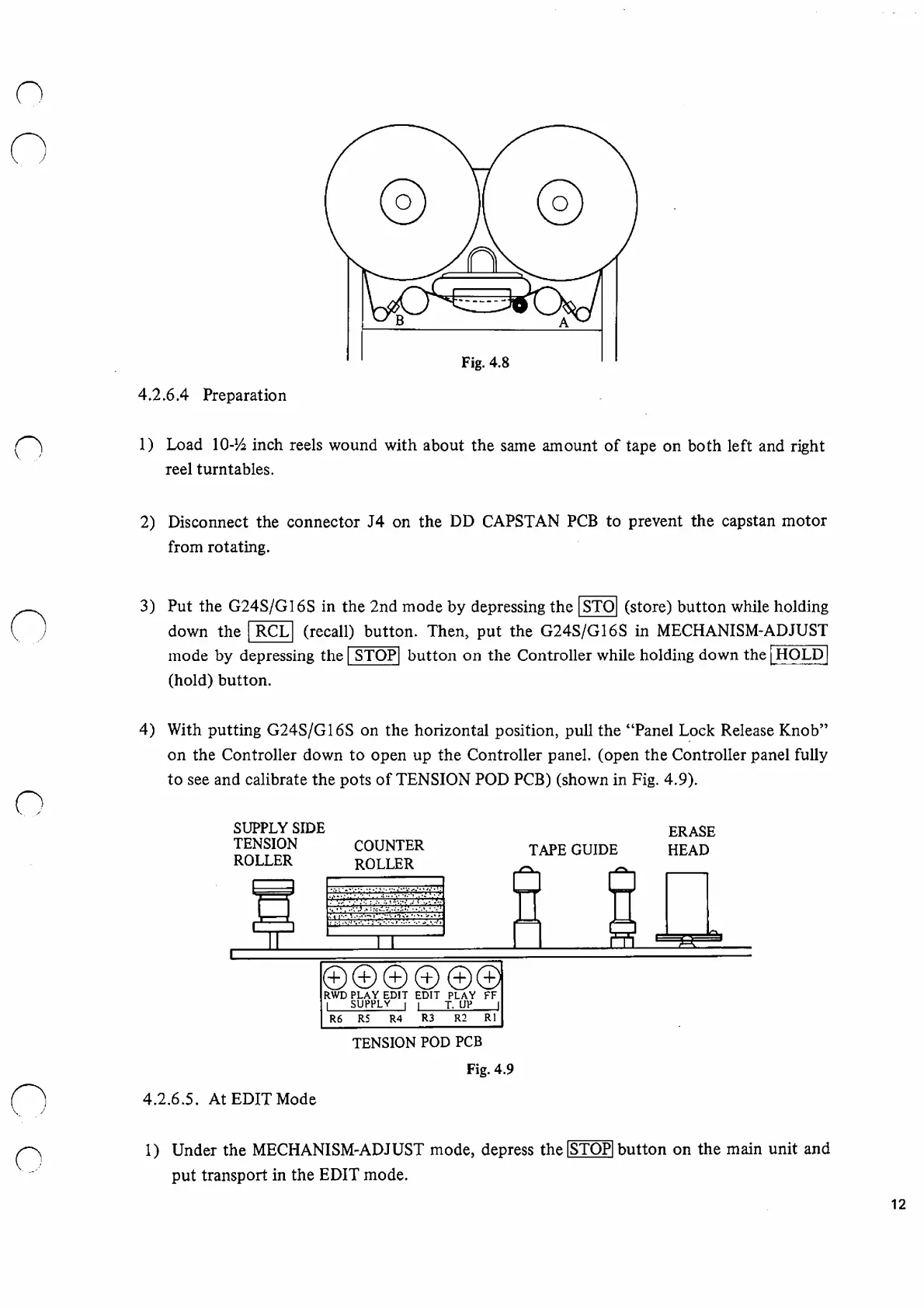
(shown
in
Fig.
4.9).
SUPPLY
SIDE
TENSION
COUNTER
ROLLER
ROLLER
TAPE
GUIDE
ERASE
HEAD
©©
©
©
©©
RWD
PLAY
EDIT
EDIT
PLAY
FF
I
SUPPLY
I
I
T.
UP
I
R6
R5
R4
R3
R2
RI
TENSION
POD
PCB
Fig.
4.9
4.
2.6.5.
At
EDIT
Mode
1
)
Under
the
MECHANISM-ADJUST
mode,
depress
the
ISTOPI
button
on
the
main
unit
and
put
transport
in
the
EDIT
mode.
12

Other manuals for Fostex G16S

Related product manuals