EasyManua.ls Logo

Fostex G16S - Page 19

Fostex G16S
107 pages
Print Icon
To Next Page IconTo Next Page
To Previous Page IconTo Previous Page
Loading...
5)
Put
the
transport
in
the
F.FWD
or
RWD
mode
by
depressing
the
|F.FWD|
or
¡REWIND1
button
on
the
main
unit.
Each
tension
at
A
or
B
should
be
350
+
10,
-20g.
u
6)
Depress
the
|CLR|
(clear)
button
to
release
the
MECHANISM-ADJUST
mode.
7)
Put
the
transport
in
EDIT
mode
by
depressing
the
EDIT
button
of
the
G24S/G16S.
Then,
confirm
that
both
T.UP
reel
and
SUPPLY
reel
are
in
a
steady
state
at
the
beginning
of
the
tape
and
at
the
end
of
the
tape.
Also
confirm
if
the
tape
travels
are
made
smoothy
for
backward
and
when
rotating
the
JOG
(EDIT)
DIAL
4.2.6.10
Adjusting
the
Count
Pulse
Duty
and
Fast
Winding
Speed.
1)
First,
take
off
the
Rear
panel
and
then
swing
open
the
SYSTEM
CONTROL
PCB
by
taking
two
screws
out.
2)
Rotate
the
R300
(H)
fully
CCW
from
the
parts
side
of
the
PCB.
3)
Put
transport
in
the
F.
FWD
or
RWD
mode.
4)
Monitor
the
testpoint
1
waveform
with
an
oscilloscope.
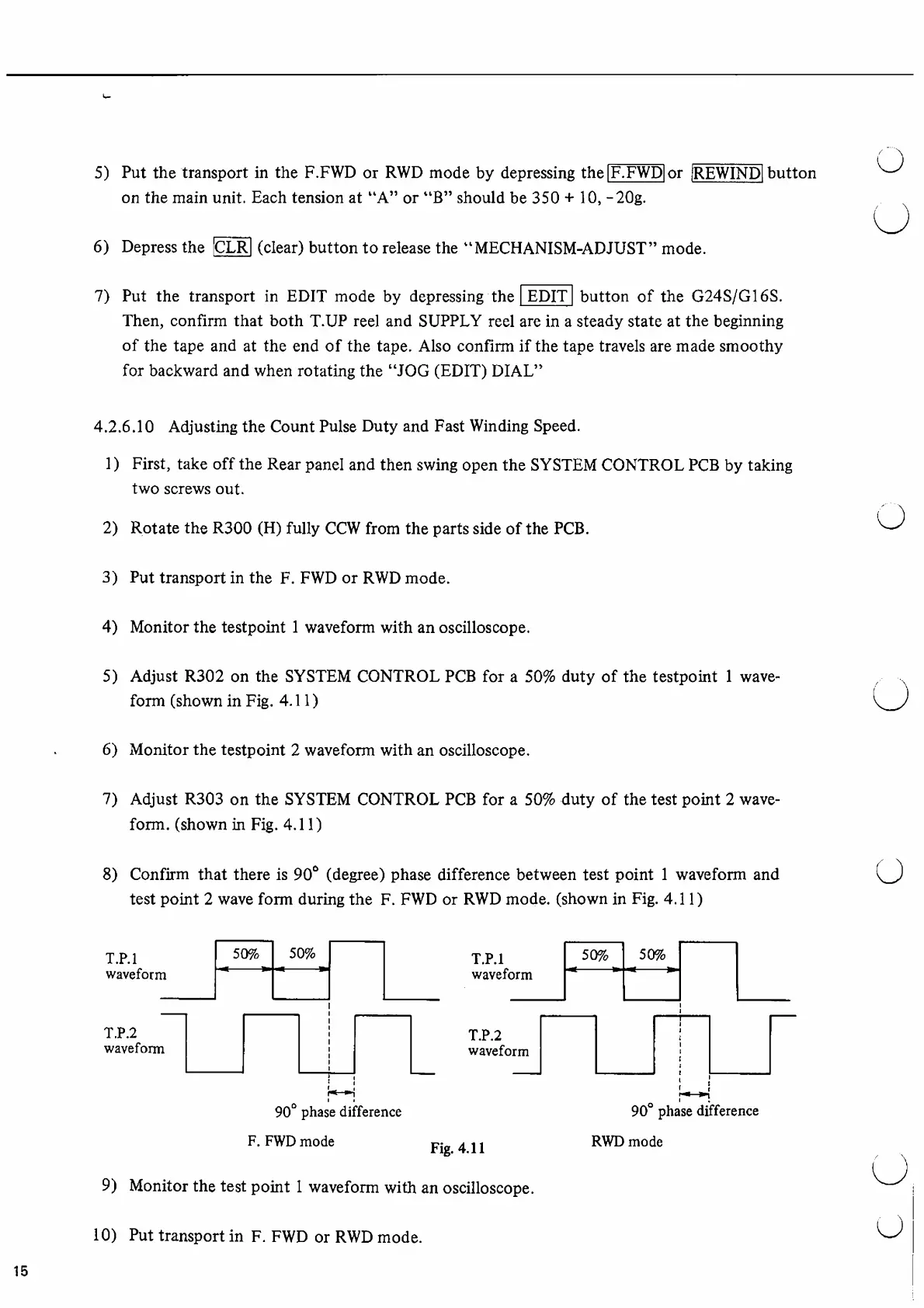
5)
Adjust
R302
on
the
SYSTEM
CONTROL
PCB
for
a
50%
duty
of
the
testpoint
1
wave
form
(shown
in
Fig.
4.11)
6)
Monitor
the
testpoint
2
waveform
with
an
oscilloscope.
7)
Adjust
R303
on
the
SYSTEM
CONTROL
PCB
for
a
50%
duty
of
the
test
point
2
wave
form.
(shown
in
Fig.
4.11)
8)
Confirm
that
there
is
90°
(degree)
phase
difference
between
test
point
1
waveform
and
test
point
2
wave
form
during
the
F.
FWD
or
RWD
mode,
(shown
in
Fig.
4.11)
9)
Monitor
the
test
point
1
waveform
with
an
oscilloscope.
10)
Put
transport
in
F.
FWD
or
RWD
mode.
15

Other manuals for Fostex G16S

Related product manuals