EasyManua.ls Logo

Fostex G16S - Page 24

Fostex G16S
107 pages
Print Icon
To Next Page IconTo Next Page
To Previous Page IconTo Previous Page
Loading...
Adjust
the
Azimuth
and
Phase
Adjusting
Screw
for
maximum
reading
on
all
24/16
LED
bargraph
meters
of
the
recorder.
Then,
set
the
oscilloscope
to
XY
mode
to
obtain
a
lissajous
waveform
to
check
the
phase.
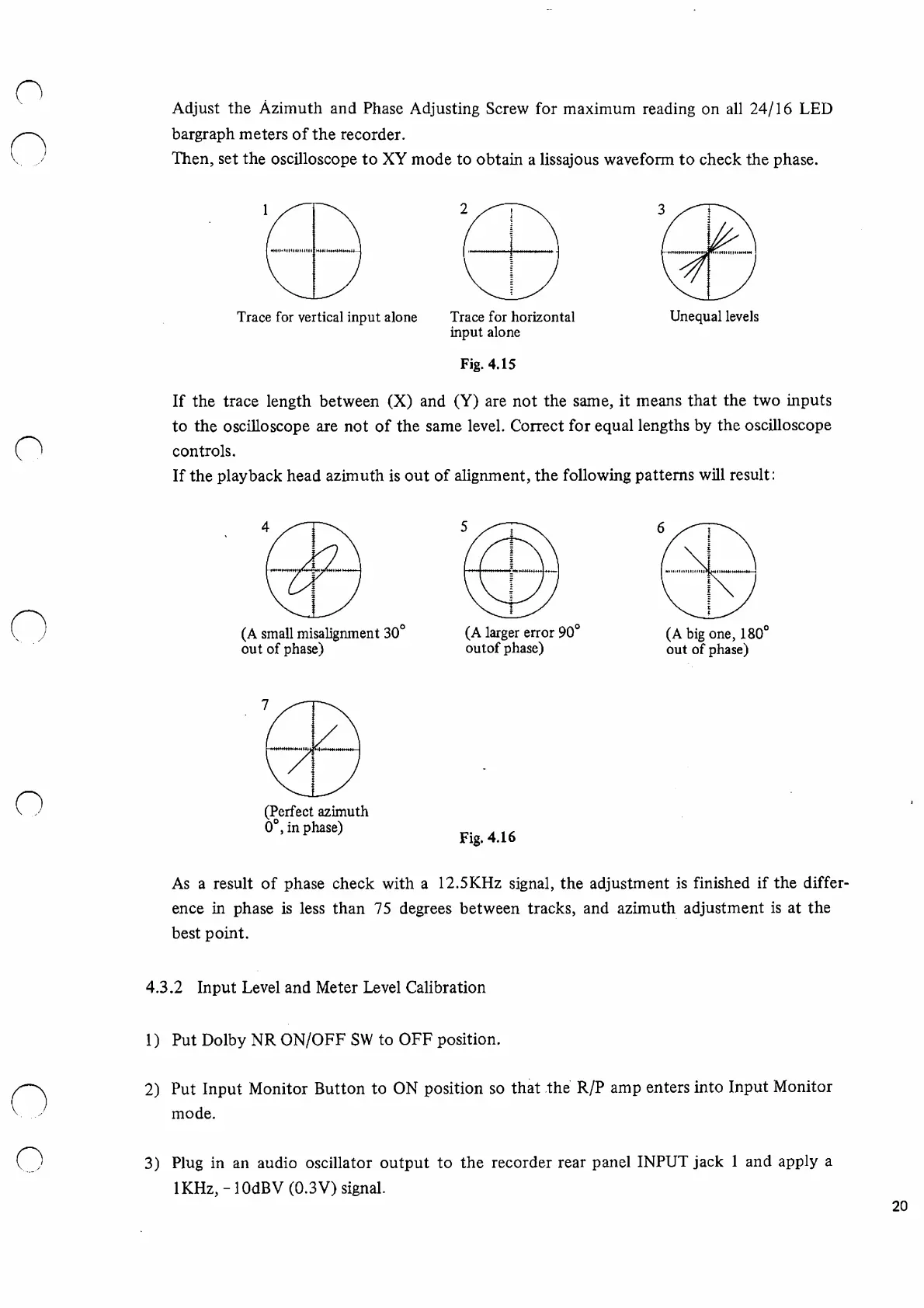
Trace
for
vertical
input
alone
Trace
for
horizontal
input
alone
Fig.
4.15
Unequal
levels
If
the
trace
length
between
(X)
and
(Y)
are
not
the
same,
it
means
that
the
two
inputs
to
the
oscilloscope
are
not
of
the
same
level.
Correct
for
equal
lengths
by
the
oscilloscope
controls.
If
the
playback
head
azimuth
is
out
of
alignment,
the
following
patterns
will
result:
(A
small
misalignment
30°
out
of
phase)
(A
larger
error
90°
outof
phase)
(A
big
one,
180°
out
of
phase)
(Perfect
azimuth
0°,
in
phase)
Fig.
4.16
As
a
result
of
phase
check
with
a
12.5KHz
signal,
the
adjustment
is
finished
if
the
differ
ence
in
phase
is
less
than
75
degrees
between
tracks,
and
azimuth
adjustment
is
at
the
best
point.
4.3.2
Input
Level
and
Meter
Level
Calibration
1)
Put
Dolby
NR
ON/OFF
SW
to
OFF
position.
2)
Put
Input
Monitor
Button
to
ON
position
so
that
the
R/P
amp
enters
into
Input
Monitor
mode.
3)
Plug
in
an
audio
oscillator
output
to
the
recorder
rear
panel
INPUT
jack
1
and
apply
a
lKHz,
-
lOdBV
(0.3V)
signal.
20

Other manuals for Fostex G16S

Related product manuals