22
About the hard disk storage device
1
2
3
4
1
2
4
3
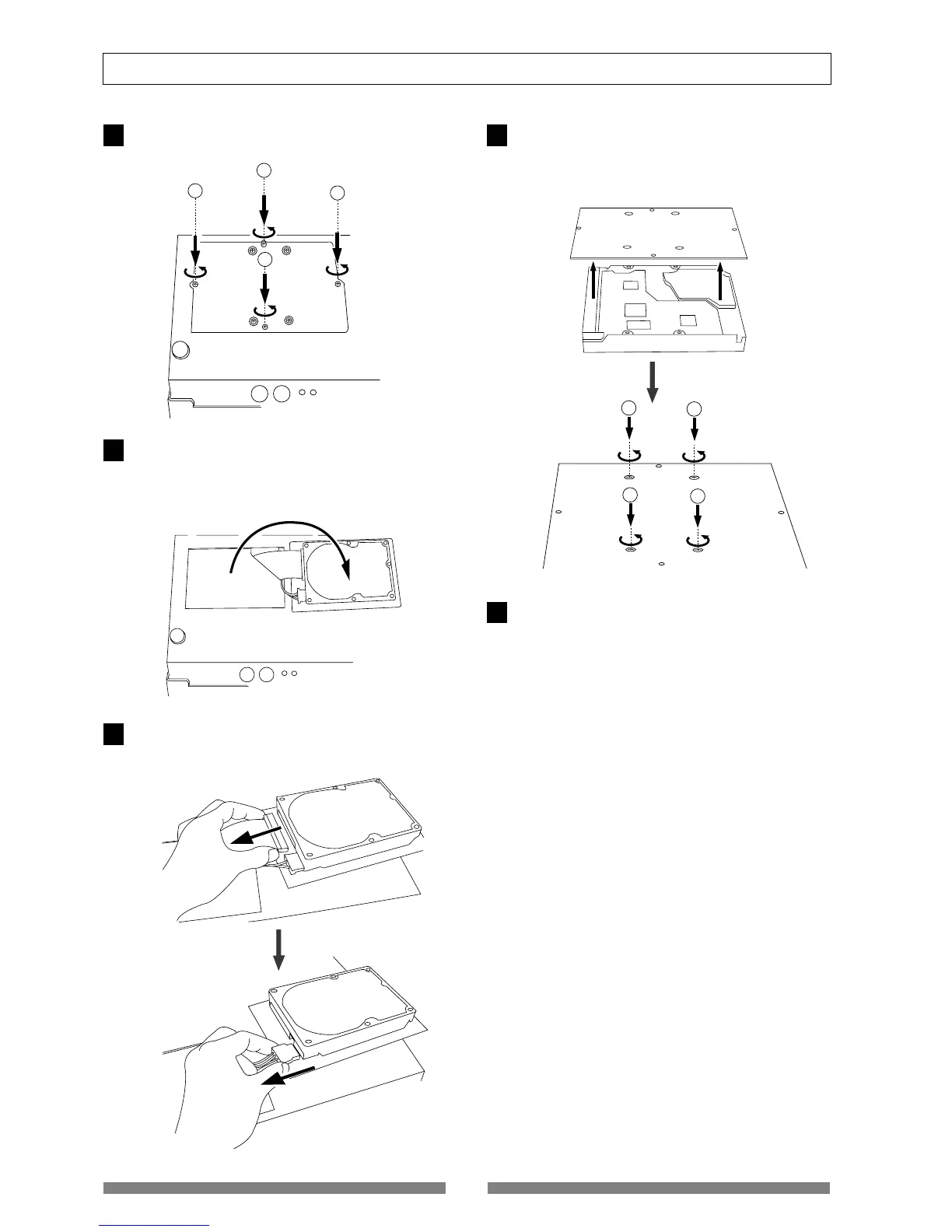
Unscrew the four screws from the bottom of the main
unit that are fixing the panel.
Turn over the panel that the hard disk is fixed according
to the instructions shown in the figure below.
Note that hard disk cables will be connected.
Be careful not to apply excessive force when turning
over the panel.
Remove the two cable connectors that are connected
to the hard disk.
Gently hold the connector and slowly pull out.
After disconnecting the cables, remove the panel that
is fixing the hard disk.
Unscrew the four screws with a screwdriver, as shown
in the Figure.
Fix a new hard disk to the panel in the reverse order of
removing the hard disk as performed earlier. Connect
the cables. Then house the hard disk at the bottom of
the main unit.
Follow the <Precautions> described earlier, and properly
assemble the parts.
When the new hard disk is successfully assembled,
go to the next section. Now, format the unformatted
hard disk.
1
2
3
4
5


 To Next Page