87
Advanced Operations
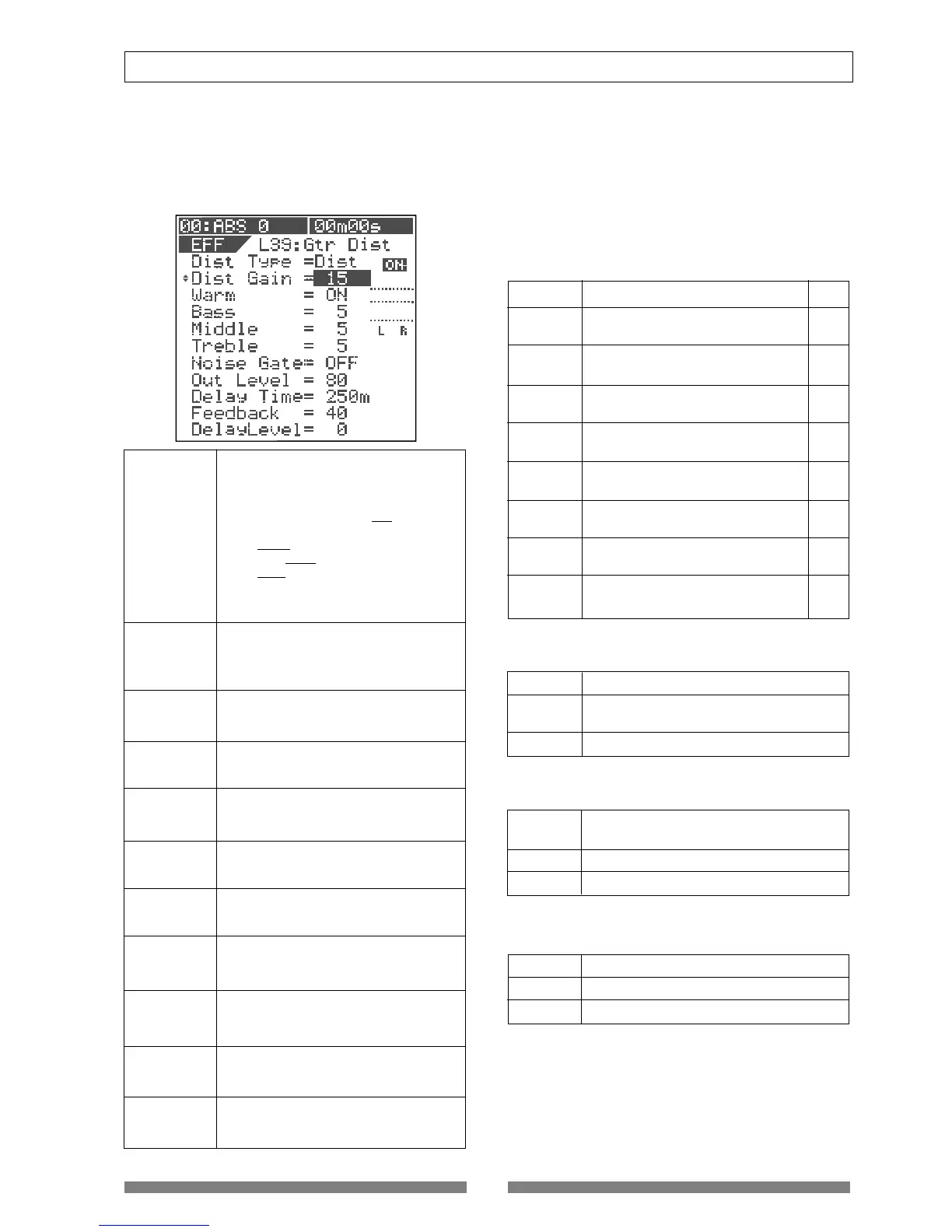
• Parameters for distortion effects
(Parameter type: DISTORTION)
Effect types No.39 through 42 (shown in "Effect type list" on
page 49) are distortion types.
Each of these has 11 parameters as shown below.
1. Dist Type
Selects a distortion type.
Each effect type has following distortion
type options. (An underlined option is
the default.)
L39: Acous, Rythm, OvDrv, Dist, Blues, Fuzz,
Lead, Metal
L40: Bass1, Bass2, Bass3
L41: Kick, Snar1, Snar2
L42: Voic1, Voic2, Voic3
See the table on the right for details
about each type.
2. Dist Gain
3. Warm
Adjusts the distortion gain.
Range: 1 to 15 (The default depends on
the distortion type selected. See the table
on the right.)
4. Bass
Makes the sound warmer when On.
Options: ON, OFF (default: ON)
5. Middle
Adjusts the low frequency response.
Range: 0 to 10 (default: 5)
6. Treble
Adjusts the mid frequency response.
Range: 0 to 10 (default: 5)
7. Noise Gate
Adjusts the high frequency response.
Range: 0 to 10 (default: 5)
8. Out Level
Turns on or off the noise gate.
Options: OFF, 1 to 99 (default: OFF)
9. Delay Time
Sets the output level of the distortion.
Range: 0 to 99 (default: 80)
10. Feedback
Sets the delay time.
Range: 5 ms to 1200 ms (default: 250 ms)
11. Delay Level
Sets the feedback level of the distortion.
Range: 0 to 99 (default: 40)
Sets the delay level.
Range: 0 to 99 (default: 0)
Acoustic You can get an electric-acoustic
guitar sound
Rhythm You can get a slight distortion when
picking the guitar strongly.
Over Drive You can get a smooth distortion like
driving a tube amplifier.
Distortion You can get a hard distortion like
driving a three-stacked amplifier.
Blues You can get a fat overdrive sound.
Fuzz You can get a rough sound with a fat
low frequency range.
Lead You can get a bright and smooth
distortion.
Metal You can get a shred sound.
Bass 1 Simulates a bass amplifier.
Bass 2 You can get a sound like recording a
distorted bass sound through a line.
Bass 3 You can get a fat bass sound.
Kick You can distort a kick sound
appropriately.
Snar 1 You can distort a snar sound appropriately.
Snar 2 You can distort a snar sound excessively.
Voic 1 You can get a smooth distortion.
Voic 2 You can get a boomy and bright distortion.
Voic 3 You can get a bullhorn sound.
Details of each distortion type
Each distortion type (selectable for each of effect
types No.39 through 42) can apply the effect as de-
scribed below.
• Distortion types for "L39: Gtr Dist"
The default distortion gain value depends on the
distortion type selected.
• Distortion types for "L40: Bass Dist"
• Distortion types for "L41: Drum Dist"
• Distortion types for "L42: Voice Dist"
1
4
15
15
15
15
15
15
Name
Comment
Default
Dist Gain


 To Next Page