EasyManua.ls Logo

Fostex XR-3 - Ping-Pong Recording Example

Fostex XR-3
32 pages
Print Icon
To Next Page IconTo Next Page
To Previous Page IconTo Previous Page
Loading...
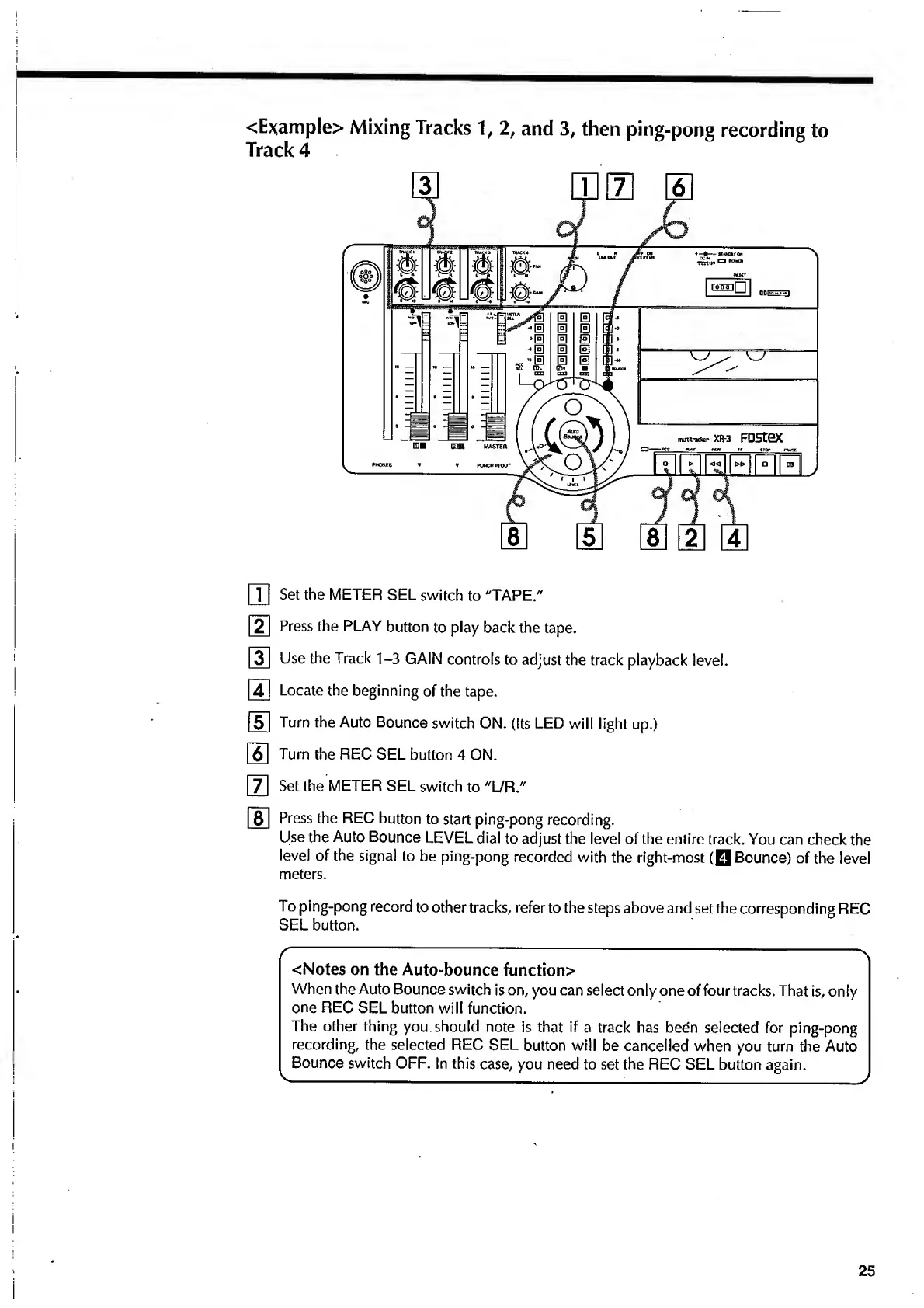
<Example>
Mixing
Tracks
1,
2,
and
3,
then
ping-pong
recording
to
Track
4
[Tj
Set
the
METER
SEL
switch
to
"TAPE."
f~2~l
Press
the
PLAY
button
to
play
back
the
tape.
|~3~l
Use
the
Track
1-3
GAIN
controls
to
adjust
the
track
playback
level.
|~4l
Locate
the
beginning
of
the
tape.
(~5~l
Turn
the
Auto
Bounce
switch
ON.
(Its
LED
will
light
up.)
6
Turn
the
REC
SEL
button
4
ON.
~
7
}
Set
the
METER
SEL
switch
to
"L/R."
8
Press
the
REC
button
to
start
ping-pong
recording.
Use
the
Auto
Bounce
LEVEL
dial
to
adjust
the
level
of
the
entire
track.
You
can
check
the
level
of
the
signal
to
be
ping-pong
recorded
with
the
right-most
(0
Bounce)
of
the
level
meters.
To
ping-pong
record
to
other
tracks,
refer
to
the
steps
above
and
set
the
corresponding
REC
SEL
button.
(
-;
-
\
<
Notes
on
the
Auto-bounce
function>
When
the
Auto
Bounce
switch
is
on,
you
can
select
only
one
of
four
tracks.
That
is,
only
one
REC
SEL
button
will
function.
The
other
thing
you
should
note
is
that
if
a
track
has
been
selected
for
ping-pong
recording,
the
selected
REC
SEL
button
will
be
cancelled
when
you
turn
the
Auto
Bounce
switch
OFF.
In
this
case,
you
need
to
set
the
REC
SEL
button
again.