EasyManua.ls Logo

Fostex XR-3 - Ping-Pong Recording Explained; Auto-Bounce Function Controls

Fostex XR-3
32 pages
Print Icon
To Next Page IconTo Next Page
To Previous Page IconTo Previous Page
Loading...
CHAPTER
5
Application
Guide
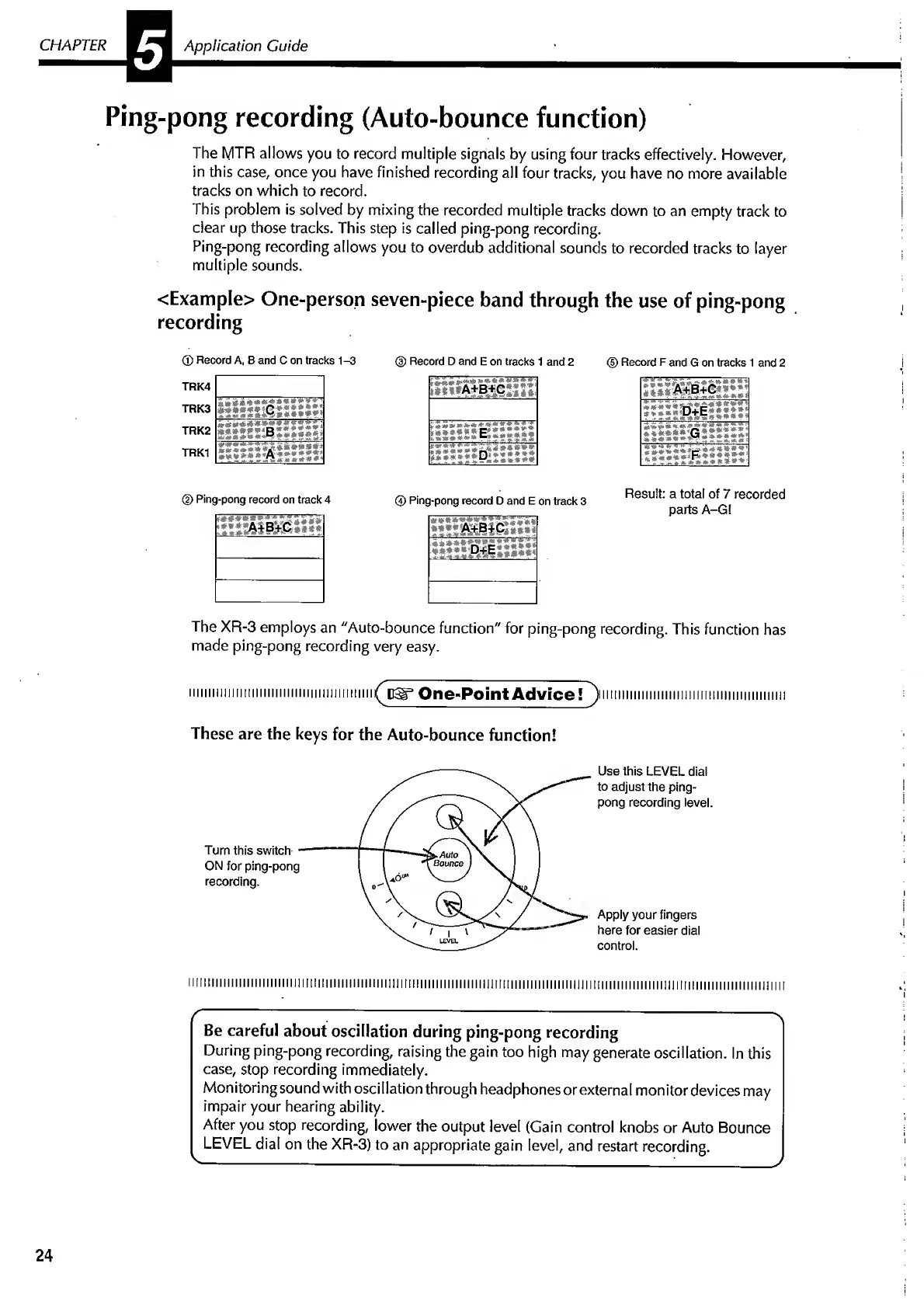
Ping-pong
recording
(Auto-bounce
function)
The
MTR
allows
you
to
record
multiple
signals
by
using
four
tracks
effectively.
However,
in
this
case,
once
you
have
finished
recording
all
four
tracks,
you
have
no
more
available
tracks
on
which
to
record.
This
problem
is
solved
by
mixing
the
recorded
multiple
tracks
down
to
an
empty
track
to
dear
up
those
tracks.
This
step
is
called
ping-pong
recording.
Ping-pong
recording
allows
you
to
overdub
additional
sounds
to
recorded
tracks
to
layer
multiple
sounds.
<Example>
One-person
seven-piece
band
through
the
use
of
ping-pong
recording
(D
Record
A,
B
and
C
on
tracks
1-3
®
Record
D
and
E
on
tracks
1
and
2
©
Record
F
and
G
on
tracks
1
and
2
TRK4
TRK3
liii*;«**;»
zlzzimitw*
1
TRK2
SiSlSffiBWWSSii
»
m
*
<««
***
»
»
-
s
5
;;
TRK1
Slliili!:!!!:
Ping-pong
record
on
track
4
©
Ping-pong
record
D
and
E
on
track
3
f###§t
it
mm
*
**
^
2m
j&l
A+B+C
Result:
a
total
of
7
recorded
parts
A-G!
The
XR-3
employs
an
"Auto-bounce
function"
for
ping-pong
recording.
This
function
has
made
ping-pong
recording
very
easy.
iiiuiimmnmiiiiiimimiimni
One-Point
Advice?
^
iiimiiiiiiiiiiiiiiiiiiiimmmmmmiiii
These
are
the
keys
for
the
Auto-bounce
function!
Use
this
LEVEL
dial
to
adjust
the
ping-
pong
recording
level.
Apply
your
fingers
here
for
easier
dial
control.
ll!ll!lllillll!!lii!l!lilil!!!IUHIIIIIIIilllllllll]|limilliill!!lll!liiilllimilllllllilllllli!j!imilllllllllllliljj||||l!lllllllllllllll||!!lin
r
:
;
;
;—;-*\
Be
careful
about
oscillation
during
ping-pong
recording
During
ping-pong
recording,
raising
the
gain
too
high
may
generate
oscillation.
In
this
case,
stop
recording
immediately.
Monitoring
sound
with
osci
Nation
through
headphones
or
external
monitor
devices
may
impair
your
hearing
ability.
After
you
stop
recording,
lower
the
output
level
(Gain
control
knobs
or
Auto
Bounce
LEVEL
dial
on
the
XR-3)
to
an
appropriate
gain
level,
and
restart
recording.
v------:_/
24

Related product manuals