EasyManua.ls Logo

Fostex XR-3 - Input Faders and Meter Select; Input Level;Mic Switch

Fostex XR-3
32 pages
Print Icon
To Next Page IconTo Next Page
To Previous Page IconTo Previous Page
Loading...
The
words
in
square
brackets
[
]
refer
to
the
printing
on
the
front
and
rear
panel.
Control
panel
©
Input
fader
[|T|
El,
El
El
1
This
fader
allows
you
to
adjust
the
recording
level
of
the
musical
instruments
or
external
microphones
connected
to
the
Channel
1,
2
INPUT
jacks,
or
the
recording
level
of
the
internal
microphone.
Raising
the
fader
will
increase
the
recording
level.
The
optimum
recording
level
is
position
7-8,
at
which
the
Level
Meter
will
light
up.
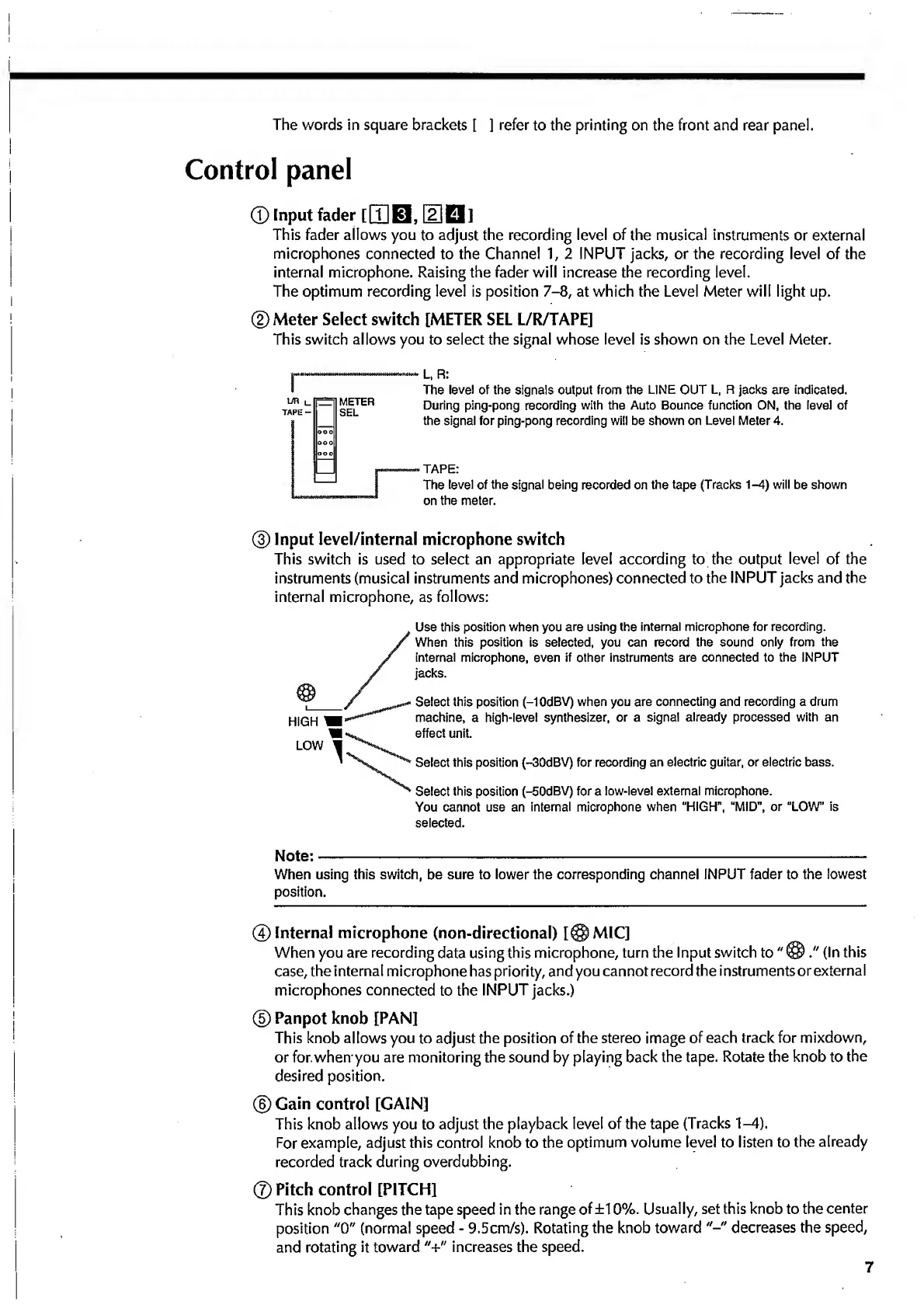
©Meter
Select
switch
[METER
SEL
L/R/TAPE]
This
switch
allows
you
to
select
the
signal
whose
level
is
shown
on
the
Level
Meter.
r
L,
R:
The
level
of
the
signals
output
from
the
LINE
OUT
L,
R
jacks
are
indicated.
During
ping-pong
recording
with
the
Auto
Bounce
function
ON,
the
level
of
the
signal
for
ping-pong
recording
will
be
shown
on
Level
Meter
4.
TAPE:
The
level
of
the
signal
being
recorded
on
the
tape
(Tracks
1-4)
will
be
shown
on
the
meter.
®
Input
Ievel/internal
microphone
switch
This
switch
is
used
to
select
an
appropriate
level
according
to
the
output
level
of
the
instruments
(musical
instruments
and
microphones)
connected
to
the
INPUT
jacks
and
the
internal
microphone,
as
follows:
HIGH
'
LOW
Use
this
position
when
you
are
using
the
internal
microphone
for
recording.
/
When
this
position
is
selected,
you
can
record
the
sound
only
from
the
/
internal
microphone,
even
if
other
instruments
are
connected
to
the
INPUT
/
jacks.
Select
this
position
(-1
OdBV)
when
you
are
connecting
and
recording
a
drum
machine,
a
high-level
synthesizer,
or
a
signal
already
processed
with
an
effect
unit.
^
Select
this
position
(-30dBV)
for
recording
an
electric
guitar,
or
electric
bass.
Select
this
position
(-50dBV)
for
a
low-level
external
microphone.
You
cannot
use
an
internal
microphone
when
“HIGH”,
“MID",
or
“LOW”
is
selected.
Note:-
When
using
this
switch,
be
sure
to
lower
the
corresponding
channel
INPUT
fader
to
the
lowest
position.
©Internal
microphone
(non-directional)
[@MIC]
When
you
are
recording
data
using
this
microphone,
turn
the
Input
switch
to
"
@
(In
this
case,
the
internal
microphone
has
priority,
and
you
cannot
record
the
instruments
or
external
microphones
connected
to
the
INPUT
jacks.)
©
Panpot
knob
[PAN]
This
knob
allows
you
to
adjust
the
position
of
the
stereo
image
of
each
track
for
mixdown,
or
for.
when
you
are
monitoring
the
sound
by
playing
back
the
tape.
Rotate
the
knob
to
the
desired
position.
©
Gain
control
[GAIN]
This
knob
allows
you
to
adjust
the
playback
level
of
the
tape
(Tracks
1-4).
For
example,
adjust
this
control
knob
to
the
optimum
volume
level
to
listen
to
the
already
recorded
track
during
overdubbing.
©Pitch
control
[PITCH]
This
knob
changes
the
tape
speed
in
the
range
of
±10%.
Usually,
set
this
knob
to
the
center
position
"0"
(norma!
speed
-
9.5cm/s).
Rotating
the
knob
toward
decreases
the
speed,
and
rotating
it
toward
"+"
increases
the
speed.
7

Related product manuals