2
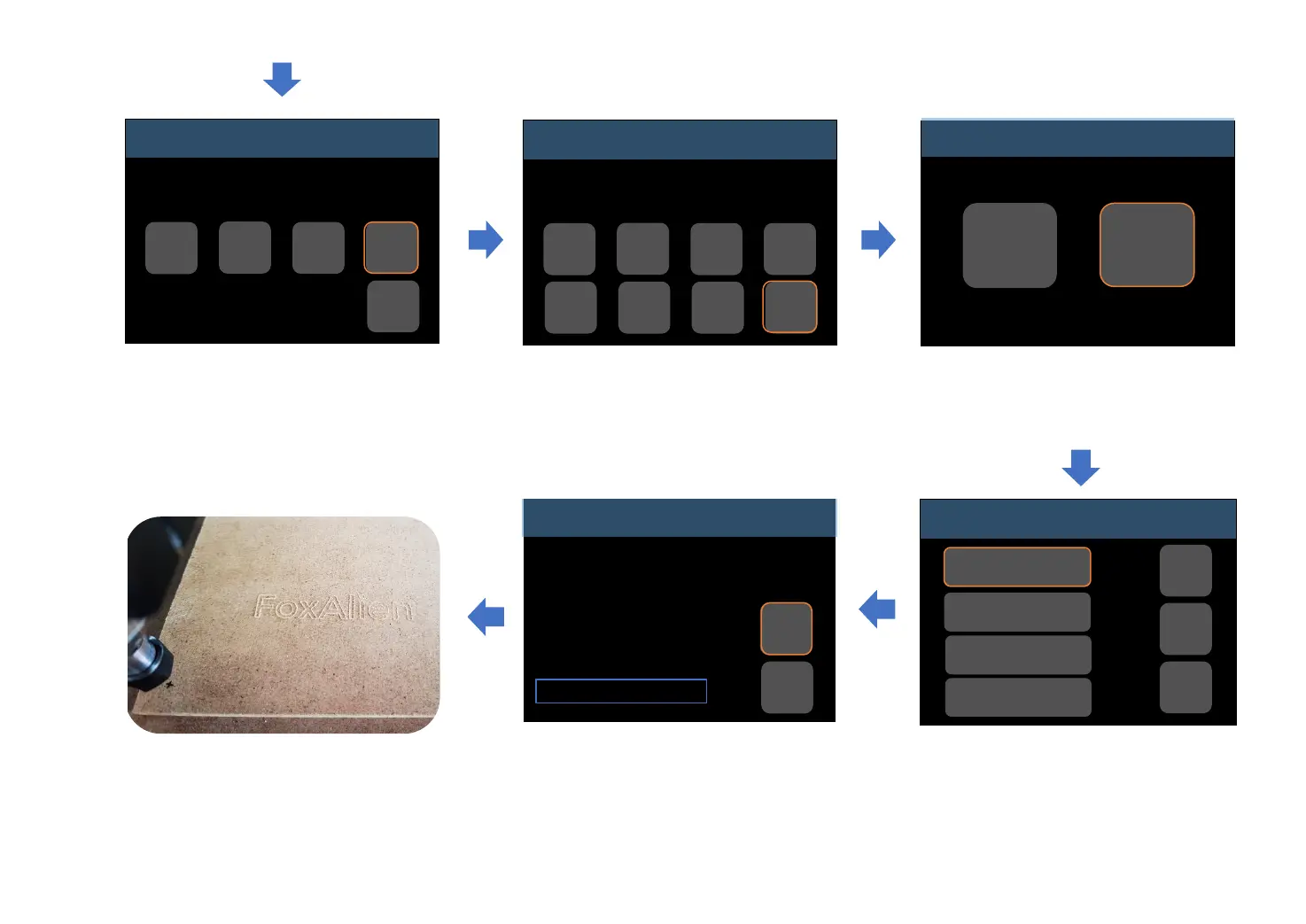
Click the “Set XYZ” buttons to set zero.
You can see that the coordinates of
the three axis have become 0.00.
Then click “Return” to previous menu.
MENU
Idle
Control
Files
Click “Return” to previous menu.
Click “Files”.
Left column shows the g-code files
pre-stored in the SD card.
For example, choose “FoxAlien.nc”.
Click “Send” to start engraving.
If you want to abort engraving in
advance, click “Abort”.
Progress bar will show rate of
engraving process.
Finish.
Control
Idle
Move
Zero
XYZ
Z-
Probe
Reset
Home
Set
Probe
Unlock
Return
Files
Work coordinates:
X : 0.00
Y : 0.00
Z : 0.00
Hold:0
0%
FoxAlien.nc
Abort
Send
Files
Idle
FoxAlien.nc
Test1.nc
Test2.nc
Test3.nc
Return
-->
<--
Zero XYZ
Idle
Set X Set Y Set Z
Set
XYZ
Return
-20-


 To Next Page