How to Use Z-Probe
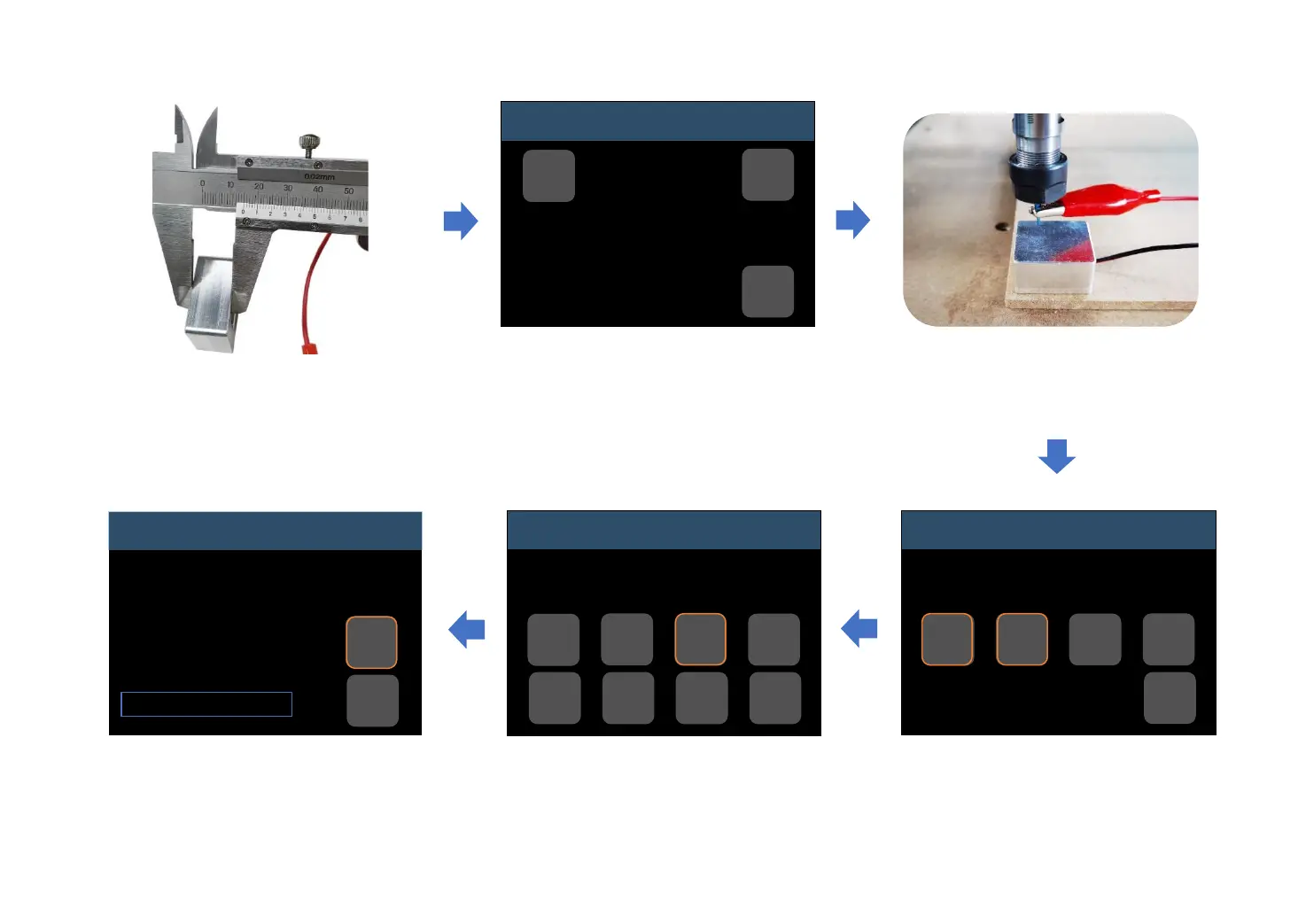
Enter “Set Probe” in Control interface.
The included Z-probe’s thickness is
15mm, so change it to 15;
and then click “Return” to previous
menu.
Click “Z-probe” to start zeroing.
Remove Z-probe after zeroing.
If there is any fault during setting,
just click “Reset”.
Place the Z-probe as picture
shows
Measure thickness: 15mm
15
Z-probe
Idle
Click “Zero X” and “Zero Y”, then
return back to previous menu.
Return to first level menu, enter
“Files” to choose g-code file, click
“Send” to start engraving.
Files
Work coordinates:
X : 0.00
Y : 0.00
Z : 0.00
Hold:0
0%
FoxAlien.nc
Abort
Send
Control
Idle
Move
Zero
XYZ
Z-
Probe
Reset
Home
Set
Probe
Unlock
Return
Zero XYZ
Idle
Set X Set Y Set Z
Set
XYZ
Return
0.00 0.00 0.00
Return
SET+ SET-
-21-


 To Next Page