Chapter 3 BIOS Description
36
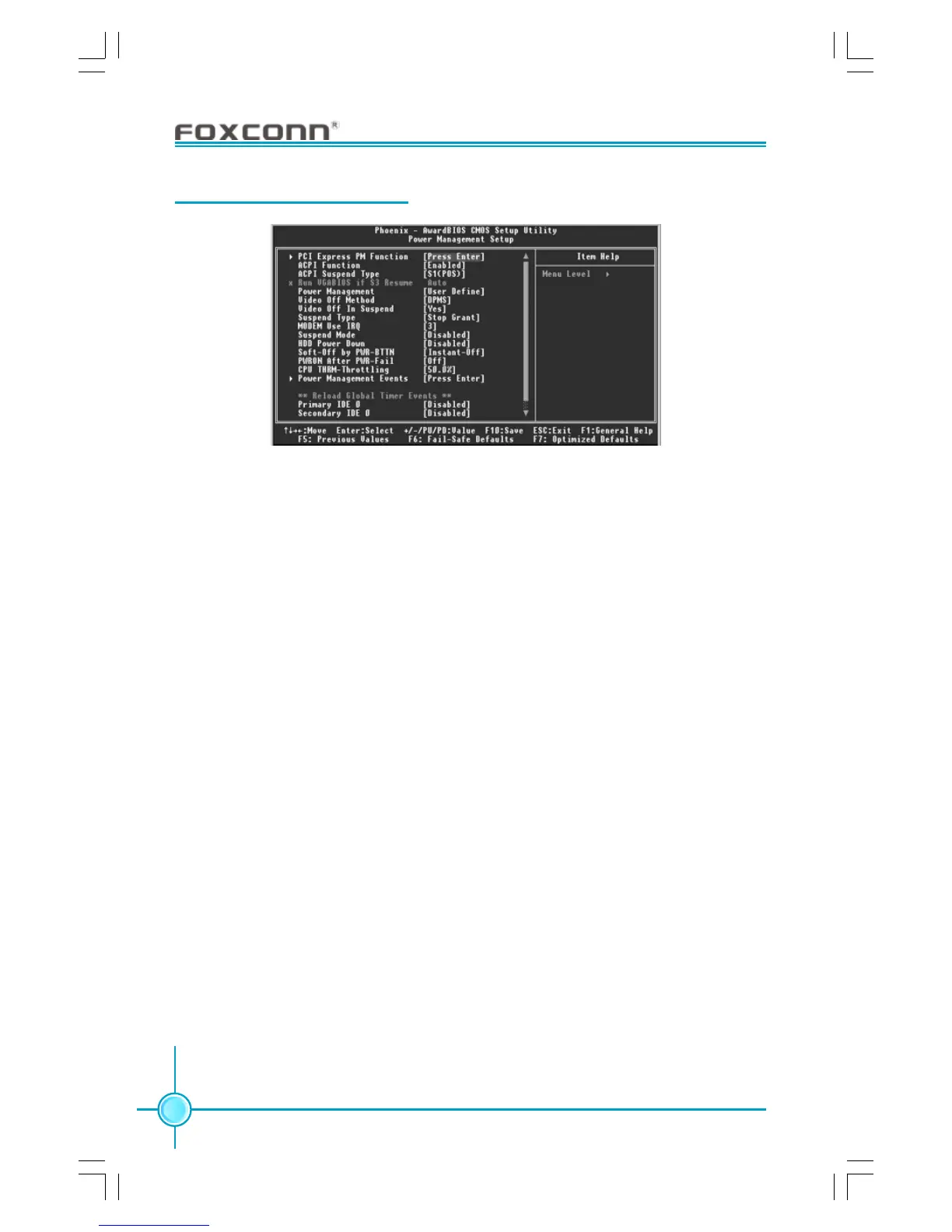
Power Management Setup
PCI Express PM Function (optional)
Press <Enter> to set the item of PCI Express PM function. Please refer to
page 37.
ACPI Function (Default: Enabled)
ACPI stands for “Advanced Configuration and Power Interface”. ACPI is a
standard that defines power and configuration management interfaces be-
tween an operating system and the BIOS. In other words, it is a standard that
describes how computer components work together to manage system
hardware. In order to use this function the ACPI specification must be sup-
ported by the OS (for example, Windows 2000 or WindowsXP). The available
setting values are: Enabled and Disabled.
Soft-Off by PWR-BTTN (Default: Instant-Off)
This option is used to set the power down method. This function is only valid
for systems using an ATX power supply.
When “Instant-Off” is selected, press the power switch to immediately turn off
power. When “Delay 4 Sec.” is selected, press and hold the power button
for four seconds to turn off power.
PWRON After PWR-Fail (Default: Off)
This option is used to set what action the PC will take with the power supply
when it resumes after a sudden power failure.The available options are: Off
(remain in turn off status),On (auto power on) and Former-Sts (resume with the
previous status).
Power Management Setup Menu









 To Next Page